Are you talking about “FLASH SMS” ? Just to make sure, we’re on the same page.
A FLASH SMS directly on the recipient’s screen.
I’ve updated my Kompakt yesterday and it’s fine.
The bugs I had are still not fixed but I have no new bugs either. I’ll use the phone as before. The bugs that remain for me are: disappeared Bluetooth devices and the inconsistent fingerprint reader.
I also had an issue with the phone accepting or declining incoming phone calls as I took it out of my pocket, don’t know if that’s resolved or not.
The updates to Mudita center are half-baked though. Music management is still difficult. Uploading music through a file picker? No folders, no drag and drop? It’s like the Mudita team envisioned the music player as an iPod shuffle with only a handful songs.
And then also: yes, you can install apks through the Mudita center, but you cannot uninstall those apps afterwards! Not through the phone, not through the Mudita center. Wtf? That feature is then only to put f-droid on the phone. The rest you’ll need to do through f-droid.
2 Likes
I believe they’re talking about this image which is on the roadmap and update changelog page
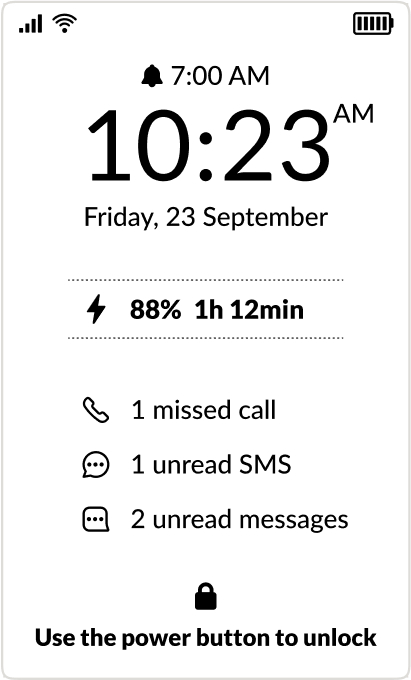
I’d be really excited to see this on the roadmap - the “2 unread messages” I assume are notifications for sideloaded apps like WhatsApp.
4 Likes
Yes, exactly. I want to understand the distinction between the unread SMS and the unread “Messages” which show different counts and are therefore different things.
2 Likes
@damian1 @urszula May I ask both of you if you have any large sms conversation threads?
It seems it is crashing for those with that. My large thread is my main chat with my partner, with MMS messages etc. it did just crash when that thread was opened, but now SMS crashes wholly when opened.
1 Like
Did you ever get your SD card working? I have no access to any downloaded files, despite using separate file managers and rebooting.
1 Like
Yes, rebooting worked for me. I just double-checked and it’s still working for me today.
2 Likes
This was already present on the website back when Kompakt was launching. This doesn’t exist, or is not in this update yet, it’s probably just a design mockup.
2 Likes
I am! And I used it to sideload my apps before. However, finding the package name of installed apps is way less convenient. I’d love a way to uninstall through the Center of the phone settings.
2 Likes
I must admit that after reading all the reports here, I will not be installing the update. The problems described with the SMS app are too off-putting for me. I send text messages to my partner every day and everything has been working perfectly so far. Then there’s the problem with the SD card…
It seems as if some problems have been fixed, but others have been added. Will these be fixed soon, or will we have to wait until the next update, which has already been announced?
I’m also very upset about the removal of the logo on the log screen. I love the lotus flower logo; it radiates a sense of calm. I always set the logo instead of the time on the Pure and loved it. It’s a shame that a loud minority seems to have been listened to here, as the many people who are happy with the logo don’t usually write anything extra about it.
What about the alarm clock bug? It often didn’t ring or rang too late. Has that been fixed? I can’t find anything specific about it.
5 Likes
As with @mikhail I am also experiencing pretty serious issues with the SMS app. Some of them will load with time, but every time I go to text my girlfriend it crashes (maybe because it has a higher number of texts?)
I would post screen shots, but they look exactly the same as @mikhail posted.
I do have developer mode activated. Here are the sideloaded apps installed:
Amex, Auto Bluetooth Connect, Claude, Diarirum, Files by Google, FUTO Keyboard, Gospel Library, Kreate, MACU, Member Tools, SubTotal, Supra eKEY, TAB Mobile, Tabs, Telegram X, TickTick, Venmo, Zions Bank.
2 Likes
The only solution I found, was something that was said on here, to delete the threads that can’t load and start a new one. Something about the large texting threads makes the app crash.
Tap the Pencil Icon > Select Thread > Delete > Start New Thread
1 Like
After updating to new software version, I have uninstalled Google Keyboard and Organic Maps. Mudita keyboard and maps are good enough now. The finger print sensor is working Ok now.
The one thing that I hate is; text in the ebook reader is not so good to read. It looks washed away. Why can’t it be very black text?
3 Likes
Now I have only two sideloaded apps after removing Google Keyboard and Organic maps.
- My kid’s school app
- Office cafeteria app
2 Likes
@anon86727033 I’m sorry, unfortunately, I don’t- having long SMS/Text convos is one of my pet peeves, so I try to avoid it at all costs.
1 Like
I had the same issue before the update and it is still the same. At times it will be really dark and defined text, but always reverts to a washed away watermark type text.
1 Like
@ramamohan @mikhail
This is e-ink “reading” mode being applied to the text in e-reader. It makes the text smoother but more washed out.
This can be fixed if they give us e-ink modes so we can choose if we want fast, reading, or just high contrast. Other android e-ink phones/tablets have these features. Mudita has locked them away for no reason.
You can read more in these two topics I made:
They will never add these features if other users are not loud about it.
9 Likes
I find it a privilege to have the logo shown, maybe indeed add options to use a daily quote etc
6 Likes
thanks @gezimos for these details. @urszula, please inform your team if they can add configuring this e-ink modes.
3 Likes
Agree with the e-reading problems and being unable to read a lot of my books due to blurry text. Definitely should be high priority.
2 Likes