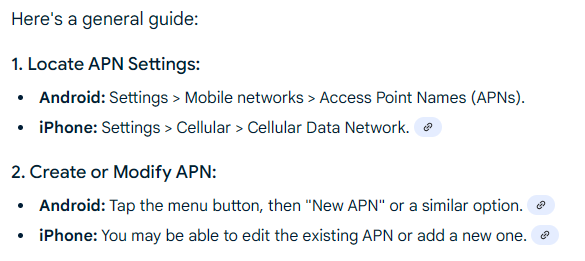
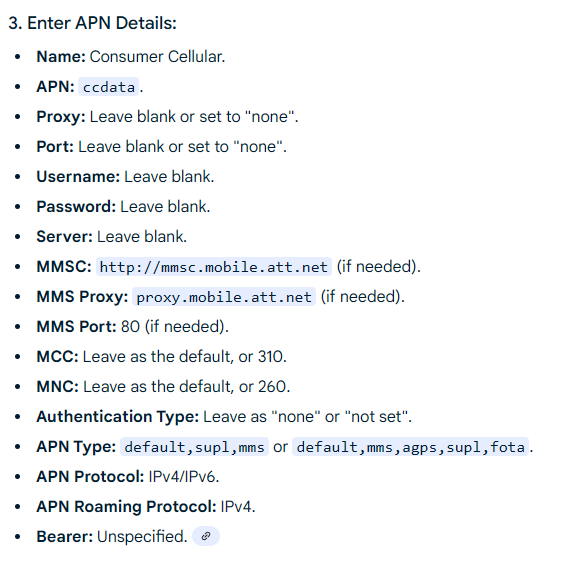
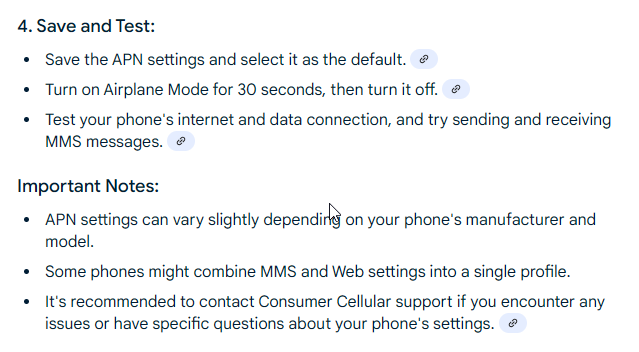
I reached out a few days ago to Mudita support team through their help form and haven’t heard back, so I thought I’d ask here. I haven’t been able to send or receive images in sms since I got the phone. I believe it is just an issue with the APN network settings but I am not well versed in that enough to be able to figure out what settings I actually need to make it work. I have the NA optimized phone and I used Consumer Cellular data plan (they use mostly AT&T cell towers as far as I’m aware). If anyone has had this issue or knows any more I would really appreciate the help.
Thank you!
@harley
I’m sorry you’re experiencing issues. Radio tests for Mudita Kompakt on AT&T, Verizon, and T-Mobile networks have returned positive results. So, network connection should not be a problem. eSIM functionality has also been successfully tested.
If for some reason, you are having some challenges with activating, we recommend using another device initially (just for the activation process & then moving the SIM card over to Mudita Kompakt) or manually entering the APN settings if needed.
My apologies if I was not clear, but my SIM card is activated and working properly. Texts and calls do send. It is only images sending and receiving that I am not able to download or send at all. That is why I think it is an APN issue. I just don’t know what APN settings I need as there are many different options and I am not knowledgeable about it. Even with my own searching and playing around with the settings I just ended up breaking the function to send any messages at all temporarily.
This actually worked! Thank you very much. However, subsequently, I have created another problem as I tried downloading images sent to me before I changed these settings and they did not appear but did have a notification. So now no matter what I do I have a notification for three images that I cannot see and it is stuck there. I have tried restarting the phone, force closing the sms app, turning off my data, and deleting the message thread from the person that the images were from. None of which have worked. Any suggestions?
@urszula, could you also ask the team whether it is okay – indeed, privacy-appropriate – to EXCLUDE the supl parameter from the list of parameters for the APN Type?:
Open the Messages app and see if the stuck notifications try again or vanish.
It sounds like the Mudita Kompakt’s SMS/MMS handling may have cached or queued those image downloads before the correct APN was set, and now the system is stuck trying to complete them or clear the notification.
I tried this sequence of operations and unfortunately nothing changed. It looks like I have more messages stacking up in this cache now as well. I also tried resetting my phone again afterwards and still nothing…
@urszula Thank you for posting how to change the APN! I am having issues with MMS messages (not receiving group messages at all) and am trying to update the APN. I see your link there regarding how to do it generally but cannot find a way to edit my APNs on the Kompakt itself. I can view the APNs but not modify. Can anyone explain how to do that? Or has anyone had success with Verizon in the U.S. and receiving group messages?
@lime9211, I had the same experience. I had three APNs that T-Mobile USA had pushed (somehow) to my Kompakt. I wanted to edit the primary one (the one with its radio-button pushed/selected), even though it was working.
But, I found no way to edit it.
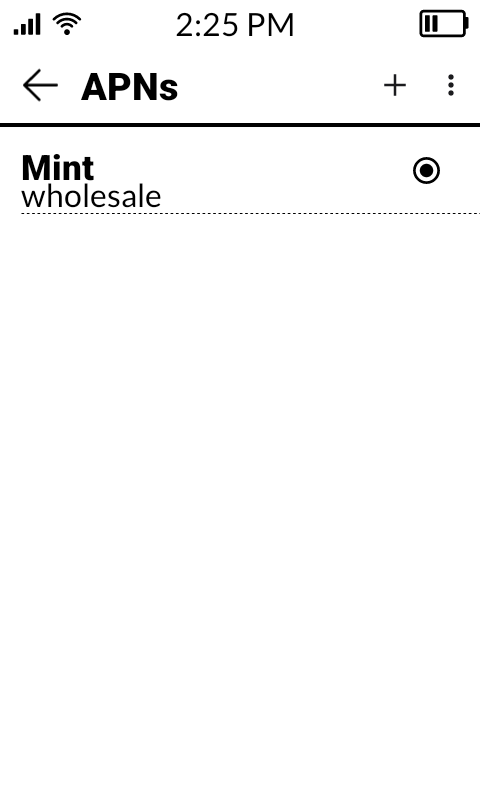
So, I tapped the “+” in the upper-right corner of the APNs page, entered what I wanted to enter in all of the appropriate fields, and then saved that entry (as “Mint” – because I am on the Mint Mobile subsidiary of T-Mobile USA).
What I found interesting was that all three T-Mobile entries on the APNs screen then disappeared, leaving me only my “Mint” entry, as you can see here:
This is ABSOLUTELY FINE with me, and this sole APN works – just as the primary APN for T-Mobile USA worked – but with values that are appropriate to Mint Mobile.
Suggestion: Be certain that you know what fields to populate for your particular carrier when you are creating a new APN entry for that carrier!
Here, for example, are the APN fields to populate for Mint Mobile.
If you look to the right of those instructions and tap your carrier’s name, then you can get the APN-population instructions for YOUR carrier.
You can edit the APN by going to settings> Network and Internet > Mobile Network> Advanced > Access Point Names > + in the top right corner > then you can add your own APN settings. In my experience it won’t save if you change the MCC or the MNC.
As for the group messaging, as far as I’m aware it is just across the board nonfunctional at this time. The Mudita team said something about it coming in an upcoming update hopefully I think.
Thank you both! So interesting, my device does not have the + button available, only the … in the upper right corner. Not sure if that’s a Verizon thing or NA optimized or what.
We are working on including it in a future update. Our team is working on it now. If someone is in a group message -you’ll likely get individual messages from that one person who sent the message. This is what happened to me me when I was traveling recently with 8 of my US friends & we were all in a group chat.
Any word on fixing my sms issue? It has 9+ notification on my phone but no way to clear or view the messages. I believe more have become “stuck” now like the images I tried to download.
My solution was to sideload the Quik app, which made all those messages appear (in the Quik app) and made the 9+ notification on the SMS app disappear.