I can’t see your MMS settings.


Thank you! I can’t find where those are in the settings; how did you get there from the main Settings menu?
1 Like
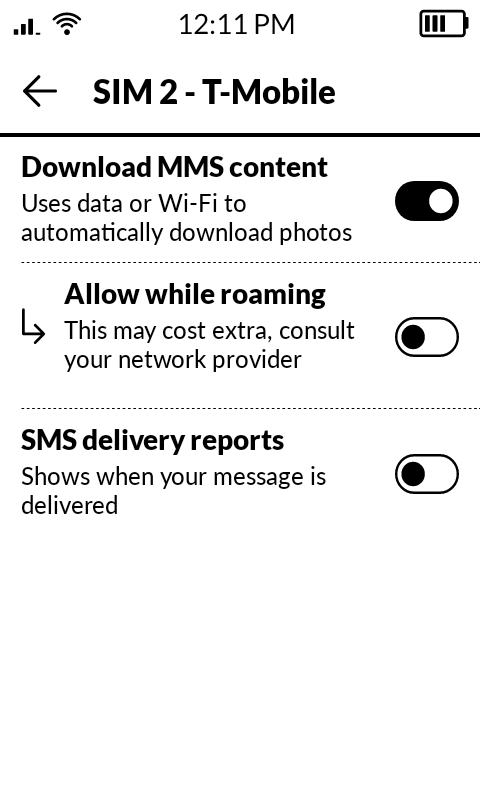
In the SMS app, tap on the 3 lines with the DOTS>
Then tap the SIM you want to Edit,
Thanks, that was helpful. I don’t have the same exact settings as you (maybe because of different providers?) but I was able to see that “allow MMS while roaming” was off (so I turned it on-- although I am not sure that this will completely fix my issue as I have missed texts while at home connected to WiFi too). Unfortunately I don’t see the setting you have in your first screenshot that had MMS messages turned off.
Thank you for sharing this. Are you switching from an iPhone? Because perhaps I can clarify how messaging works on Kompakt:
Standard SMS text messages don’t rely on Wi-Fi or mobile data at all. They use the cellular network’s signal (your carrier’s voice/SMS channel), so even if you’re connected to Wi-Fi at home, SMS delivery still depends entirely on mobile reception.
What can sometimes cause confusion is that on iPhones, many messages are sent through iMessage, which does require data and can be delivered over Wi-Fi just like WhatsApp or Signal. So if someone is used to that system, it can feel like texts should arrive as long as Wi-Fi is available.
The Mudita Kompakt native SMS/Text app only uses traditional SMS/MMS services, which means:
 Wi-Fi connection does not affect incoming SMS
- You need a strong cellular signal for reliable delivery
 SMS does not travel over Wi-Fi or data networks
If you’re experiencing delays or missing texts, it’s most likely related to mobile coverage or a carrier setting, not the Wi-Fi connection.
Let me know which carrier you’re using and your approximate signal level at home, and we can take a closer look together.
1 Like
To all the people who are missing messages:
You can have mine. I received a bunch of spam messages, there are enough for everyone. You can have them for free 
2 Likes
Thank you! This is helpful.
I am in the U.S. and use Mint Mobile. I have pretty good service at home (3-4 bars) and didn’t have issues with missing texts prior to switching from iPhone to my Kompakt.
1 Like
This could be the issue. Did you disable iMessage? Is your phone number still connected to iMessage?
iMessages are sent through Apple’s servers and require a data connection, unlike standard SMS, which uses your carrier’s network. If you switch to an Android device without deactivating iMessage, your phone number can still be tied to Apple’s messaging system.
This means that any text messages sent to you from iPhone users (which is the majority of US users, tbh) will still try to send via iMessage instead of SMS, which could result in you not receiving those messages. This happens because your number is still registered in Apple’s system, and iMessages are directed to your old iPhone instead of the Kompakt device, which uses AOSP (Android-based)
Solution: Before switching devices, it’s crucial to turn off iMessage on your iPhone.
Unfortunately, that’s not the problem. I turned off iMessage and RCS when I got my Kompakt in early September, and I’m also missing messages from BOTH Android and iPhone users.
3 Likes
@anna.lynne.gilmour Hmmm, that’s interesting. Let me ask my team if they have any more ideas.
I’m having the same issue. Also switching from an iPhone and I turned of iMessage through my mobile phone number when I switched. I’m estimating I miss 25-50% of messages every week at this point which is quickly becoming unsustainable.
4 Likes
@adam.m.stevenson Thank you for reaching out & welcome to the Mudita Forum. We’re glad that you’re here.
What type of messages are you missing? Some messages, if they contain emojis or are longer than 160 characters are clasified as MMS messages & you need to enable them on your Mudita Kompakt.
Hello! I am having a similar problem, receiving only some MMS messages but not all.
My Komapkt is updated to 1.4, I switched from iPhone with Verizon to Kompakt with Mint, and iMessages are turned off on my old phone. I updated all the APN settings and the SMS app settings to what you have above. Anyone have any other fixes I can try?
Thank you! I love the Kompakt!
2 Likes
Now when I update the APN, it keeps reverting back to the old one after I restart the Kompakt. Any ideas?
1 Like
@milesrose17 Welcome to the Mudita Forum! We’re glad that you’re here.
I am not sure what’s happening in your case, so I’ve reached out to our team for some guidance. I will come back to you when I get a response.
1 Like
I believe you have to create a new APN rather than editing the existing one.
1 Like
I found a solution! For anyone switching from Verizon + iPhone… I had to get a whole new phone number via T-Mobile, but now MMS is working perfectly.
2 Likes
I am still struggling with this and about at the end of ideas to try. I, like several other people here, had an iphone on verizon. Verizon told me there was nothing to do to make the Kompakt work (I know this conflicts with what others have been told) so I switched to mint based on some recommendations here. I also disabled imessage on the iphone. Mint has had me check my APN settings three different times, they’ve reset their network connection to my phone, and they told me Verizon had some sort of number lock on my phone that I got unlocked from Verizon. Mint told me today they’ve checked everything they can on their network and they believe the issue is with my Kompakt. All that and I’ve received two group messages out of several dozen that I know have been sent to me.
I’m not sure what to do at this point. I’m not willing to change my number. I feel like I’ve really bent over backwards to make this work. I really like the Kompakt overall. But the fundamental job a phone is to have clear reliable communication and it is totally failing me on that front. What else is left to check and fix? Do I just need a different phone?
I get that developing new hardware products is extraordinarily challenging - in fact, I also started my own company to do exactly that. I paid full market price for a phone with the understanding that it would work and it doesn’t. In my company, I tell my customers straight up front when they’re buying a prototype. Then I give them a discount proportional to how early they’re adopting and offer a 24 hour personal maintenance guarantee. I’m only selling enough prototypes to work the bugs out with the idea that all early adopter customers are going to get an at-cost or cheaper upgrade once the product is fully developed. With the Kompakt, I feel like I’m getting a shrug and a suggestion that maybe core functionality will be fixed in months, but also maybe not. I would really love for this phone to work. I’m just not sure what else to do.
6 Likes
I’m also having problems, but I’m not sure the extent to which it’s affecting me as you can never know what messages you aren’t receiving… I am successfully using open bubbles for iMessage on my MK and the group text function has worked correctly for me a handful of times…. But I do have one group text that predates my MK that I can’t receive ANY messages to my MK. This group is a mix of iPhone and android users. I disabled RCS on my iPhone prior to switching, and I’ve verified my phone number on the google form to turn off RCS. If the other participants message the group I never receive the messages, and I even tried starting a new group from my MK where they received my message but no replies came to me. One of them also tried to remove me, and then re-add me. I additionally tried to make a new group chat with a different sim/different number which has never been used for RCS as far as I know, and they received that message but I received no replies. I know at least once on another group text I had missing messages, but that was before I submitted my number to be removed from RCS. Is this an RCS registration issue? Or is something else going on? I really miss this group message and I have major FOMO about what other messages I could be missing. I use US mobile with a t-mobile sim as my primary, and I have stellar coverage usually full bars in all my typical locations. The other sim I tried was us mobile Verizon, but it had the same problem. Open bubbles is working fine for my non-android communication, so I don’t think that is the issue either.
1 Like
Everyone else (not just you) needs to completely delete their existing group text threads with you in them. Then you need to start a new group text yourself.
I had the same problem when I first switched to the Kompakt. The issue seems to be that both Android and iOS handle group threads in such a manner that they default to RCS if a person ever used RCS in that group at all once upon a time. So even if you remove your phone number from RCS servers and then you start a new group thread on your phone, your friends’ phones will still default to your number being treated as if it is on RCS servers, because that information is “burned” into each group thread. This is why all of your friends must completely delete their old group threads that include you.
It’s a major hassle. It’s honestly the biggest hurdle to changing from a modern smart phone to the Mudita Kompakt, in my opinion. If there were a way for the Kompakt to work with RCS, sooooooo many everyday problems would go away.
3 Likes