I’m still having this problem, no matter which SD card I use. I reformat it on my computer using the exFAT format, and then everything works fine for a while, until eventually it shows that the SD card is empty again. But it isn’t. When I plug it into my computer, I can see all the data.
The first post here about this issue was made in October, and it’s a real shame that the team hasn’t fixed this bug yet.
It works fine for a while, then suddenly disappears and shows the card has 0 bytes. Despite formatting.
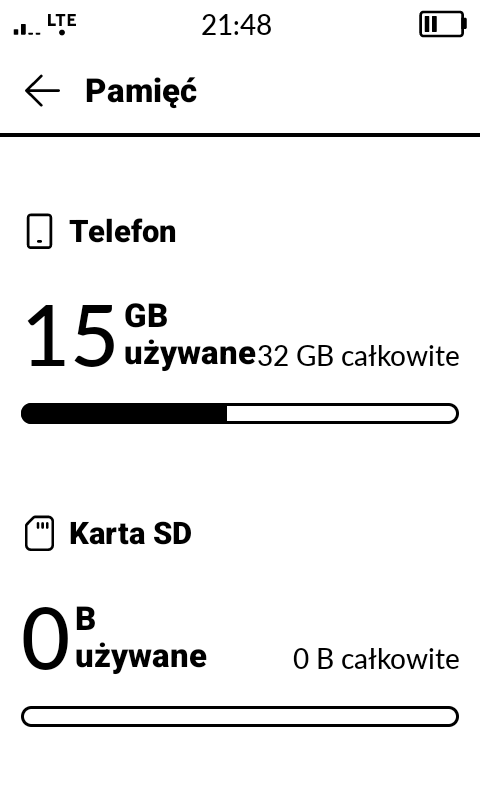
Same issue here too. When I had only like 200 songs it worked fine. When I had 4,500 songs, it doesn’t recognize anything on the SD card.
Is there an open issues list?
SD card *issue(s) should be on the bug list already? No?
*SD Card issues also may be, not ejecting the card properly from their computer, incorrect format of the card, loading excessive number of files, incorrect info on files
When an Android device or MP3 player fails to recognize a large jump in songs (like going from 200 to 4,500), it is usually due to a scan timeout, folder clutter, or a counterfeit SD card [1, 2]. The device’s media scanner is getting overwhelmed or timing out before indexing can finish.
The recurring corruption you’re experiencing is likely caused by the exFAT file system itself, which lacks a journaling feature, making it highly susceptible to errors when devices are powered off or disconnected without safe ejection [1, 2]. Using exFAT heavily with low-quality SD cards often compounds this issue.
…
When reformatting on a PC and copying files back doesn’t resolve SD card issues, it usually means there is file system corruption, the card is stuck in a read-only state, or the Windows format didn’t apply the correct format type needed by your specific device
How big is your SD card?
Size doesn’t matter  - specs say Kompakt up to 2TB.