Hello,
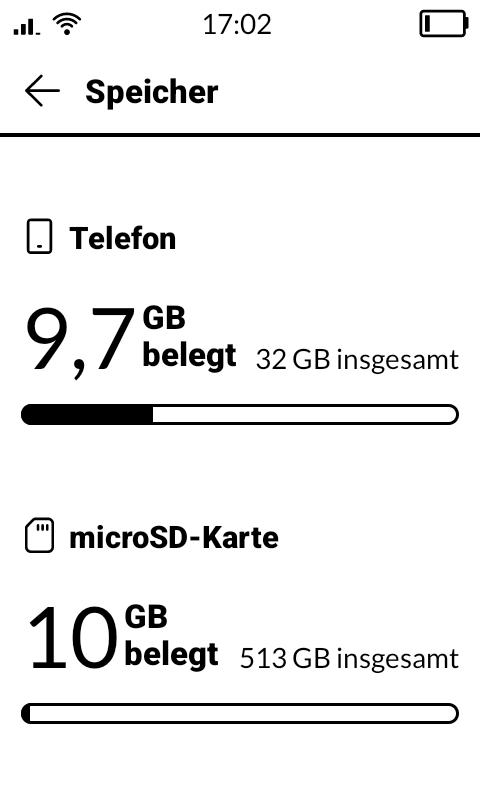
my device is running on Mudita OS K 1.3.0 and I installed a 512 GB microSDXC card Samsung Evo Plus three weeks ago, which works pretty well. The file system is exFat.
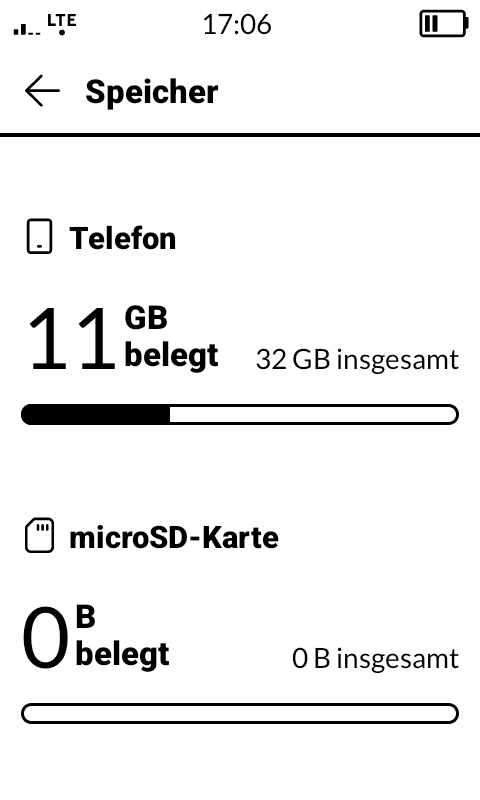
But yesterday something happened. I did power off the phone and removed the SIM card tray to use the SIM card in another phone for testing. After tests were finished, I installed the SIM card tray back in the Mudita Kompakt with same configuration of SIM card and microSD Card as before. Then I did power on the phone and went for a walk. I noticed that my whole music was missing and I could only listen to the preinstalled songs from Nick Lewis. I checked the settings and saw, that the microSD card is recognized, but shows 0 bytes of size. The microSD card itself was never put in another phone or removed while the phone was powered on. So the file system should not be corrupted.
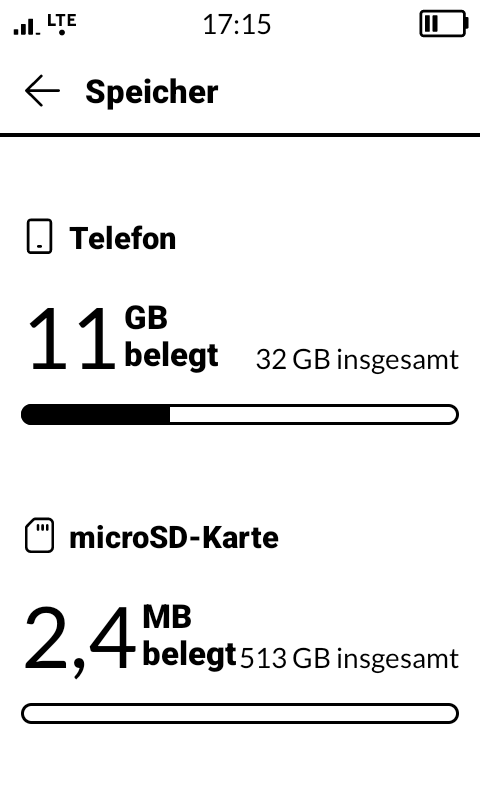
I later put the microSD card in my Computer and saw that all data was available, my whole music was there. But I was not able to get it working again with Mudita Kompakt, it always said the size is 0 byte. The only thing that worked was formatting the microSD card again with exFat and now it is recognized by Mudita Kompakt like before.
I now tried to run in this error intentionally, but wasn’t successful. So at the moment I am not able to tell you, what happened. Did someone from the community had the same issue before and maybe knows the steps to force this problem, so that it can be fixed? Thank you,
I had the same problem, one day the sd card storage was working and the next it wasn’t. I hadn’t done anything to the phone, so I sent it back for repairs (the sd card reader and the usb-c connection both had problems.) When I got the phone back the usb-c connection worked but the sd card was not being read, despite being readable on the computer. I could see that it was already formatted in exFAT with MBR partitioning, but I backed up the sd card and reformatted it in FAT with MBR partitioning. I just barely checked it after loading one song on the sd card and the Kompakt can now read the sd card.
This happens to me, and I, every couple of weeks, end up reformatting the card to fix it. I’d love to know if anyone finds a solution. I have however just been storing less stuff on it… and somehow that lengthens the amount of time before it does this again.
unfortunately reformating the SD card with a windows pc and then copying the files back on it didnt work. I wanted to reformat using the Kompakt, but it doesnt show the sd card not recognized message anymore (though its still not possible to access data on it) so I cannot figure out how. Can anyone help me with this?
Hi ! Maybe the volume is corrupt in some way ? I don’t know Windows tools, but there must be some to check & fix that ? Shouldn’t occur in the first place, of course. Is you data on the SD mostly read-only (music collection) or do your apps write to it ?
I am also using it for some apps that write on it (eg podcast app). Though on the computer I can access the SD card, so it must have something to do with the Kompakt
sorry, I dont understand your question. Could you be a bit more specific? I just bought it, plugged it in and it worked for 3 months until it didnt a few days ago.
Yes! Can I use a brand-new SD card in the Kompakt? I used a new SD card in a similar device (Supernote Manta), but I had to reformat it before inserting it. Thank you.
This happens to me all the time. Unfortunately, Mudita has not improved this problem to date. And regardless of whether it’s an older or a brand new SD card, regardless of whether it’s formatted with Windows or Linux… It works for a certain amount of time and then suddenly the Kompakt shows that the card is empty, even though the PC can read the card without any problems. Then you format the card again, reload the data, and everything starts all over again in a few weeks or months.
SD card usage is a basic function which should be working… I hope the mudita team will quickly come up with a fix for this. Unfortunately, formatting didnt even work for me, to make the card usable in the Kompakt again, though it shows no problem when inserted to my computer.
Seconding this – I too have tried different SD cards, different formatting, even formatting on device itself, etc. nothing works. There is indeed a bug that needs to be solved. The problem is that it occurs intermittently. I know if I start using lots of data (often 100GB+) the corruption will happen sooner, but I never know when. At the very least if there is a way to repair it on device without losing data that would be a big help.
For the team I’d trying the following:
Download third party apps like music streaming, OSMand+, etc. and download lots of data to an external SD, then continue to add more data regularly until it crashes. For me that’s about 1-3 weeks (long before the SD card is full). I’m sure the state of the SD card, and the errors that appear in the logs will reveal a lot about what the underlying issue is.
Another note is I’m using large capacity SD cards, so 256gb-1TB, high quality, high performance SD cards also crash.