I’ll try again!
2 Likes
I do in fact use inkOS as of yesterday. Does it have a lock screen function?
2 Likes
It doesn’t but you can use Katapult for the Lockscreen function. And set inkOS as your default launcher so you can have both functionalities 
1 Like
Thank you! I wasn’t sure if I could choose settings form both! This is great!
2 Likes
Unfortunately, I’ve noticed that too over the past few days. For example, when I send a text message, it takes longer for the text to appear in the chat than it does with the default launcher. And when I use Offline+, the weather widget on the settings screen doesn’t display anything, and it updates when I disable Offline+. With Katapult, this now takes much longer than with the default launcher. Everything seems to be a little slower.
Battery consumption has also dropped significantly with Katapult lately. With the default launcher, battery consumption returns to normal, assuming the same level of activity and app usage. I don’t think that was the case with older versions of Katapult.
2 Likes
Are any of you using the Lockscreen Music Controls? Try disabling that if you’re using it. Also the Lockscreen notifications.
Because these are the only things “out of the ordinary” that could cause battery drain and lag. Screensaver as well if any of you are using it causes a lot of battery drain because the SOC doesn’t suspend it’s activity when using it.
None of these are standard practices, they’re just workarounds to circumvent the limitations of the phone.
I’ll investigate better tomorrow and see what can be improved.
1 Like
I don’t use the lock screen music controls at all. However, the lock screen shows me when I’ve received a text message or missed a call, even though I haven’t enabled that feature. I actually think that’s a good thing, and I was surprised to see that it still shows up when I switch back to the default launcher.
1 Like
No I mean check if you have them enabled, even if you don’t use them they might be enabled.
Katapult Settings / Lockscreen notifications & Lockscreen Music Controls
Mudita always has shown phone calls&message notifications for their own apps in the Lockscreen. So that might be the Mudita info if you haven’t turned on Katapult settings mentioned above. A photo of this would help to tell them apart.
1 Like
v1.6 has been released. Link directly on the site, in Github releases or just tap “Check for updates” in your Katapult System Settings page.
New
- Lockscreen Message: put your own line of text at the bottom of the lock screen, replacing “Touch the power button to unlock”. Handy for “If found, please call…”. Needs the Action Service. @notyet
- Screensaver shortcut: use Katapult’s screensaver from other launchers, plus an optional Screensaver icon in the app drawer.
Changed
- Dark Mode is now Theme Mode: System, Light or Dark. (applicable for LineageOS or the future).
- Home and All Apps are faster: the app list and icons stay in memory.
- Most Used sorting now looks at the last 30 days.
- Performance improvements.
Fixed
- Weather keeps the last reading when the connection drops. @marko
- The music widget now controls apps like Transistor. @Minouchas
- Long app names shorten to one line on Home. @ploum
@marko @superannette Try the new update, there have been some updates to improve performance. Let me know if it’s better if you’re going to try Katapult again.
5 Likes
Thanks! I just installed it and so far I haven’t noticed any lag. Even with lock screen notifications and music controls enabled 
2 Likes
Thanks for the quick update
The launcher really does respond faster. As for battery life, I’ll have to wait a few days to see, of course, but so far I’m very satisfied. It’s really great!
2 Likes
Have been using Katapult as my default launcher since initial release - I love it. Thank you so much for all the updates! & I use InkOS on my Fiio JM21 audio player <3 Very grateful
2 Likes
@milohf Thank you!
I’ve noticed that some people are using it in DAPs! very cool
1 Like
Hi @gezimos
I seem to have a display issue with notifications (any sideloaded app). If I have a pending notification on my lockscreen and I get a phonecall, the notification tray stays on top of the phonecall display and I have to move the katapult notification tray in order to answer.
Same happens when the alarm goes off and I have a notification there.
Is this a bug or is it a missconfiguration?
I have Katapult v1.6.1 installed.
Thanks in advanced! 
1 Like
Do you mean Mudita OS 1.6.1 ?
It might be a bug or a change on how calls/alarm overlay works, I think I didn’t test it for calls/alarms after the 1.6 changes I did.
As a workaround move the notification widget in a position where it doesn’t cover those buttons. And decease its max height. (longpress then drag to move, and drag the cue bar to limit the number of notifications).
And I will check test the calls/alarms once I go back to MuditaOS as I’m using LineageOs right now.
1 Like
gezimos
Do you mean Mudita OS 1.6.1 ?
Sorry i ment Mudita OS 1.6.1 and Katapult 1.6
Nevertheless, this was already happening on last Katapult version. It randomly starting happening.
gezimos
And I will check test the calls/alarms once I go back to MuditaOS as I’m using LineageOs right now.
Thank a lot!
2 Likes
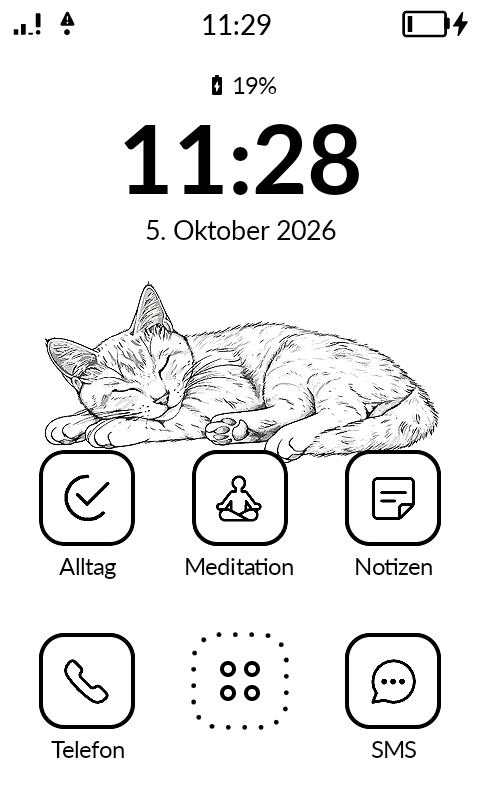
I like Katapult very much, but I have an aesthetic problem: with the new version of Katapult the distance between the rows of icons on home is bigger than before, can you please change this back to the old format?
1 Like
Sorry, I know this might have caused issues like this to some users. But that change was practical.
If you don’t use arrows in the all apps page, you may notice that home apps and all apps grid aligns perfectly.
This was done to reduce the refresh needed on the screen and to avoid ghosting between borders of home and all apps. Before the grids didn’t match and it was leaving lines.
If you need your wallpaper adjusted send me a PM
1 Like
Ah, that’s why. I prefer to use the arrows in the all apps pages, so there is still a bit of ghosting, which doesn’t bother me. I already made a wallpaper for the new home.
The bigger distance between the rows probably irritates me because in my old job I sometimes had to format Word-documents, and I see when there is a tiny difference between the formatting of one paragraph and an other.
1 Like
If it helps I’ve added an option to increase icon size to 80x80 and that makes the gaps smaller in Settings/Appearance. And I’ll see if i can add an exception for when arrows are enabled for the gap to be smaller in home
3 Likes