Thank you for the quick answer and your great work.
2 Likes
Where did you get this amazing wallpaper?
2 Likes
If I remember correctly from this thread, but you have to ask, if the wallpapers are once more uploaded.
2 Likes
I just re-uploaded them again. They are still in the old format, so if you need any adjustments to make them fit the new version of Katapult, you can contact me too, since @gezimos has too much work already anyway 
Get some wallpapers here:
3 Likes
This may be a dumb question but I somehow cannot find the setting for changing the shortcuts (e.g. pressing on the date). @wander made so many amazing apps, I want to switch with the original mudita ones.
1 Like
Katapult Settings / Gestures / Long-press app in home (and you can choose the mode there) you might have it at disabled or something else.
Yes @wander has made a lot of great apps you can check their whole suite here https://wanderthe.dev/
3 Likes
Thanks for the quick answer! I forgot, that I disabled it and now managed to change the calendar app!
Is there also a way to change the weather app used by Katapult?
1 Like
Not possible, sorry
1 Like
Is there a way to change the default clock app that opens when you click the clock in the home screen?
1 Like
works for both apps and clock/date
1 Like
Thanks! I knew it was possible somehow, but forgot how 
2 Likes
Ist there a way to hide the names of the apps on the home screen? I don’t want to hide the ones in the menu, just calls and messages on the home screen. If I try to put spaces it jumps back to the original name.
1 Like
There is only a setting to hide all app names. Not individually.
Space won’t work. You need a different empty unicode character.
2 Likes
Loving the launcher so far.
I have two things that would be really helpful for my use, both about the audio widget:
- I use Plexamp for listening to music using my phone. Any chance the audio widget can begin to work with Plexamp?
- The other is that I use my phone for listening to audiobooks (Smart Audiobook Player) and podcasts (Podcast Addict), and it would be really helpful for these media types to not have track-skipping, but rather time jumping buttons, similar to the buttons in the players in the apps. Would this be feasible?
1 Like
Glad to hear that
There is nothing that should stop Plexamp from working with the audiowidget. Unless plex is lacking something as it seems the app is not supported anymore. I can’t test it as it requires setting up a server to do so.
Normally that is handled by the app itself. If the app gives the next button the role of: skip to next episode or fast-forward.
If that is not declared on the app, Katapult will treat it as next button.
Anyway I tested quickly with Podcast addict and Smart Audibook player, it works as Time Jumping not as next episode. So see if you have touched any of their settings. I just tested them in their default state and both worked fine.
2 Likes
Ooh NICE!! 
I never tried it, as I assumed it was “previous/next”,
and opened the apps to skip forward/backwards.
(I prefer the mini player / widget, as
- with Sveriges radio, the full-screen layout with the skip forward/backwards controls minimizes if I put the app in the background and I have to full-screen it again to get to the controls
- Pocket Casts … hmmm
 … it used to flicker (due to its progress bar?), but for some reason [I’m not complaining!
 ] it doesn’t when I wanted to double-check it?)
2 Likes
Thanks for pointing out the age of the app - I installed the Plexamp beta and it works with the widget.
And thanks for testing the scrubbing! I honestly just never clicked the buttons because of the headache that skipping a book or podcast and going back to it would induce.
Problems solved
2 Likes
Katapult v1.7 released
Download website/changelog
For existing users simply go to settings/system/check for updates and download/update through Katapult app.
Changelog:
- Folder support, longpress an app in all apps → add to folder to create it. After that you can longpress on that folder → Edit apps and you can quickly add apps to that folder with multi-choice dialog. (up to 9 apps per folder only).
- Added support for system font (sytem meaning it detect the default font that Android has and uses that instead of Lato) It’s mostly beneficial for those with LineageOS that can change the android font.
- Lawnicon support. My recommended icon pack is Lawnicons it has over 10K outline icons that work well with the circle/rounded icons format of Katapult. They should enable by just installing the Lawnicons app, but just in case there is a switch in Settings/Apperance. After that you can longpress on any app and Edit icon / Lawnicons tab and choose icons.
I’ve mapped a few of the popular community icons to generic icons like music notes, podcast icon etc but feel free to customize.
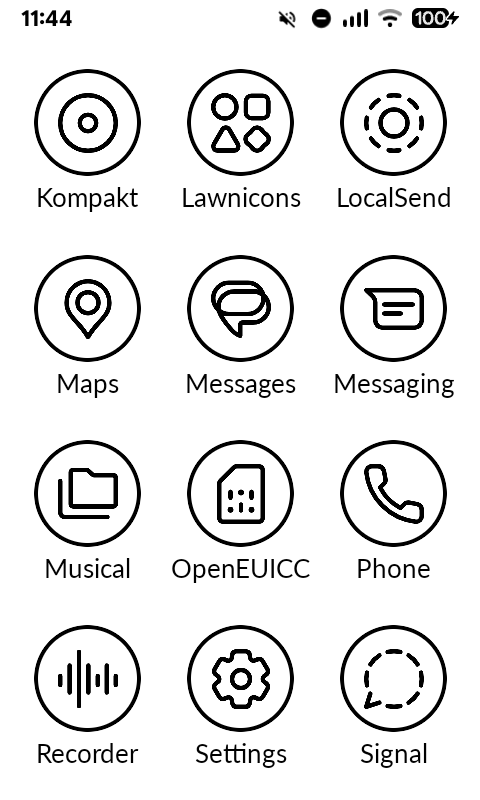
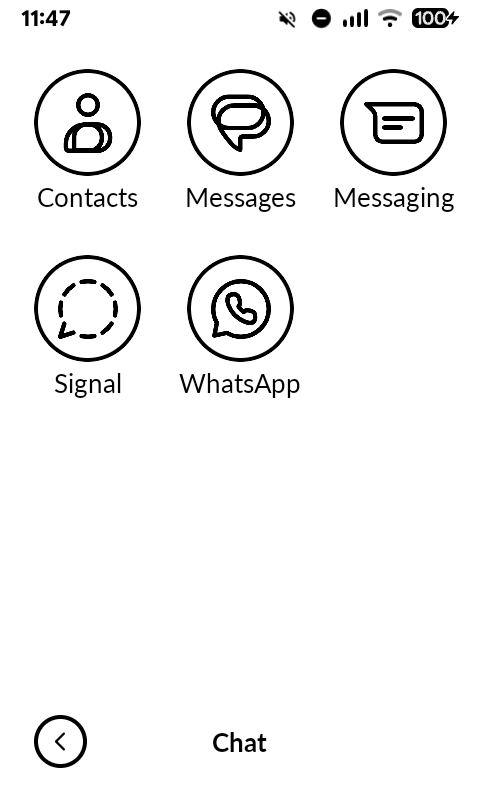
Left: Just showing how consinstent Lawnicons make the apps look, and on the right a simple view of a folder with 5 apps in it.
And this is pretty much it. I’m trying to finish the new inkOS update so there might be no new features here for a while
Thanks to all of those who have supported me through BMC! I appreciate it.
5 Likes