I recently got a Mudita Kompakt and I’m enjoying it so far except for a few issues I’m having with group texting. When I select “Single MMS Group Chat,” none of my messages ever send. Group messages only send if I select “Separate SMS Chats,” but then they are not bundled as a group chat. I am also unable to receive certain messages from people - I see a block with a loading icon but nothing ever comes through. Any idea as to what might be causing these issues?
before the Kompact, where you using the same SIM in an iPhone or Android, using iMessage or RCS?
1 Like
I was using the SIM in an iPhone but I turned off RCS/iMessage before using it in the Kompakt
1 Like
The turning off iMessage takes effect quite quickly, but it’s been reported here on the forum the RCS part could take a bit. It’s not instantaneous. Additionally, please make sure you’ve got the right APN settings & that you have MMS setting enabled.


An update about this issue.
My original phone plan was with Verizon but I was unable to edit the APN settings on this network. I switched to Mint Mobile and added the custom APN settings for this network - I can now receive texts with photos but I am still unable to receive group messages. With Verizon, I could see that somebody tried to send me a group text but now I am receiving nothing at all. When I asked Mint about it, they told me the phone was too limited and can’t receive group texts on their network (I can send them though which is strange). I have a mostly working phone but group texts still seem to be an issue.
1 Like
@d.forestgamble, I sold my Kompakt last year because of group texting and voicemail issues, but I was able to RECEIVE group text messages on MuditaOS K v1.2 with Mint Mobile as my cellular service provider. So, it’s odd that you can SEND group text messages but not RECEIVE them, and whoever at Mint Mobile told you that the Kompakt is too limited to RECEIVE group text messages on their (the T-Mobile) network does NOT know about what he or she is talking!
2 Likes
This is indeed very odd because we do have users on this FORUM on T-mobile supported networks & their group messages function just fine. I did pass this info on to the team & they are looking into it.
If it helps your team diagnose the issue, I used the default Mint APN settings. I tried to use a different T-Mobile APN but it broke the rest of my messaging capabilities. Setting the right APN seems to be an issue with Mint on some other phones too, so I don’t think that it’s an issue that’s exclusive to the Kompakt. However, group messaging does work properly on my old iPhone if I move the SIM card to that device.
1 Like
I managed to get group texting working correctly on the Mudita. It seems there are issues when switching from an iPhone to many Android devices. I couldn’t receive messages from an old group chat but when I got my family to create a brand-new chat, everything worked fine. I think there are some residual RCS/iMessage settings in place for those old group chats, but everything gets reset if you create a new chat.
My Mudita works perfectly now and I am quite happy with the device!
4 Likes
I am glad to see that. From what I have read here on the Forum, there are indeed residual RCS/iMessage problems for those switching from iPhone. Although I continue to use Mint Mobile, I knew that I was correct in posting here that the particular Mint care agent who tried to help you did NOT know about what he or she was talking.
2 Likes
This is very key information. That’s why we tell people to deregister from iMessage & RCS. The RCS process is not instantaneous. It can take up to 30 days, as some users have reported.
2 Likes
how? and why? I want to understand if I have to do it it, too. ma last smartphone was an iPhone, too
1 Like
Okay, here were the steps I took to enable SMS and MMS messaging on the Kompakt:
- I turned off iMessage, FaceTime, and RCS messaging in my iPhone settings. This defaults the messaging on the SIM to SMS and MMS. This process takes time to fully work itself out on the network, so you will need to be patient if messaging is a little wonky for a few days. RCS is a closed system with higher security so it is only accessible on compatible devices. As such, if you don’t switch iMessage and RCS off, the network will try to send messages to you in this format without an accompanying way for you to receive it on your new device. This results in messages either not coming through or arriving as a message you can’t read (you will get an error code or a blank text).
- Afterward, I moved my SIM card to the Kompakt. Most messages would come through at this point but I still had difficulty receiving certain messages, namely group texts and texts with photos.
- In order to enable MMS messaging (group texts and photos), I needed to modify the Kompakt’s APN settings. Since Verizon doesn’t allow you to modify their existing network settings or add a custom APN, I had to switch to Mint Mobile as their network is less locked down.
- Getting Mint to work on the Kompakt took a little work but MMS messages started coming through once I added the standard Mint APN and fiddled with a few settings. Turning on wi-fi calling on the phone and Mint dashboard helped for some reason. NOTE: If you are switching to a new network, you may need to activate your SIM on a smartphone - I had the hardest time trying to get this to work on the Kompakt.
- I currently cannot receive MMS messages from older group chats (those created while using my iPhone) but messages from new group chats come through. You may need to get anyone you have a group chat with to recreate the chat from scratch. This is a minor inconvenience but seems to work.
That’s about it. Everything works on my phone now after several hours of diagnosing the issues I was encountering. Apple and Android have different processes for connecting to cell networks, so there are things that get lost in translation when switching to Android. Asking help from the cell networks is pretty useless - they usually just tell you to get a smartphone. These steps worked for me though. Let me know if you have any questions if problems crop up.
5 Likes
Hi! I am also having issues sending and receiving MMS messages on my Mudita phone. However, I did not switch from an iPhone, and I don’t seem to have the settings menu shown above.
My sim card is on Verizon and was previously in an android phone. I can send and receive some group/MMS messages, but the vast majority do not come through. When I go into the network settings on my phone, I see mobile data and roaming, the top two items in the image above, but I don’t have a setting for MMS messages.
Do you have any other suggestions for being able to send and receive MMS messages on Mudita?
1 Like
@d.forestgamble Thank you for sharing this. I’m sure this will help many users… Thank you for taking the time to outline this.
Have you deregistered from RCS messages? Also- just to confirm- you do not see these settings in your phone:

Additionally, did you set the correct APN settings?
Navigating the Verizon network can be a bit tricky, but another user posted that the followed these steps:
Hi Urszula! Thank you for those links. I will try updating the APN settings and see if that helps.
To reply to your questions:
I do not see the MMS messages option in settings, regardless of whether mobile data is set to on or off. My OS is fully updated, so I don’t know why I am not seeing that.
I didn’t deregister from RCS messages. I was under the impression that that was only an issue if the SIM card was previously used in an iPhone, which mine was not. I have always had Android phones.
1 Like
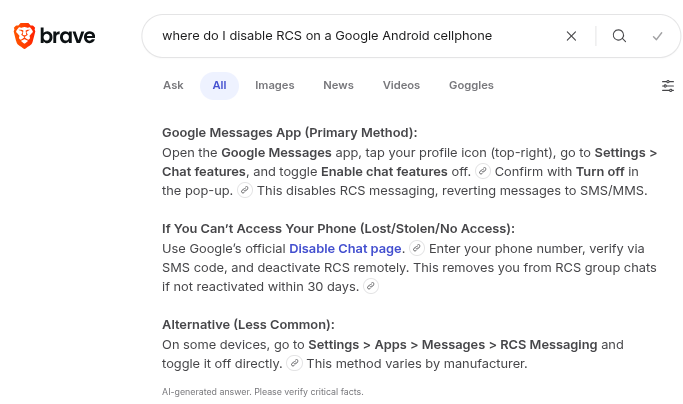
Google Android cellphones, at least the ones with later versions of the OS, have an RCS setting.
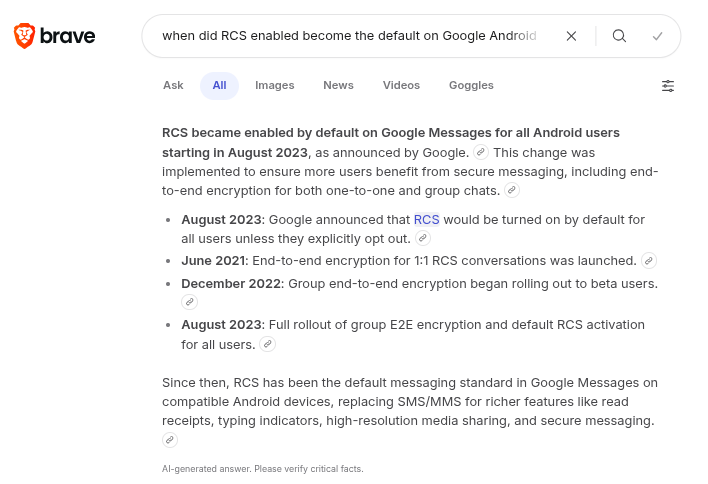
You may want to check whether you had RCS enabled on your most recent Google Android cellphone.
1 Like
For anyone still struggling with the ‘Separate SMS’ vs ‘Group MMS’ issue, definitely double-check those APN settings. I noticed that on some carriers (like Mint or T-Mobile), you have to manually ‘fiddle’ with the MMSC field to get the Single MMS thread working. Once that’s dialed in and the ‘Single MMS’ toggle is on, it feels much more like a normal phone!
3 Likes
By “Single MMS thread” do you mean in “Group MMS” mode OR in “Separate SMS” mode?
1 Like