It’s a launcher, of course it’s running on the background
1 Like
I forgot to mention that it’s even there when I switch back to the Mudita launcher!
1 Like
Notifications and action service. Disable notification reading permission and action service (accessibility permission for the app and it shouldn’t have any processes running on the background.
3 Likes
Ah, that explains it, thanks 
2 Likes
Hi gezimos,
I didn’t wen’t to this thread because lack of time and because the version 0.3 fits my needs. So I didn’t wanted to add complication.
But what I missed is the abilities to read the apps and system notifications.
I have the asterix enabled for the notification, so when there’s a new sms, a missed call or so, it’s ok, I open the app and see.
But sometimes I have an asterix on DavX5, Signal, Calendar (not Mudita’s but Androïd) but can’t know why. Is there a way to read somewhere the notification message?
Thanks in advance for your help.
1 Like
@shadock in v0.3 in Settings / Extras you should have an option system shortcuts. There enable “notification log”. This will appear as an app in Appdrawer.
With this you can see the notifications how android views them (no filtering whatsoever), there you might be able to find the culprit.
For this reason in v0.4 I made another notification window variant called the SimpleTray:
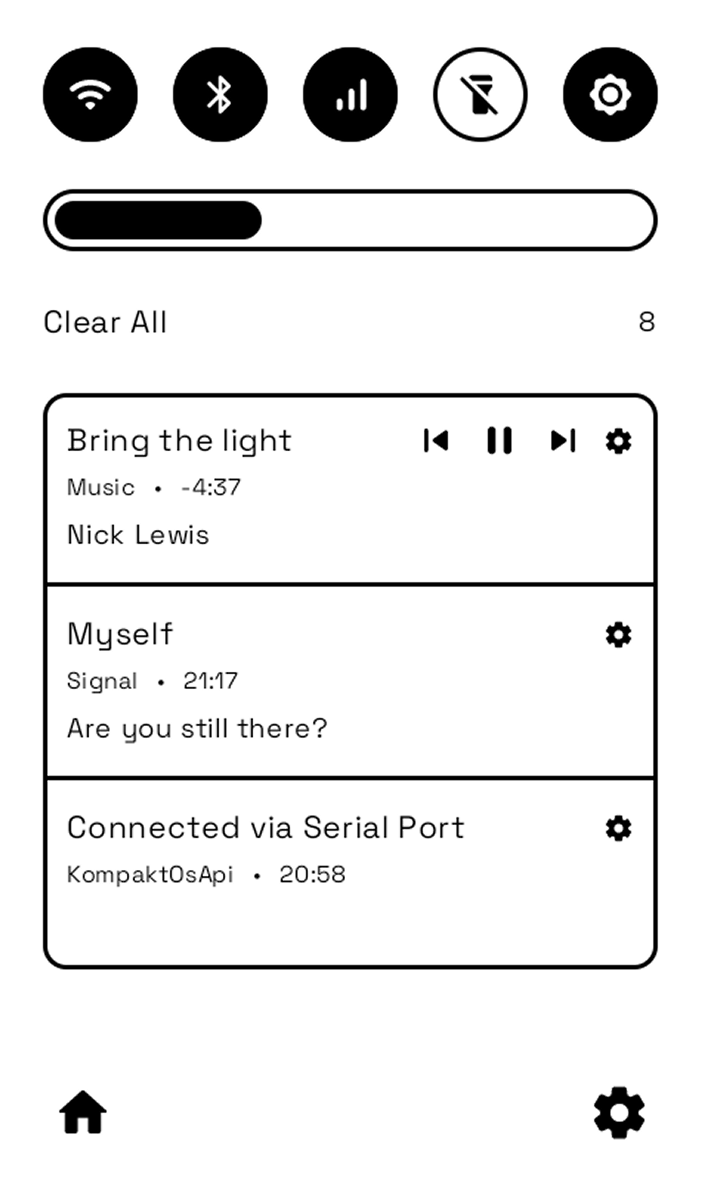
This shows the notifications more similar to android and it doesn’t have any filtering of notifications hardcoded (it still has an allowlist, but other than that it shows them pretty much 1:1 with how Notification log would work.
1 Like
Thanks gezimos for the quick and useful reply (as usual have to say).
I will try that and If not satisfied will make the update but I’m a bit tired to farkle with this device meant to make my life simpler.
That said, and once configured with your help and InkOs, it fits my needs and I love it.
2 Likes
Done!
Just what I needed. Thanks a lot.
Soon I will have to buy you another coffee. 
2 Likes
Glad I could help
 Thank you but save it for next version v0.5!
2 Likes
Hi,
First I’d like to say that InkOS is really top, I have it on a Kompakt and a classic android and I’m glad of it.
I have a little issue on my kompakt:
I think that when I installed InOS, I had notifications of sms or missed calls below the applications name.
I don’t have it anymore, although in the configuration, all kind of notifications or asterisk are enabled.
Any idea on how to make them reappear?
Thanks in advance
tmaes
1 Like
@tmaes Glad you’re liking inkOS!
For SMS you might have had, for phone calls no.
Are you using the Home notification Allowlist at all (Settings / Notifications)?
If you select any app it becomes an allow list, so make sure you have the SMS app there.
Also see if you might have disabled “sender name, group name, message” under the Chat Notification section.
Are you getting home notifications for other apps (assuming you have something else installed)? It might help if you can post a screenshot of the Notifications page.
To elaborate on the phone app. If you’re using the Mudita Phone app you can’t get notifications in home.
Simply because Mudita phone app sends a notification that can only be read by Mudita Launcher/Lockscreen, the notification exists but doesn’t give any info and gets deleted by the Mudita Phone app when the call ends/stops ringing. The only way I’m able to catch it is by caching it in the “Letters” page. There it will appear simply as “Phone - Notification received” because the notification it gives is empty.
1 Like
Thanks for the quick answer, I checked all your propositions and it doesn’t seems to work 
One guess would be that I installed and removed fossify sms app and removed it, maybe it changed something in the way notifications are managed
1 Like
Do you use SimpleTray or Letters page? Do you get the sms there?
Also try this:
in App Drawer / System Shortcuts / Enable “App Notifications”.
This will create an “App notifications” fake app in the app drawer.
Go there find the SMS app and see if you might have turned them off there. (at the source).
1 Like
I don’use Simple tray o Letters, but I can access it and nothing happens there if I receive an SMS
1 Like
Ok try the App notification shortcut I mentioned
1 Like
they were “on”
Thanks for your pugnacity
1 Like
Well I’m out of ideas honestly.My last suggestion is to give "inkMessage” a try, it’s a QUIK fork but optimized in black and white for the Kompakt.
2 Likes
Thanks again, I finally succeeded(it drived me crazy, I even backuped-removed-restored inkOS without success).
I than disabled and reenabled the push option in inkOS/notifications parameters - this made the trick (I think)
2 Likes
Very happy you were able to solve it
2 Likes
I have a couple of quirks with my Kompakt running v 0.4 of ink os
Molly fork of Signal messenger - when i recieve a message the text size reduces considerably, which I understand is intended but iI also get “websocket service R”displayed unnder the Molly text in the menu
Camera - Mudita camera does not appear in the app draw or in selections when an app in the the menu is long pressed.
1 Like