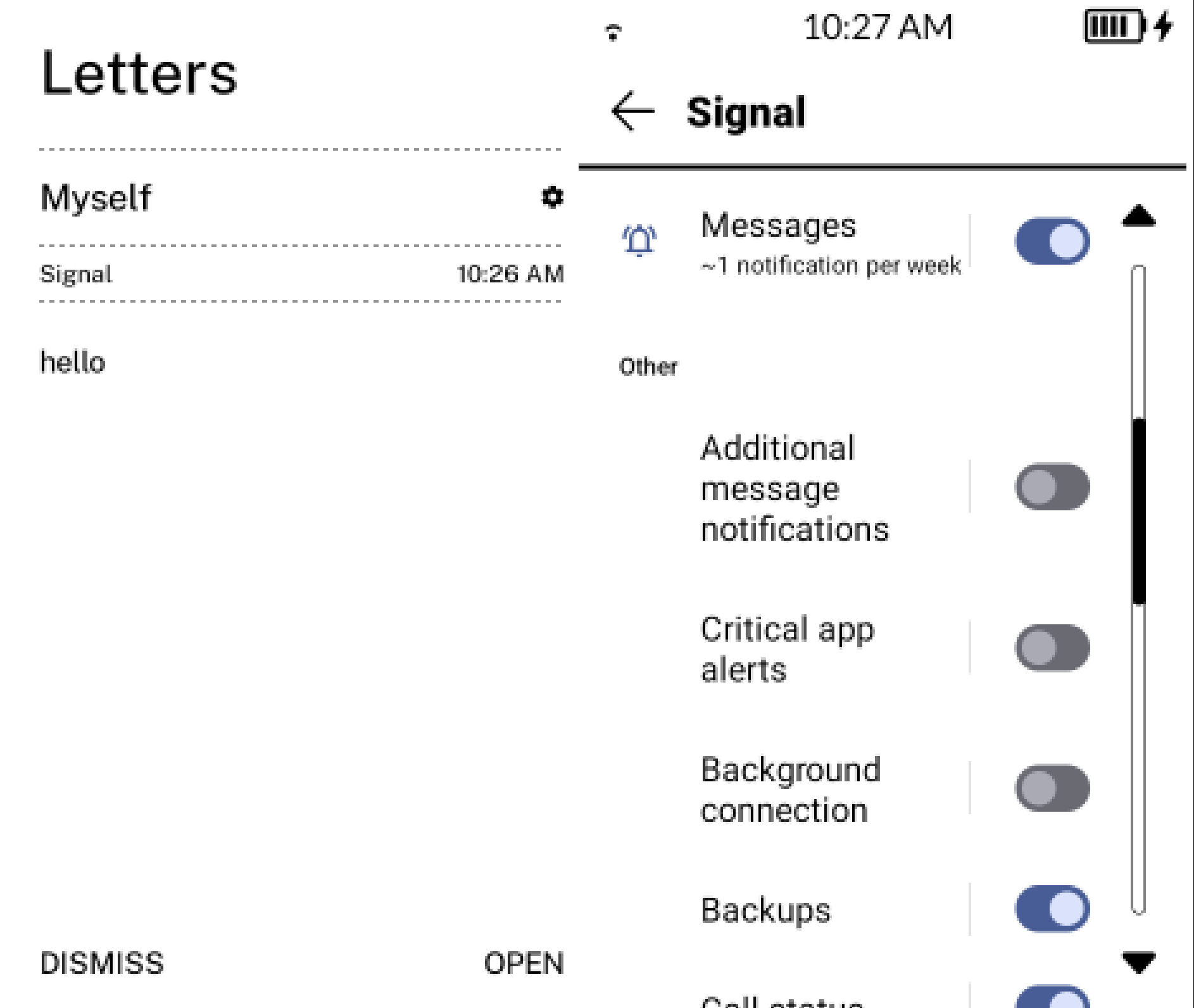
When you receive a notification, click on the cog icon in Letters or in Simpletray for that app. It will open the android notification settings for that app.
Disable stuff like critical app alerts, background connection, additional message notifications. Play with others as well, I don’t know which category Molly uses to send that notification that is occupying your message notification spot.
Camera appears fine to me, I just re-enabled it to test it for you because I had it disabled. See if you have added it to hidden apps in Settings / Appdrawer / Hidden apps.
thank you Gezimos for the as always prompt response, I have disabled some of the notification settings in the letters menu, hopefully this will remove the extra text when a message is received.
The camera was in the hidden apps list, as you suggested. I have removed it but contuually crashes when trying to take a picture within both molly and signal. It also seems to happen when using the stock mudita launcher so Im guessing it must be related to the camera app not the launcher.
No problem. It has fixed the issue for me for Signal that used to post the notification “background connection established”, so hopefully it works for you in Molly.
Yeah the launcher can’t have any affect in the Camera, since it doesn’t use it as a feature. The only element of Camera that inkOS uses is the Flash light through Camera2Api permission for the SimpleTray page where there’s an option to turn on the flash light. It’s an ancient android thing, and there are no other workarounds.
I would suggest try to toggle offline mode on and off, and see if that fixes the camera. Another point, make sure you have clicked the flip camera button to change to the back camera, at least Signal can’t detect that there’s no Front camera available.
thanks for the advice Guys, its not possible to know if you have front or back camera enabled in Molly wich is frustrating, and once it starts crashing, you arent able to reset it. Sorry Shadock what do you mean “dont toggle from offline to online” do you mean when I have molly running?
Ive had a very frustrating day withe Kompakt, the issue with the camera was one thing, but I had a much worse problem, the battery was draining extremly fast 100% to 48% in 4hrs. I had installed a couple of new apps, and Ink launcher, still not entirely sure what the cause was, but I think it may have had something to do with how I had Killapps configured.
I have done a factory reset and re installed everything, I have not installed the launcher yet as I ran out of time, will do it tomorrow, but I plan on leaving Killapps and the other app off for a few days to see if I see a difference.
im beginning to revaluate the Kompakt much as dont want to give up on it, it seems I run into a new “quirk” every week
Found that if I didn’t toggle from Offline to Online (or reverse) on a locked phone, I had no issue. Works with the native camera app and with Simple Camera. Running or not.
Thanks for the clarification, I had not been doing that, but I saw on another post people advising to do exactly that.
Molly is a fork of Signal messenger with some slight tweaks to address a couple of issues running on a system without google play services
I have been getting a lot of battery drain and also found I had a large discrepancy been the battery indicator on the Mudita launcher and ink os, so i have reverted to version 3 of ink os, to remove one of the variables.
I get the same text under the signal / molly app as I did in vers 4, but I dont see the cog you describe in your previous instructions.
How do I get to the configuration settings for the individual app as per your previous advice thanks in advance
You can however go to Settings / Extras / System shortcuts, and Enable App notifications and Notification log.
Those are shortcuts to those Android Utilities where you can see notifications that android sees and see app notification settings.
They will appear in App drawer after you enable them.
@gezimos I’ve just downloaded the latest version of inkos (awesome, thanks again). on the line where it gives the data and battery percentage it also shows the notification bell with a number in front of it. Is there a way to have that bell not visible? Also, it stays stuck on 1 when I get a signal message eventhough I’ve opened it. To be able to get it to 0, I have to stop all notification for signal and put it back on. Is this a common thing that happens?