Hello people, happy holiday!
inkOS v0.4 is here.
To download go here and download, v0.4:
I’ve prepared a simple website hosted in github to list the features and some faq:
https://gezimos.github.io/inkOS/
Please read this, or click on the website above:
This will be the last topic about inkOS and I’m opening a new one because the old ones had comments about disabling Mudita Launcher which now it’s not necessary with 1.4.0 update, and I don’t want users to get confused. I know the forum search is very confusing, please don’t open other topics about inkOS questions. Post here, on reddit r/inkos or in the github issues page.
Again: you don't need to disable Mudita Launcher if you're in 1.4.0 Mudita OS K
v0.4 has these changes/features:
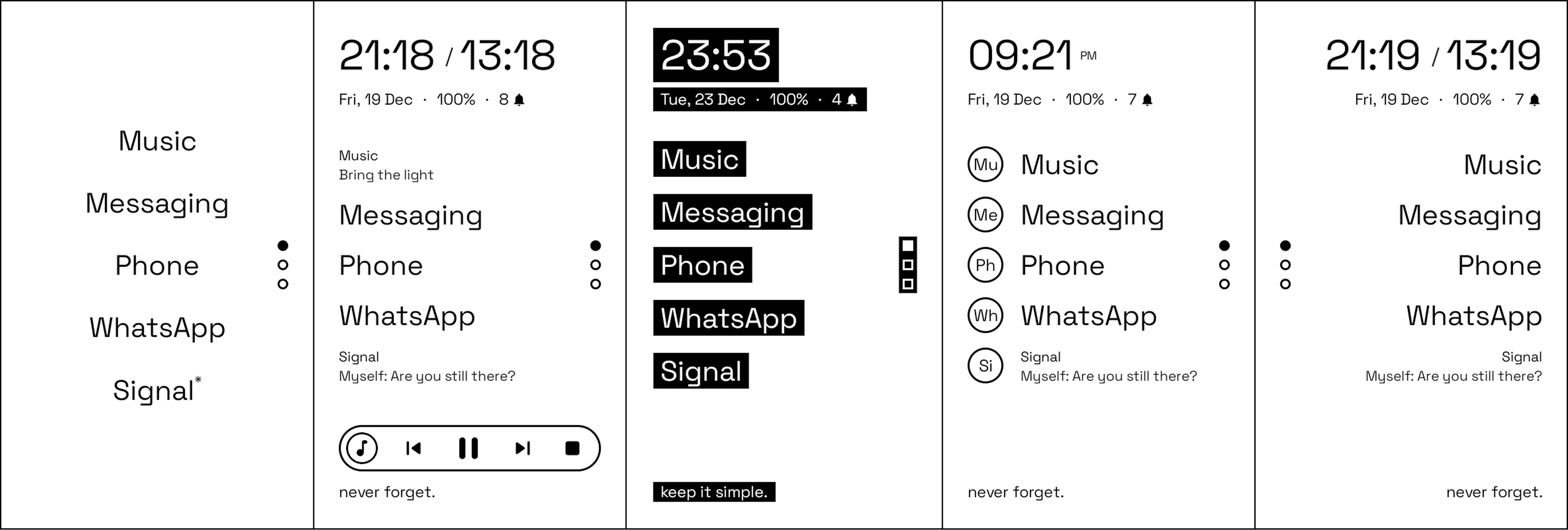
Home:
- Home alignment will allow u to set the mode to left and right. Left is set as default so users can know that this is now possible. You can go change it back to center if u wish to do so.
- Dual clocks option, 24/12hr clock option, AM/PM option for those that use 12hr clocks. Second clock time is set with a simple time-zone offset, it won’t have city names or search for simplicity reasons.
- Added charging indicator in home, appears automatically.
- Removed re-order apps.
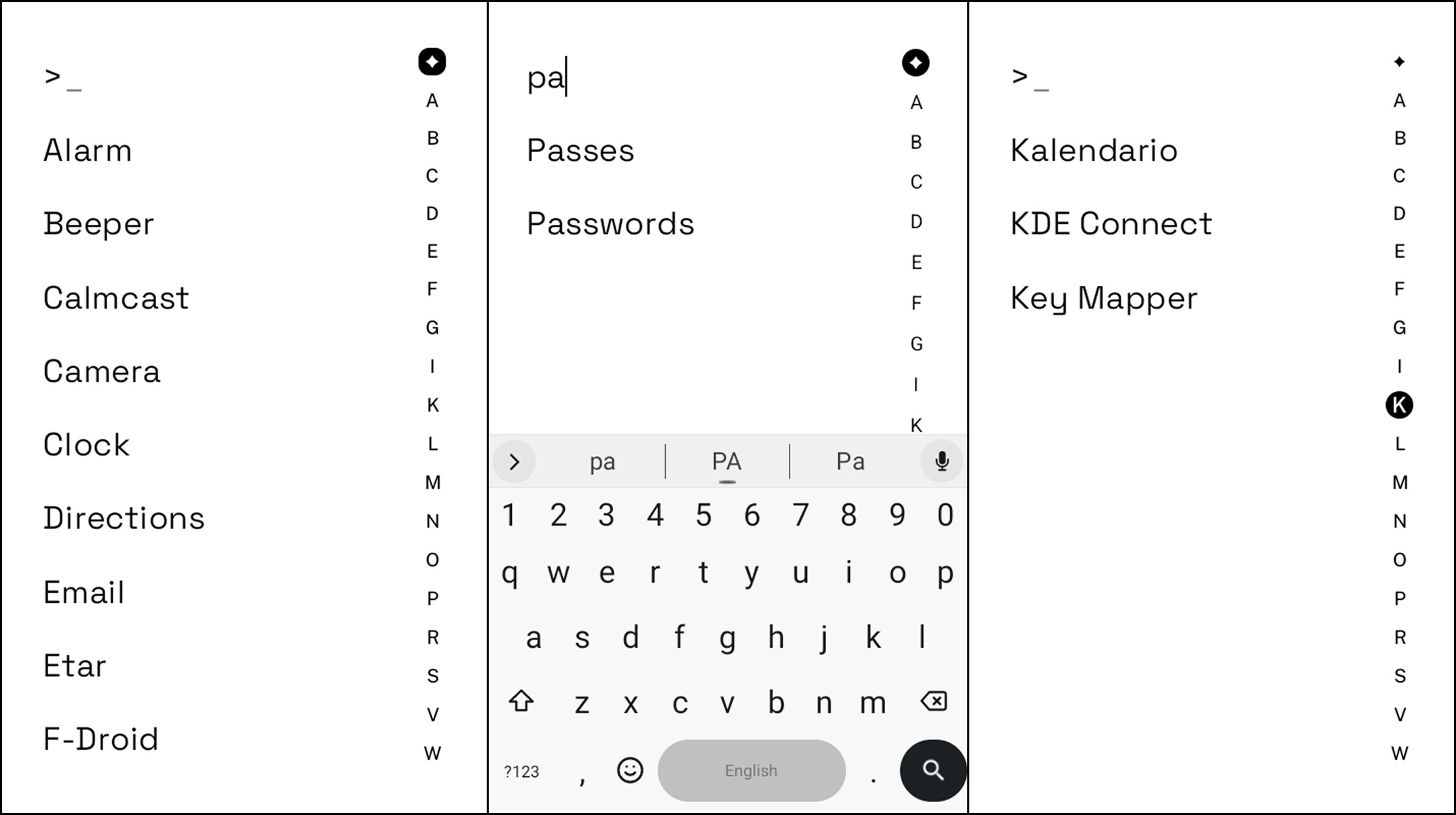
AppDrawer Settings:
- AZ filter will be the default option it allows you to filter quickly to see apps that start with “X” letter. It supports diacritics so apps with “Ë will appear under E”.
- Page indicator dots have been removed.
- Hide home apps is added, which will filter apps that u already have in home so you won’t have duplicates.
- Search function has been added. Auto-show keyboard will enable keyboard automatically when you open AppDrawer.
- Auto-launch result will open the closest matching app automatically without you having to press ok.
- If there are more than 1 app with the same keyword, pressing search/enter will open the top one.
Look & Feel: Colors:
- Added Rule to disallow having the same background color as the color of text to avoid the mistake some users have of making everything the same color which makes everything impossible to read.
- Merged all text colors into one color preference for easier management. (this is for users with lcd/oled screens, or color -eink). I don’t reccomend using anything other than white and black for E-ink/E-paper. 3. Removed System theme mode, which wasn’t working properly in devices that had scheduled theme change.
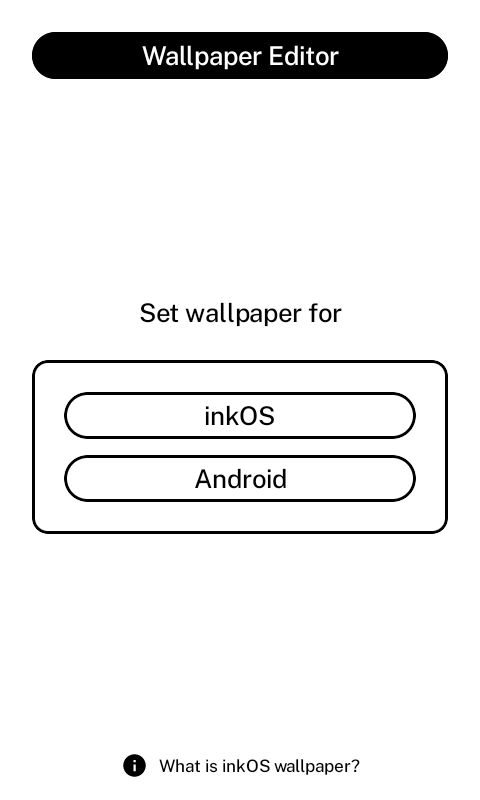
- Wallpaper system has been changed to use Android Wallpaper System because a lot of devices didn’t allow access through files app to embed images. It also includes a wallpaper editor, and some wallpaper presets.
- Background opacity has 0/255 values and sets the opacity of the background color (which affects how visible the wallpaper is). For full transparency use 0.
- Added text islands, so you can have proper contrast if you decide to use wallpapers.
- Added icons
- Corner style (affects text islands, buttons, and boxes).
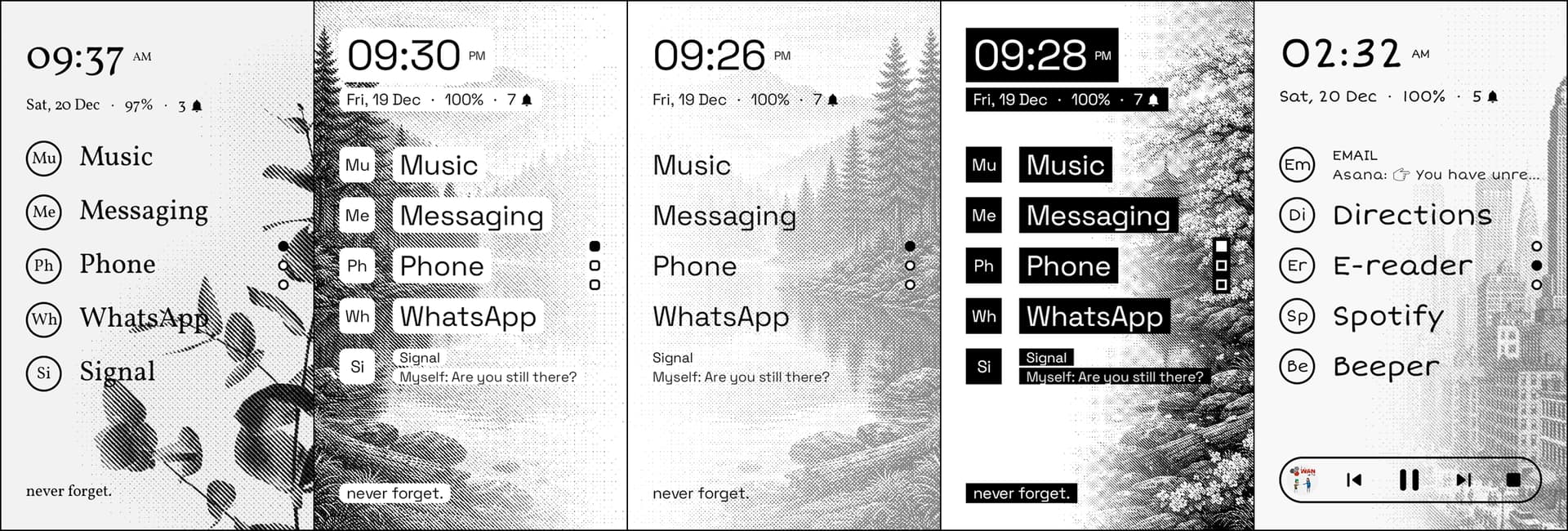
Fonts:
- I’ve added more font choices.
- I’ve changed the default to be PublicSans
- Please try other fonts, System (roboto) doesn’t look good in E-ink at all.
Gestures:
- Added Swipe up and Swipe down gestures in home. Because we already swipe pages there can be a conflict, so i’ve added Swipe Treshold slider, so u can configure short swipes and long swipes.
1.1 Default: Short swipe 0.35x (swiping pages up and down).
1.2 Long swipes 2.0x(swiping up and down to access Simpletray, or App Drawer). If you’re having issues, only use swipe left and right, or keep only 1 page of apps in home.
Notifications
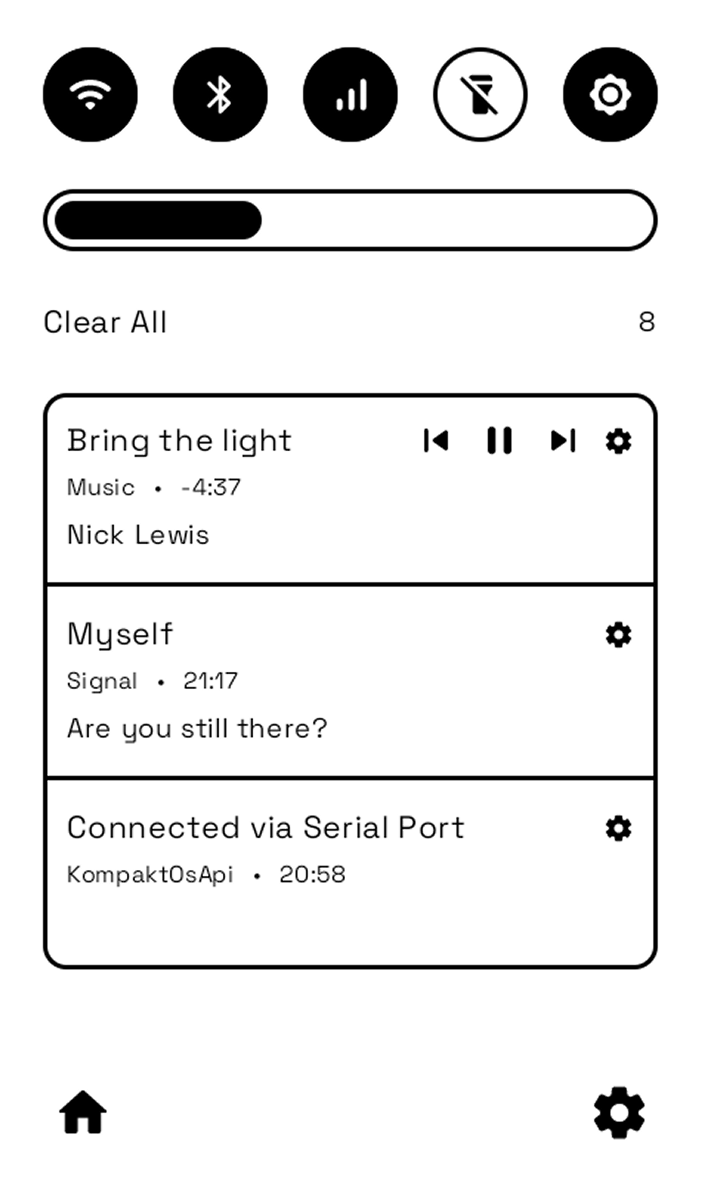
- Added 2 new settings at the bottom for SimpleTray. Notifications per page, and enable/disable the 2 bottom buttons. It uses the same “notification allowlist” as Notification Window.
- I’ve added setting icon for each notification in SimpleTray/Letters. So you can click and go to app notification settings for that app.
inkOS only previews hidden notifications, if android can’t see it. inkOS can’t see it. If your app is not showing you notifications, it’s not inkOS problem it’s a Google Play Services (lack of) problem, Push Notification problem from your app.
The allow-lists are empty by default they allow all notifications to come through, so you have 2 choices:
-
Add apps that u want in allow lists, there’s 3 (one for home, one for letters, one for simpletray).
-
Click. the setting icon for that app and disable those notifications at android level.
Extras
-
Removed mKompakt Bluetooth fragment from Extra Settings, it’s not needed anymore. 2. Added default apps shortcut in SystemShortcuts
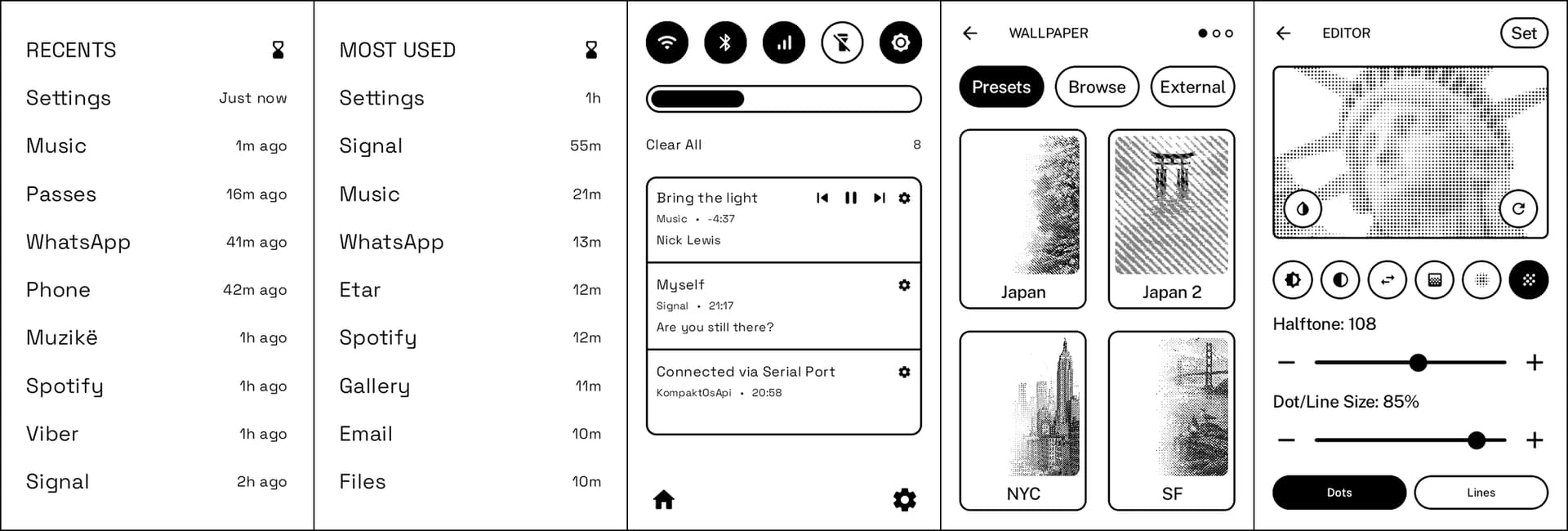
2 New fragments have been added:
**1.Simple Tray: **
This is a replacement tray that combines QuickSettings and notifications.
It is added as a default gesture for Swipe Down (long swipe)
In order to utilize this page you need to accept these permissions:
Allow modifying system settings (for audio on/off).
Allow Inkos to find connect and determine the position of nearby devices (for blutooth on/off)
Allow inkOS to make and manage phone calls. (for data on/off airplane mode on/off).
Allow inkOS to take pictures and record video. (Is used to turn on/off the flash light)
If you don’t want to use simpletray, don’t accept these.
2. Recents
This is a replacement for the Missing Android Recents in Mudita Kompakt.
First page will show your most recent apps, so u can navigate quicker instead of having to dig in the appdrawer. The other page will show you the Most used apps (tap hourglass icon).
It’s added by default as Swipe Right Gesture
Usage access is used for Recents/most used apps fragment.
There might still be some bugs, but during testing there wasn’t anything major. So it should be good for an update. However as always:
- Backup your inkOS data at Advanced / Backup&Restore / Backup.
- If you’re happy with v0.3 you don’t have to update.
- There have been some sizing changes so the default gap for home apps is 10, same for App Drawer is 8. So if you get big gaps, update those.
A big thank you for those that donated to the project, a big thank you for those that helped me test the new version. For those that want to support the project here’s the BuyMeAcoffee link.