I figured it out. I lt was because it was sideloaded but it was easily fixed
3 Likes
Go to apps / inkos / click 3 dots on top / allow restricted settings
Edit: Glad u fixed it
3 Likes
Thank you fore your Update.
A different background image from the gallery is not being applied.
2 Likes
Reduce the background opacity from 255 to 0 or to something else if u don’t want it fully transparent.
1 Like
What version of inkOS are you using?
Show a screenshot of your look&feel settings.
1 Like
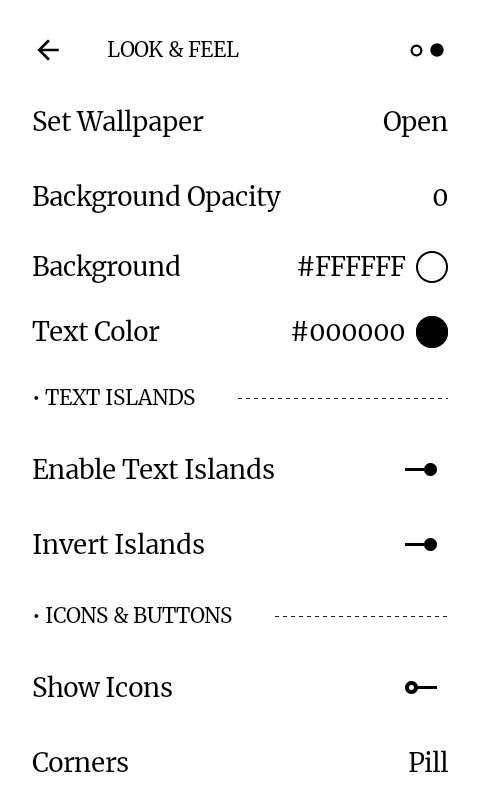
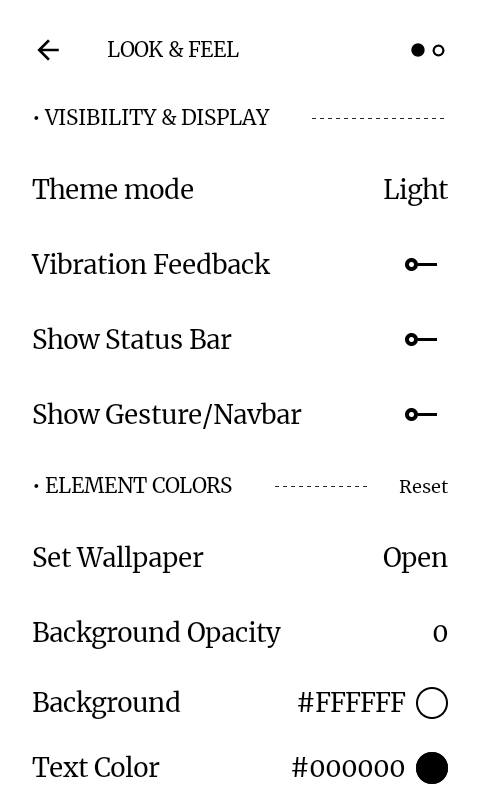
When u choose a wallpaper you get a popup. set wallpaper for “home screen, lock screen, both”. Did you click for Home Screen?
Is it only happening with this wallpaper or with all?
1 Like
i tryed all, but it only displayed white background.
Only on this background. I testet one foto and it worked…
1 Like
I scaled the image down and converted it to jpeg, can you please try this and let me know if it works.

3 Likes
It worked you are the best!!!
2 Likes
I was wondering if there is a possibility to put “E-Ink refresh” on the third button (which opens the stock-OS screen with brightness, loudness, flashlight etc. I am using the simple tray from inkOS so I dont need access to the stock-OS ones and being able to refresh the E-Ink screen by clicking the button would be helpful in many apps. I tried Key Mapper but didnt find the option for E-Ink refresh while in gestures its available but I cannot map it to the button.
1 Like
You can
Follow this post:
The example I gave there is for simple tray, but you can simply replace it with E-ink refresh
2 Likes
How can I remove the background image? I uninstalled ink os, and now when I restart the Kompakt, the background image appears briefly. How can I delete it again?
EDIT:
I have found it.
3 Likes
Hi Gezimos, thanks so much for all your hard work on this OS.
I have a small request to make. Right now when we are in notifications or the app drawer, we need the home button (or go back swipe) to go back to home. But it would be nice if we could swipe between them as if they were 3 separate pages.
Like so: swipe from left to right, you are at notifications. Swipe from right to left, back at home. Again from right to left brings you to the app drawer.
Sorry for the long winded explanation, wasn’t sure how to explain it right.
Again thanks and keep up the good work 
2 Likes
Hi, very nice work on the launcher.
Some suggestions:
- a link on the home clock to an application (i.e. the alarm)
- a link on the home date to an application (i.e. agenda)
- the ability to align home widget left and applications right, its a very cosmetic detail but I think it can be nice.
2 Likes
You can do all this already. You can set actions when tapping Clock, Date and Quote under “Settings/Gestures”
Alignment for elements on home screen can be adjusted in “Settings/Home”.
4 Likes
Thank you for the taps, for the alignments I meant independently align clock and applications.
1 Like
@brotweg Thanks for the suggestion and for the kind words
I do like the idea to be able to move between different fragments with swipes. I’ll consider it if I can work out a good UX, because any gesture added causes more complexities and I’m trying to keep the app to support as many devices possible.
As of right now you can close the Letters page with Edge swipe back, you can enable this in Settings / Gestures / Edge Swipe back. This also work in Recents page, App Drawer, Simple Tray. In addition to these you can close Appdrawer and Simpletray by swiping down (while in the first page in Appdrawer), requires long swipe.
And sorry for late reply
1 Like