@denguefeber Yes it does work with the Mudita SMS app, but it doesn’t work with the phone app. 
@petemeister Let me know how it goes
@denguefeber Yes it does work with the Mudita SMS app, but it doesn’t work with the phone app.
@petemeister Let me know how it goes
Thank you for your response! Have you made a special customization for the Mudita SMS app in your launcher? I am currently using Minimo launcher, and in the latest version, the function to display notifications has been added, but the notifications do not work for the Mudita SMS app (but it does work for e.g. Signal). I’m just trying to understand if the developer for Minimo can do something to make it work in Minimo launcher.
@denguefeber I haven’t used Minimo so idk how it works, but No honestly nothing custom for the sms app, it works because it uses standard notifications.
Meanwhile the phone app doesn’t so I wasn’t able to fix it. (it works in other Android phones but not with the Mudita phone app).
Will there be a possibility in future to add a mobile data, or location toggle. Or something similar?
@john765 That was the plan for the near future to have a page from swiping left or right that will open a page with simple toggle menus and sliders.
However for Mudita Kompakt since the last update 1.2.0 this will not be possible, even if I make these features.
Mudita devs have removed the accessibility permission that was there in Mudita OS K 1.1.0.
The accessibility feature is required for wifi, data, location etc. The only thing that could work without it, is turning Bluetooth on and off 
This also broke simple actions like Double tap to “lock screen” that some users requested.
Instead of adding missing features they remove some 
Just wanted to share some progress in the phone notifications. I’m trying to figure the logic behind the Voicemail notifications, but I don’t have voicemail service.
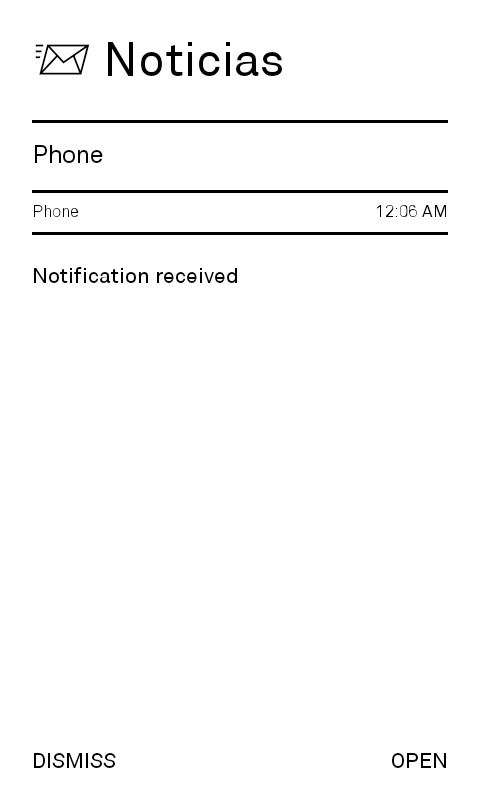
FYI the phone notifications will only work in The Notifications Window (letters) or as I named it Noticias here. Because this records the notifications until dismissal. Mudita is removing the phone notifications after the call is ended so they won’t work for the Label Notifications (as those are dynamic, and if the system hides, same will be done by inkOS).
@gezimos I’ve seen a sneak peek of the newest inkOS changes in the Brightness and Volume thread – amazing to see your progress!
Meanwhile I noticed one thing in my daily usage, that imo can be improved.
Current behaviour: Label notifications show the oldest unread message.
Suggested behaviour: Show the newest unread message instead.
Example: Let’s say I receive SMS “A”, I open the app, but do not open the SMS itself and go back, at this point label notification is gone. Then if I receive SMS “B” label reappears but it displays SMS “A” instead of “B”. Which should not be the case I believe.
BTW, do you accept pull requests? I’d be happy to contribute 
@nilstzh So basically what i’ve done is added a Pref for System Shortcuts In Settings/Advanced, which when enabled will give access to some Hidden Activities in the phone. Like Notification managment, battery optimizations, Notification Log, Memory usage. They will appear in the Appdrawer and you can add them in the Home App list. One of them is the AOSP brightness dialog. I just renamed to to a Sun Emoji  - it’s stupid but it works lol
I wasn’t able to figure out Shortcut creation from Activity Launcher → inkOS so I thought this might help some users.
If i understood you correctly I think I have fixed this:
…However i did try to ALWAYS show the latest message no matter what, but I decided against it. It will spam the home-screen if somebody sends messages too often (like some people do 10xshort messages quickly instead of 1 long one).
Of course! But wait when I release the next update because there have been some changes and I don’t want to risk breaking something in v0.2
@gezimos I just want to say you are a godsend, the inkOS make the Mudita Kompakt experience much less a pain I still adore the phone on a hardware level (form factor, eink display (even if not that crispy I would like), 3,5 jack) but the software has a looong way to go and with your inkOS the waiting is a way less painful so thank you a ton for releasing this for us.
Thank you for the kind words.
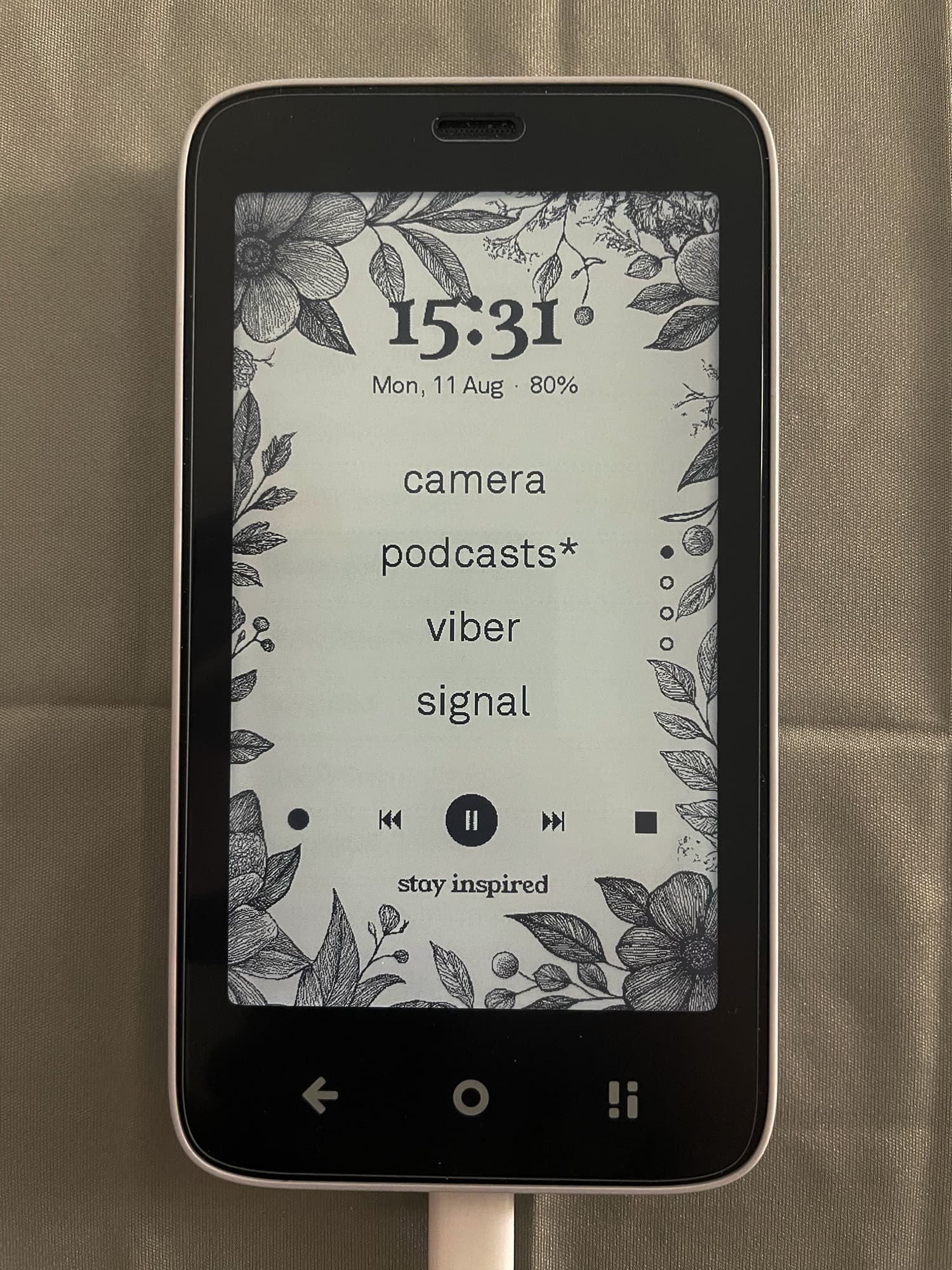
Here’s a sneak peek of some upcoming features
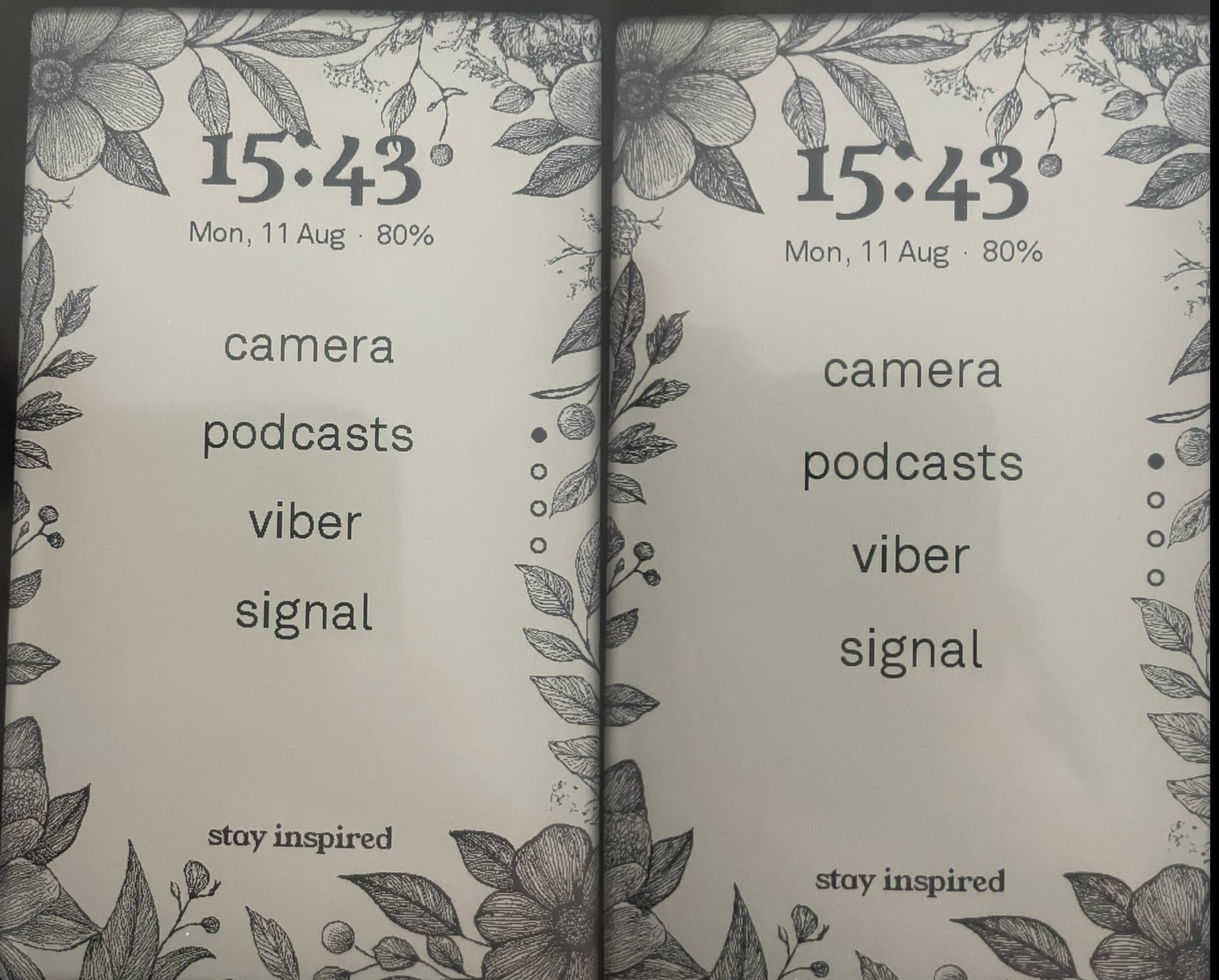
The screen is actually crispier than it looks, it’s just working on fast mode all the time:
Here you can compare how it looks normally on the left, and on the right with slow refresh rate that I can force via adb commands (but it will go away once you enter an app).
I love that wallpaper! 
Holy sh*t, this looks absolutely stunning  so looking forward this update. I suppose there will be an option to choose your own wallpaper by loading picture into the device? Or only presets? I any case, this is really awesome Thank you for making this already great app even better.
Regarding the screen, I believe the reader runs on slow mode, right.?So it should have the best quality the screen can provide. (apart from software tweaking which to be honest can make wonders). Even the ereader seems to me kind of blurry, thus not suitable for me for longer use. But maybe I am spoiled by other eink devices.
This is so epic
There will be an option in the settings to add background images. I will call them like that because I’m not using the android wallpaper system which is broken in Mudita Kompakt.
I will provide some wallpapers in Github, but there will be no presets on the app. I reccomend only using “frame” wallpapers not have full images with different colors where the app names are because it creates too much ghosting.
Anyway I’ve also made a new Double tap gesture to clear ghosting manually, because I saw a lot of people didn’t like the auto-refresh option because it’s annoying.
The reader runs in “reading” mode which is supposed to give the crispiest texts, but from what I’ve seen it lacks a lot of contrast so I don’t like it. I very much prefer the look on the right of the image that I provided. It’s crispy but it has a lot of contrast, and it doesn’t refresh all the time, it updates slowly in the background for the most part. But we have no access to include this in the app I just showed it for fun.
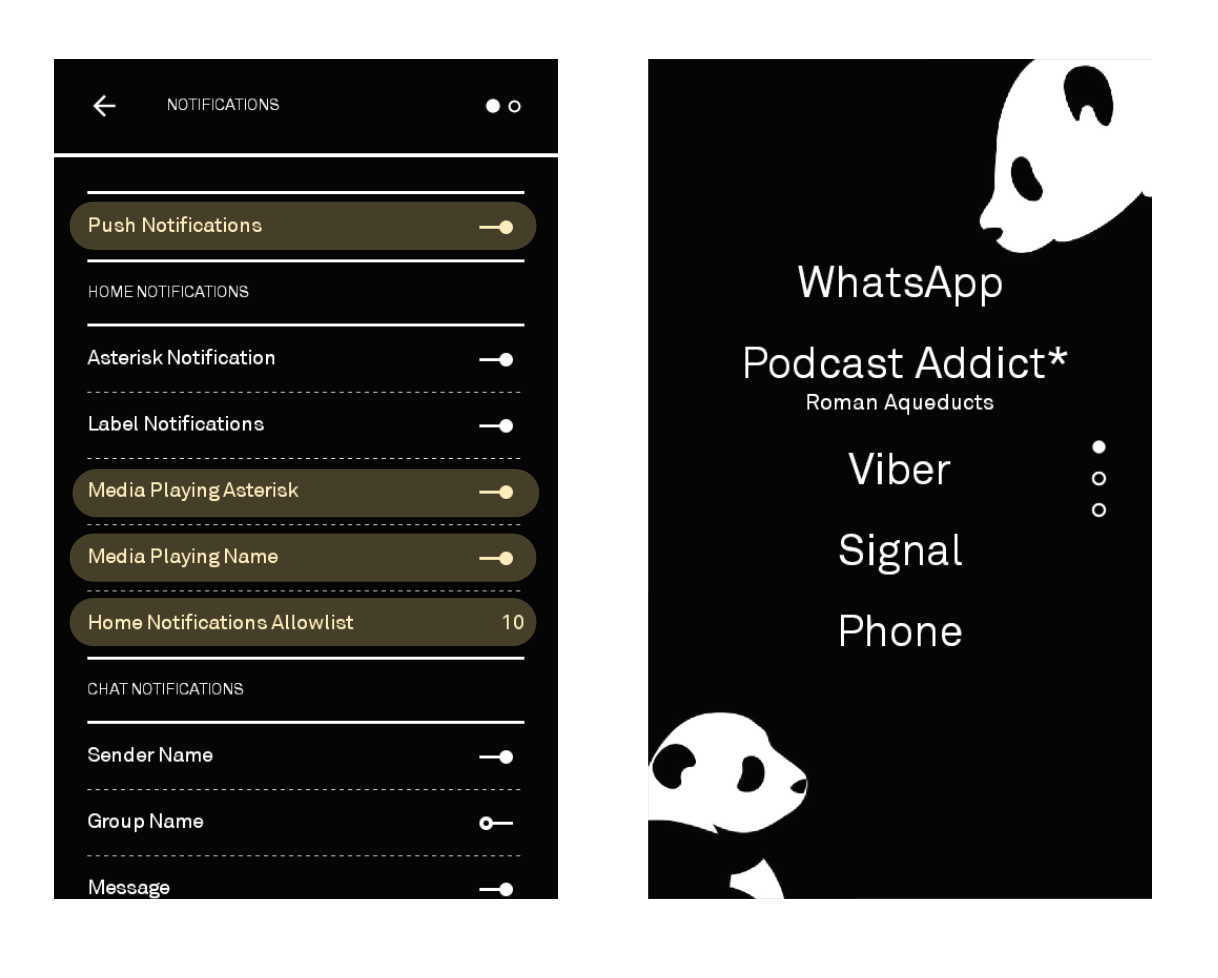
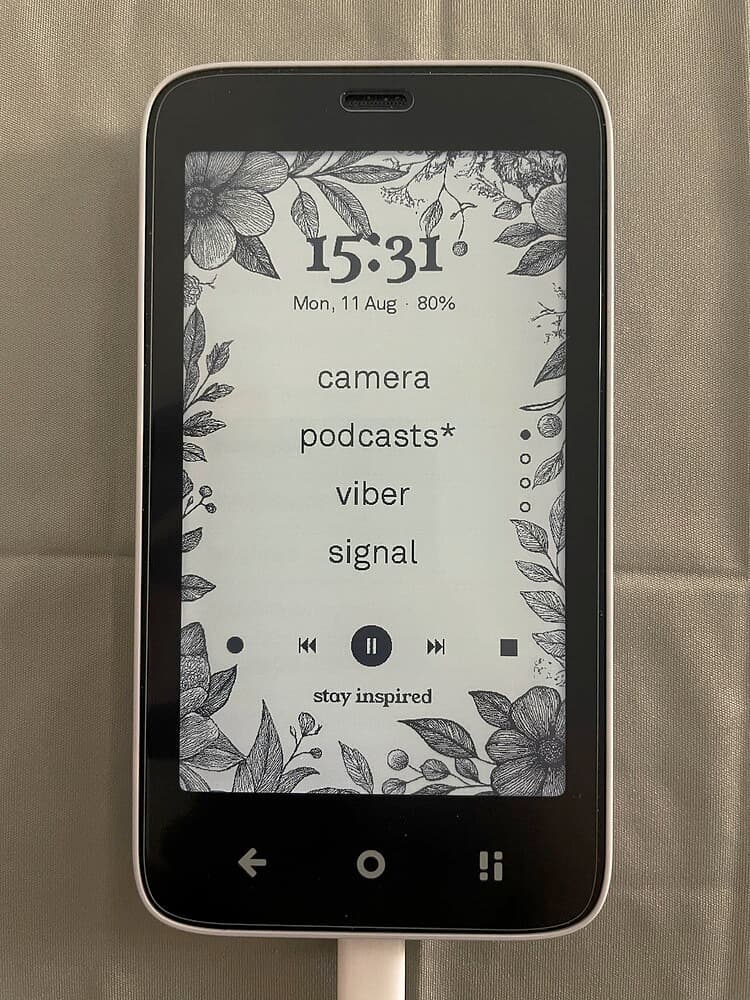
I’m having an issue, and I’m pretty sure it’s user error. I want to see the music note “asterisk” to indicate something is playing, either music or podcast, along with the sub-text indicating what is playing. I’ve tried enabling notifications for the individual apps I’m interested in (default Music, Podcast Addict) with no success. Any tips or thoughts why it might not be displaying?
For messaging, I do see an asterisk and a message preview, so it’s not all apps that are exhibiting this behavior, just my music apps.
(the interface is a little bit different for you as this is v0.2 work in progress).
It won’t work for the default music app, because Mudita Music app uses their own proprietary notifications that the notification recorder doesn’t have access to because my app is not a system app. It’s a similar case for the mudita phone notifications (they will appear for a fraction of the second but the system will delete them automatically). The only outlier is the sms app which gives a more proper standard android notification.
Thanks for the reply. Makes sense regarding the Music App! For whatever reason, even after ensuring those some toggles are selected, podcast addict does not display any information on what is playing. Any further troubleshooting tips you can think of or information I can provide?
Solved! Turns out I’m just impatient–if I give it a few seconds and refresh the home screen, it does show what is currently playing. Thanks for your help
@max.c.diener I’m glad you were able to solve it! It takes a bit for the app to send the notification to the system and then inkOS to read it and present it to you
In the upcoming update there will be a simple audio widget that will let you control the music from the home screen like in this screenshot
But again this wont work with the default music app