Glad you like it! I’m very happy people are finding the launcher useful, and I’m very surprised in how many different devices they’re using it !
2 Likes
I love it thank you so much!.
Just wondering, will it work with the upcoming Mudita update, or do we need to switch back to the original Mudita launcher before updating? thanks
2 Likes
Glad u like it!
I’m not sure tbh, I don’t know if Mudita will forcefully re-enable the Mudita Launcher with the update or not, because there haven’t been updates to see what happens. But will test it when the update comes
1 Like
Hi gezimos
Loving the inkos, been using it since the day you made the post.
With the new update, specifically the music widget in the home screen. It doesn’t appear to work? Is this something you are able to add by any chance?
2 Likes
The Mudita Launcher hasn’t been forcefully re-enabled after mine has updated!
2 Likes
Glad you like the launcher. Can you elaborate?
The audio name that shows under the app name or what.
@anon86727033 That’s great, thanks for letting me know!
1 Like
inkOS survived the update mostly unscathed. Still in the early stages of investigating but it feels like notifications asterisks for my pre-existing sideloads aren’t as reliable as before. The asterisks seems to appear only after I open the app - but it is hit or miss. Sometimes the asterisks appears in real-time.
Still investigating to see if i can reproduce on demand.
1 Like
@es1996 Thanks for letting me know. If you wouldn’t mind trying to reset all data in advanced/backup/restore (in inkOS). Hopefully your customization weren’t very big to replicate. And see if that fixes the issues with the notifications.
I can’t update my phone right now as I will be traveling and don’t want any bugs that may cause problems.
There could be the DuraSpeed killing the apps sending notifications, but I’ll have to investigate once I get the update and some time to work on the update for inkOS
1 Like
Yeah, I’m THAT guy. LOL. Loved inkOS so much that I have a TON of customizations. Is the ask that I clear data then restore from a backup?
1 Like
@es1996 Yes!
First I would try just reset inkOS from scratch (not restore from a backup) and add a few apps that have notifications and see if that fixed the issue.
Another thing to try would be to re-enable Mudita Launcher, uninstall inkOS and then re-do it again.
If these doesn’t work, just restore your backup and keep using it until I figure out what the issue is. (if i actually can, because I have no idea what they have changed).
Im just saying these are the steps I would take when I test it myself, but you don’t have to if you’re ok with waiting 
1 Like
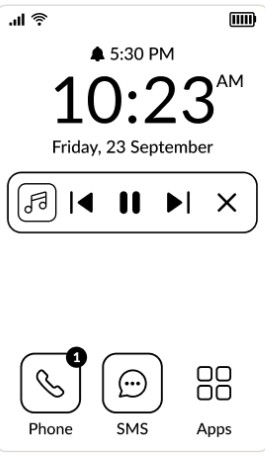
I am talking about this widget which got added in this update, doesn’t show up on the home screen of the inkos launcher.
2 Likes
I understand what you’re saying. Again, could just be my imagination. For the most part, the asterisks is present more than it isn’t. Unless someone else complains, I wouldn’t worry about it. It was just my preliminary report post upgrade. Otherwise, inkOS functionality seems about the same.
2 Likes
This is AWESOME, thank you SO much! My brain loves it!!!
2 Likes
That widget is part of the Mudita Launcher, I won’t be able to show that in inkOS. And also I think it only works with the default Mudita Music Player.
I wanted to create a similar one for inkOS but I wasn’t happy with the results so I scrapped it. Maybe in the future updates it will come.
2 Likes
@es1996 I understand.
Well whatever you find share it and I’ll collect data if anything needs to be changed (hopefully not) because inkOS notifications are very simple it just shows the notificiations that exist but the MuditaOS is hiding from you. And if MuditaOS doesn’t show them, inkOS won’t show them either.
2 Likes
Well done. Just tried your launcher. It is very easy and pleasant to use. Thanks alot for your effort!
One wish/improvement would be to reduce “screen changes” to a minimal amount: no refresh, no animations, no “transitions”- two obeservations to illustrate this:
- in the app list, it is scrolling continously, whereas it would be more efficient for the eInk display to make “page-wise” scrolling (like a book).
- also, on the home screen, the app notifications are shown after about one second after the home screen is already displayed. This leads to another “eInk update” which could perhaps be omitted if the “notifications lines” would be displayed immediately.
Do you know if it would be feasible to reduce these screen updates?
2 Likes
Thanks for the comments! I appreciate it.
- That is correct, because this launcher is a fork of other launchers I didn’t make it from scratch. I took off animations and smooth scrolling anywhere I could. But in the AppDrawer I was having issues not to have apps get cut off in some devices (I tried to optimize it for other phones too not just Kompakt).
I aim to fix this soon and make the App Drawer paginated like I did for the Settings
- It seems you have turned on the “E-ink refresh” feature that I added specifically to remove ghosting. You can turn this off in Settings / Look and Feel.
This is necessary if you’re using the Dark mode, because ghosting is terrible. But if you’re using light mode ghosting doesn’t happen that often.
It’s not even real e-ink refresh, I’m literally just displaying a full white or black background and flashing it quickly because it tricks the display to clear the ghosting.
I have zero access to the e-ink modes that the phone has because Mudita has locked them to the System Apps only. So this was the best I could do.
I’m reading all feedback and writing everything that can be improved. Some fixes and some features will be added in next update.
Thanks again!
4 Likes
You are a saint. Thank God those LP3 shmucks didn’t get you on their side 
3 Likes
So I had ordered LP3 last year, but delay after delay I decided to order the Kompakt.
Still kept the LP3 order for months after, until I cancelled recently. Not because of the delays (those helped) but the sketchy responses regarding their warranty policy.
I tried to optimize this app for LP3 as well, using Android Studio emulator (same resolution same android specs). But because I didn’t have the device I missed one issue that I will in the next update.
1 Like
Hey, I just installed inkOS and also enjoy its simplicity and configurability. Thanks so much for creating it and making it available to all of us.
Can someone help me with one challenge though, please? I like the launcher to open the app drawer on swiping left and can’t get this done. When i select open app for swipe left in settings it shows “open camera” as the setting, but it does not open the camera (and I never selected the camera either). What can I do to either open a specific app, but even more so to open the app drawer?
3 Likes