I plan on looking into download speeds. I think it’s dependent on the server the podcast uses to provide the file. Because everything is done client-side (on your device) in this app, I’m not sure yet how much control I’ll have over it.
For the directory, I’ll have a version out tomorrow that will not require an api-key. I’ll update that thread when it’s available.
Hi David, super excited to download/install CalmCast. Once I download the APK file from the link in your first post, can I install it through the Mudita Cemter? If so, is it possible to uninstall at a later date if needed (I saw some posts about being unable to uninstall apps if they were I staked via the Mudita Center )?
Yes, you are able to install it via the Mudita Center. Mudita does not currently have the ability to uninstall from the Mudita Center or Settings but you can either side load an uninstaller or download one from a store like Aurora if you have one installed.
@davidray my experience echoes that of @cxcxcxc. Case in point, if you directly compare the exact same podcast and download the same episodes in, say, Pocket Casts vs CalmCast, they download in a fraction of the time in Pocket Casts compared to CalmCast. These are measurable differences so there must be differences in the distribution of content.
awesome thanks so much for all your work on this by the way, excited for this directory, one of the features I loved about the light phone. Once you release this I can remove herewego maps thats what I was using for my ‘directory’
Ya, I’ll be looking into different download methods. My assumption is that you’re actually downloading the podcast from PocketCasts and not directly from the podcast distro. But I have some research to do for sure.
I just released a new version (v0.3.2) that I’m hopeful will improve your download times. In my experience, I downloaded a 3 hour podcast over a 5G hotspot in just a few seconds.
@marko I also laid the groundwork for an external storage option but I have not fully tested it. I need to go pick up an SD card to confirm it works but you’re welcome to test it if you feel up to it. (I may also be able to simulate this in Android Studio but I haven’t figured it out yet…)
So I can select the external memory, and it saves the podcast episodes there too Simply great! The download speed has also improved enormously. I have now uninstalled Antennepod and only use CalmCast! However, I do have one problem from time to time. When I go to Downloads and tap on an episode to play it, it plays in the background, but the playback screen where you can pause, fast-forward, etc. doesn’t appear. This only happens sporadically. I’ve also noticed that the app doesn’t remember where you were in an episode if the Kompakt is turned off over the weekend, for example. Can anyone confirm this?
So I am trying to download your app this new version but when I connect the phone to mudita center it shows its downloaded but the actual app does not show up in the app installers section of mudita center, usually it pops up there and then I download it onto the phone, I have tried it a few times now and its not downloading the phone
Can confirm downloads are much faster for me now
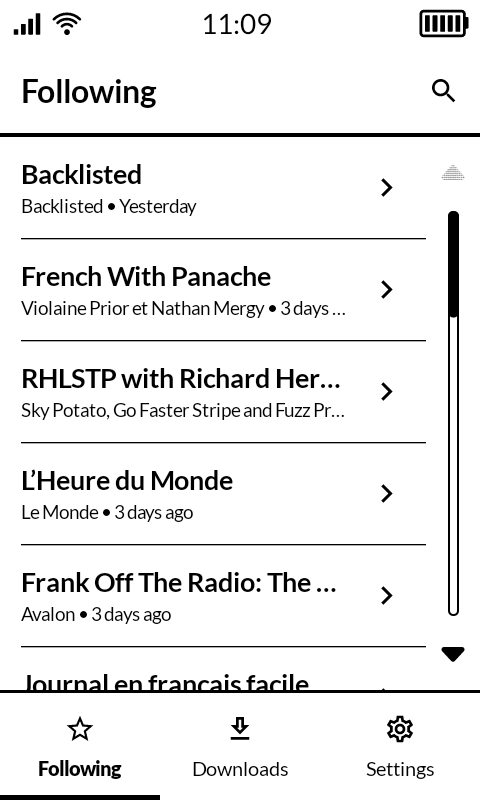
I mentioned before that I thought having the date of the most recent episode shown in the podcasts list might help demonstrate how they’re sorted. I forked the repo and had a bit of a play around, and I quite like having the date there (I also think I now prefer having them in release order rather than alphabetical – it’s a nice way of getting to the most active podcasts quickly).
Here’s a screenshot. I’m not an Android guy at all and this is just hacked together, so I don’t think you’ll want a PR. But I thought I’d share in case you’re interested. I also think it would be better without the publisher’s name on the second line to make it cleaner.
I’ve had this happen from time to time. I’m not sure if it’s a problem with my package or if Mudita Center is having an issue. Typically, renaming the file and uploading fixes it (but it’s often slow to upload the second time.) Sorry for the inconvenience. When I publish an official V1 release, it will hopefully be through one of the stores as well.
“…tap on an episode to play it, it plays in the background,…”
Can you confirm if these are older downloads (when you downloaded, not the date of the podcast)? Or does it not seem to matter.
“…app doesn’t remember where you were in an episode…”
I think this is because Android eventually kills inactive apps to conserve battery
There might be a way to request permission to keep running but that seems intrusive
I’ll probably write to the database what the last episode is you had playing and re-init it when the app initializes (although I thought I already did this so maybe I broke it at some point…)
Thanks for the feedback, I’ll make some adjustments!
Sorry that I am using this thread for an off topic, but I wanted to ask…
I really like your work and was wondering if you would be interested in doing a simple FM radio App? The Kompakt has got the hardware but Mudita is not interested in making the App sadly…
Do you think it is possible?
It is not possible. The radio fm app already exists in the app list, you can use if if you use other launchers.
And the radio fm libraries are installed in the system, they’re not part of the app itself so you can’t access those simply by installing another fm radio apk, or making one from scratch.
Simply put the MuditaOSK will not let u access those without root.
There’s a should’ve been simple way to fix this, I unpacked the fm radio apk and edited the look to make it black and white. And then of course you can’t install it because you don’t have the Mudita signing keys to override a “system apk”.
 )?
)? Simply great! The download speed has also improved enormously. I have now uninstalled Antennepod and only use CalmCast! However, I do have one problem from time to time. When I go to Downloads and tap on an episode to play it, it plays in the background, but the playback screen where you can pause, fast-forward, etc. doesn’t appear. This only happens sporadically. I’ve also noticed that the app doesn’t remember where you were in an episode if the Kompakt is turned off over the weekend, for example. Can anyone confirm this?