I sideloaded Whatsapp through Aurora Store but the location sharing does not seem to work. It doesn’t find me on a map and when I share it I’m stuck with the “Retry” button. Anyone found a way to fix it?
1 Like
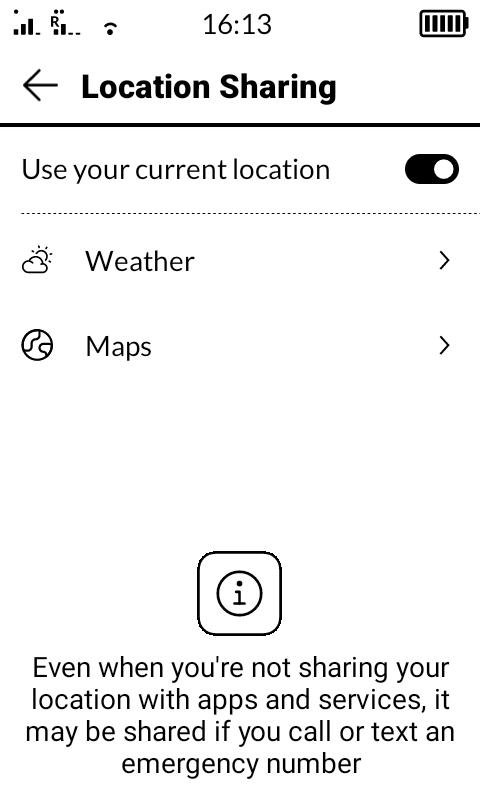
The issue is that location sharing permission is only given to 2 system apps (weather/maps). So that’s why Whatsapp can’t access it. I’m not sure if they have changed this on the upcoming update, maybe @urszula can answer that for you
1 Like
Yes it is actually what I saw:
- On the location sharing interface in settings, the list only contains weather and maps
- When I go on the whatsapp settings interface, location is allowed as a permission
1 Like
Location permission yes, location sharing permission no.
Those are two different permissions in Android Manifest.
And Mudita has only given access to Location sharing to Maps/Weather apps (their own system privilege apps)
1 Like
The GPS in Mudita Kompakt is receive ONLY. It’s a privacy feature. I’ll ask the team about WhatsApp, but I think this is the case here, that the GPS in Mudita Kompakt is RECEIVE only, and you might not be able to share it.
2 Likes
Is this going to be fixed? i have the same issue
1 Like
I just tried sharing my location in sideloaded Whatsapp and worked for me, that’s weird.
1 Like
for me i’m trying to share my location with the amazon app so that i can use the amazon storage lockers.
1 Like
I’m not sure what you’re looking to be fixed? Can you be more specific?
@gezimos Said: “Location permission yes, location sharing permission no.
Those are two different permissions in Android Manifest.
And Mudita has only given access to Location sharing to Maps/Weather apps (their own system privilege apps)”
Will it be possible to give location sharing permission to apps other than these two system ones?
1 Like
I will ask our team about this.
1 Like
I could share my location to others in WhatsApp.