Have you enabled your MMS settings & are your APN settings set correctly?
@iphone_despiser Please reach out to our customer support with this specific technical issue. Our team was troubleshooting this bug & they would like to address each individual issue on a case-by-case basis.
Their email is [email protected]
I think so. However I don’t know so.
1 Like
-
an official browser
Customizable home screen
-
For the title of the music number playing to be shown
3 Likes
Hello there!
- Cyrillic suppport and alphabet. I want to be able to take notes in my native language.
- Synching capabilities between the native calendar with DAVx5 (or other software) in order to transfer events to my desktop. IF POSSIBLE: I would love to be able to sync contacts and notes between desktop as well. Or SOME simple exporting feature.
- Faster keyboard, more responsive keyboard with autocorrect.
(More wishes: ability to group notes or tag them, creating folders for them, some better way to look them up and organize them).
1 Like
RE. WebBrowser.
The current issue is that sometimes a person will send you a link through SMS that you would want to be able to open later. So you are forced to either copy it painstakingly letter by letter into the websearch or copy the text and use a third party app to send it over (which I do not want to install just to be able to do that)… It would be nice to either have an syncing option of messages between Mudita Center on desktop and phone and/or at least a WebView / preview that fits within Mudita’s philosophy and UX/UI style. Additionally, it’s not just an issue with links but also with images and pdfs that people like to share. Hence why I mention the synching options in my top 3 suggestions.
1 Like
@niikomanis But you can just copy paste the link.
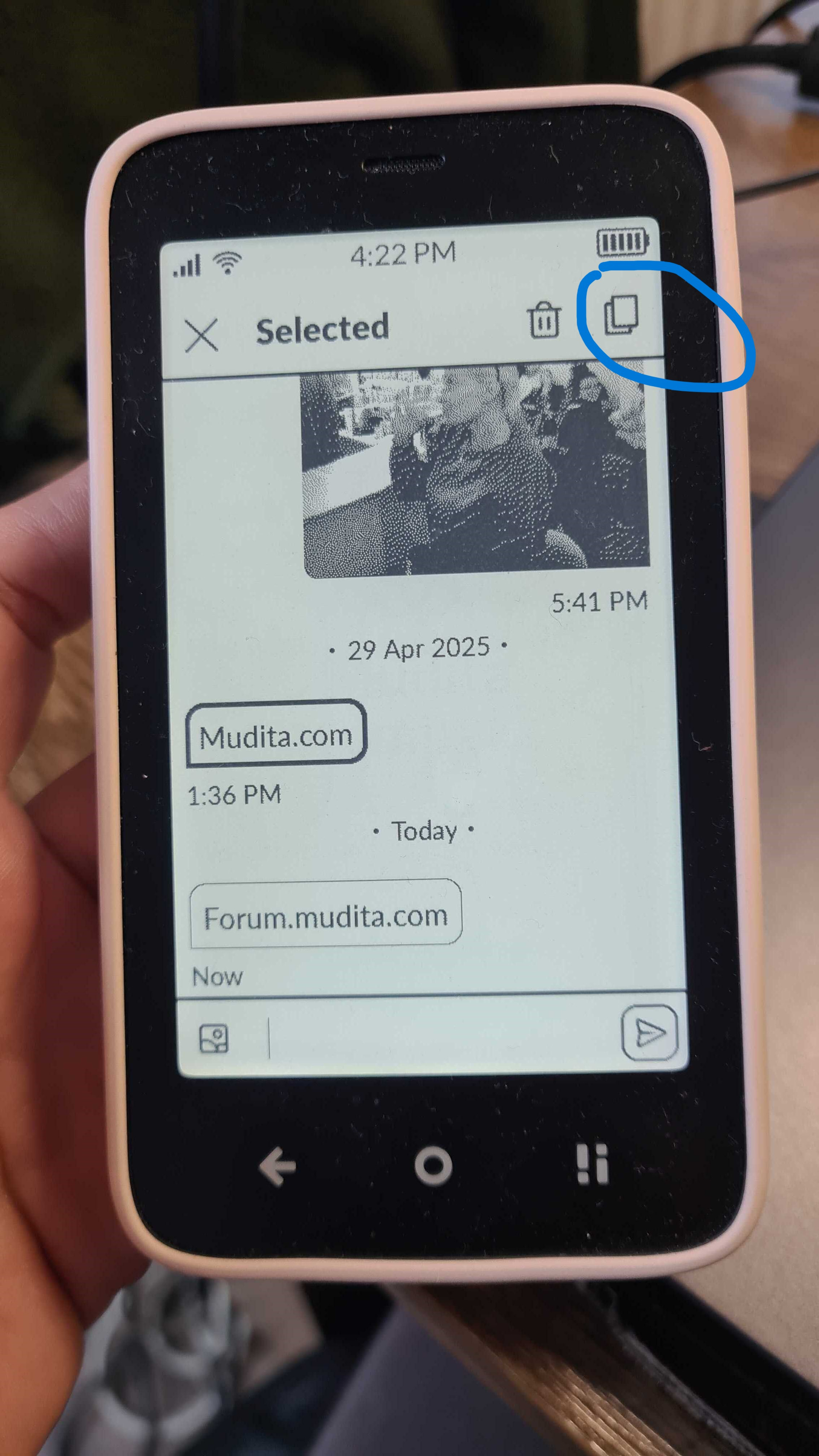
Just press on the message, tap the copy icon & paste into your preferred browser.
1 Like
Yes, thank you! I checked and realized that too later. However, I disliked all of the browsers I have tried so far and dislike the idea of relying on a browsers on a phone. I just wish there was a way to separate such direct access to the internet and some sort of sync feature is the only thing that comes to mind for that. But that might be just me.
1 Like
The date isn’t shown in the note
An audio recording says it’s from yesterday, but that’s not true—I recorded it weeks ago
1 Like
I’m not sure I understand- You’d like to open the link, but not use a browser? Do you just want to save the links?
I do not need a browser in the Mudita neccessarily, I merely want to be able to easily transfer links to my desktop without sideloading an external app for that purpose  The possible solution I can come up with, is just some synching integration of messages between Mudita Kompakt and the Mudita Center but I am not a dev, just a designer
1 Like
I’ve had my Kompakt for 1 week and am loving it so far. My top 3 features I’d love to see implemented are:
- Option to set up repeating calendar events. These could repeat daily, weekly (on specific days or days), monthly (specific date or 2nd Friday of every month for example), or annually.
- Timer and stopwatch capability added to the alarm/clock app.
- Ability to film videos with the camera.
3 Likes
- Being able to read all the (Dutch) settings. When a sentence is too long it shows “…” and I do not know what the setting does. Example: “geluiden en trillingen tijden…” (advanced settings for sound). Or the settings for date and time “Tijdzone automatisch bijwer…” and “ altijd lokale tijdsindeling geb…”. There are a lot more examples like this. I do like the settings that have a little explanation underneath. Like the hotspot settings.
- More user friendly settings and explanations about sounds. For me the settings for sounds are difficult to understand and difficult to check. I don’t hear calls somehow and sometimes I receive all kinds of loud notifications during an appointment and I don’t know how to silence the correct ones. For example with sideloaded whatsapp, but also with the notifications from your calendar or sms. (BTW, I am not sure why I don’t receive all calls)
- Security is always important to me. I don’t really understand a lot because talking and reading English isn’t very intuitive for me so I am not able to check out everything the way I would like to do. But please, always keep investing in security <3
Bonus improvements:
- Screen being able to go dark when not used. At least not always the little icon showing. I do know where the button is. Instructions of that should only be visible on the very beginning
- A few dutch language improvements (setting for permissions for example, they keep repeating settings for “location” as title. Even though I am looking at the menu for camera or contacts for example
- The option to have 45 seconds before the screen goes dark. 30sec is sometimes too soon, and 1 minute too long.
- An easier way to disconnect 4G (I have unstable wifi at home, but I don’t want to get extra costs from 4G but my phone connects automatically.
1 Like
Yes repeating events in calendar is really important to me too!
Overall I am really happy with my phone so thanks to all the people working on this project <3
1 Like
@DutchUser I’ve passed your feedback on to the team.
yes please! with support for Cyrillic letters outside Russian like Tajik, Kazakh/Qazaq.
Would love a Greek keyboard and Perso-Arabic keyboard as well for Arabic, Persian (Farsi/Dari), Urdu, other.
1 Like
I’d list some ergonomics such as:
- Permit custom SFX.
The (i.e.) alarm bell is supposed to be startling, not comforting. - (configurable) Display auto-refresh.
This will prevent ghosting in apps in general. It’s an essential feature for e-ink display. - Paged PDFs in E-reader
The reasoning was covered extensively here - PvP mode in chess
Play against your co-worker, or anyone else you met on your journey.
It’s an afterthought though.
1 Like
Having used the phone for almost 5 months now, and gotten the latest update, I’d say my three most pressing concerns are:
- Better notification management. Currently my needs are met by the sideloaded app KompaktX, but when I first got the phone I had many days were I was stressing out thinking I was getting text messages I couldn’t see, when actually I was just getting text-like notifications about random functions, including some from my bluetooth keyboard of all things.
- More features in the ereader. More support for different file types being the big one, but considering how many Kompakt users use KOreader, I would suggest the Mudita team study that app and what people like about it.
- Customization options. Custom ringtones, custom lockscreen, etc. Again, I have some features from sideloaded apps that help out, but I’d like for the Kompakt to support that level of flexibility from the get-go.
2 Likes
1 Custom lockscreen
2 timer app
3 reminders app
4 a proper music player
5 WhatsApp notifications like those of stock SMS and Call
Bonus: I don’t know if it’s possible, but increasing the vibration energy would be helpful. I don’t feel it.
With these changes, for me, the phone is perfect.
1 Like
The ability to turn off vibrations completely. Right now it vibrates when I plug it into my PC, when I receive sms/spam, or when I turn it off. I don’t need any of that.
1 Like