I’ve had the Kompakt for a month or so, it’s great, but I semi-regularly get these random notifications for which I have no idea the origin.
For example, every night I hit the (Offline+) ‘kill’ switch, and yet last night at 3am I get a notification bell going off. I have no way of knowing which process or app has issued the notification (I checked all the apps I have installed/sideloaded and none of them showed any change).
Is there a way to access the system log to know exactly what these notifications are? Any help would be appreciated.
(I don’t have many sideloaded apps, just VLC Player, LxReader, Signal, F-Droid store, Anytime podcasts, Fabularium, Upnote, Bandcamp, And DuckDuckGo browser. Mostly I have these apps stopped after use).
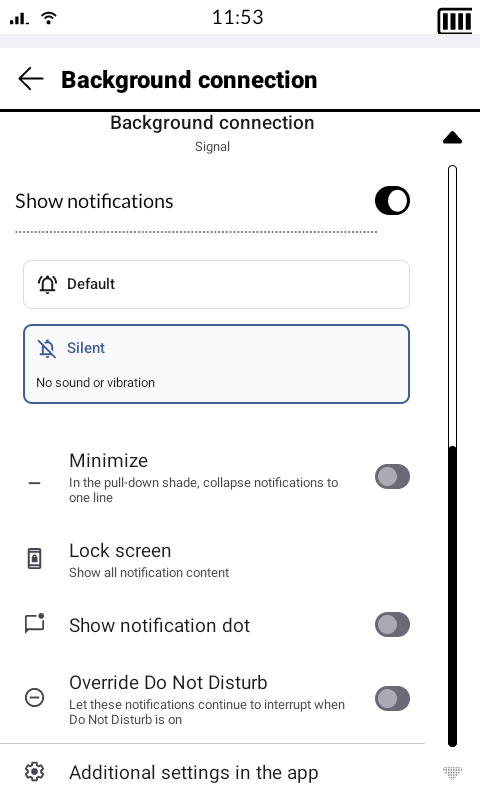
Without adb I went to Activity Launcher → com.android.settings → NotificationStationActivity and there after selecting a DuraSpeed notification, picked Silent to disable its sounds and vibrations
The other type of ghost notifications I’ve experienced are about Signal notification updates (if installed from their website apk). I do use those for updating Signal so they don’t bother me but every time I’m a bit annoyed that Mudita removed the built-in notifications panel from the system and I have to use workarounds like the NotificationLog app etc
@miiiiiiiiiiiii I don’t get the update notification from Signal because I got it from Aurora just because of this. However the “background connection enabled” is a bit annoying, I tried to exclude this particular notification in my Launcher but it still appears sometimes.
Mayyybe under Settings → NotificationAppListActivity → Signal → Other, one of the categories controls this. But I thought it would be called something like “background connection” and I don’t see it there. Well, maybe it is there but scrolling the list skips over it because Mudita broke it with the system changes
Yup it’s exactly there, after the updates toggle, but scrolling the list jumps over it. You have to temporarily flip off the all chats notifications toggle so that the settings page content changes and you can access the background connection toggle…
Found it and disabled it. Hopefully it doesn’t cause any issues with chat notifications.
btw when you find menus that you can’t click because they get cropped what I do is:
Developer options → Smallest Width and change it from 360 to 501, and it zooms out allowing to see those items that get cropped. Then I put it back at 360.
I too have this ghost notifications.
I just sideloaded one app, Signal. But at the moment I stopped it because it drains a bit the battery. Despite I have the ghost notifications.
Can’t find the setting you guys said. Is it in the développer’s option?
If find this farkling is a pity. I buy a simple phone and it gives me more headaches than any other I had. For a phone that should gives us serenity…
Well I gave you the solution. Now you can wait for Mudita to fix it or not.
And no you can delete things after.
After u fix your ghost notification things you can look for “Storage manager” - “Remove Items” hidden activity which will allow you to delete apps. And that way you can delete Activity Launcher app.