The radio app is good is the basic Android radio tuner app. It works as it must be. You have the possibility to record the radio, save the favourite radios. You have the possibilty to change source of audio from the 3.5mm jack to the phone speaker. Moreover the radio is RDS capable so the name of the radio is automatically saved. Really good app
2 Likes
+1 we would like to have the native fm radio app! 
3 Likes
I would really enjoy having an integrated Radio FM App from Mudita. I think it is not against the philosophy of the Mudita Kompakt because it is no active distraction. You can not scroll hours through the radio stations. It ist a basic, useful and simplistic App. So I would really like to see this from Mudita:)
So far I enjoy the mudita kompakt 
3 Likes
If you want to use the hidden android radio app as is go to:
Settings>System>Developer Options
use search for “Radio” you can find it there, works just fine for listening, as noted above UI is not optimized for e-ink… but maybe someone clever can dev an app or integrate into calmcast maybe… @davidray
2 Likes
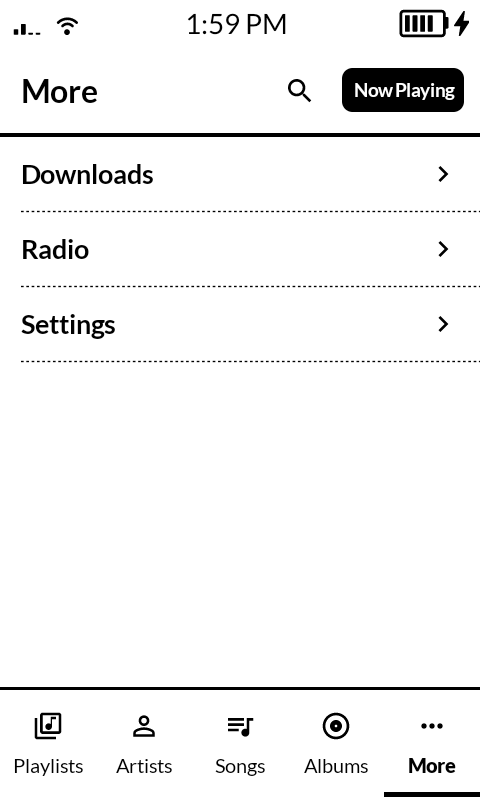
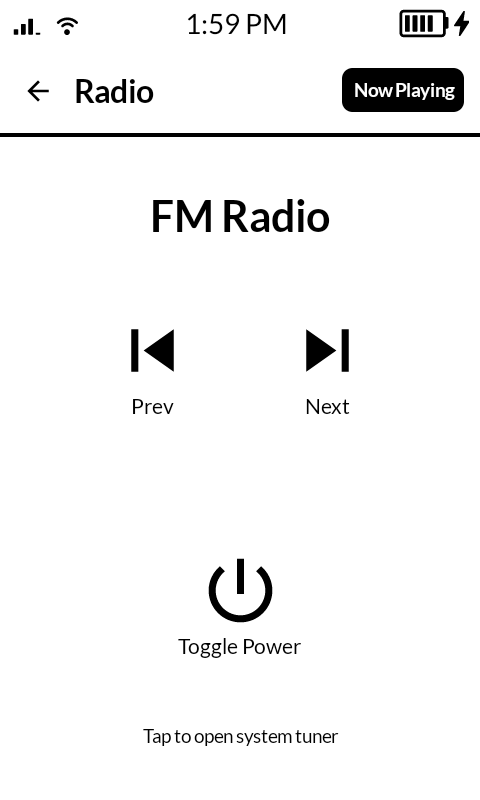
So… I’m actually working on adding an FM Radio player to my CalmMusic app. It will act as a “remote” for the built-in radio app. I hope to share a little more on it soon. The current UI is not complete, obviously.
5 Likes
ah that is awesome !
1 Like
This is not a trivial solution so do not take anything to the bank yet. I’ll update as I get things working. Currently I have it opening the built-in tuner so you can start playback. Then returning to CalmMusic it shows the currently playing station and the ability to turn off the radio. Seeking the radio is the hard part and that’s where it will determine if I continue trying this approach.
At a minimum, I’ll leave in the ability to open the built-in tuner.
2 Likes
Update: after a lot of log tracking and trial and error, I was able to walk Gemini into a solution for seeking. I’ll clean up the UI tonight or tomorrow and get it out to users.
2 Likes
You are a miracle worker! Thanks for all your effort!
1 Like
CalmMusic – Radio function is now out. It can be found under the “more” tab. This is a “best effort” as of now. There is a required “helper” permission that must be enabled (it will prompt you.)
When “turning on” the radio, the helper will open the system FM Radio app, click play, and return you to CalmMusic within about a second.
Seeking works but because the system FM Radio app does not directly expose the frequency you will see “Unknown” on some stations. This is because not all stations give the correct meta data to the notification which is the only visible frequency from the system app.
This may or may not get better in the future when I have time but I’ll leave it at this for now.
This update is now available in the Mind Apps store.
1 Like
It’s incredible how quickly you always respond to problems and inquiries! The updates come so fast, even though you do this in your spare time! And what are the people at Mudita doing whose job this actually is? They make us wait for months and only fix problems bit by bit. What if people like that worked there full-time? 
2 Likes
I appreciate the kind words! It’s important to remember, though, that personal projects have a lot less bureaucracy 
2 Likes
Indeed! Fred Brooks wrote about this with respect to software engineering in his 1975 book The Mythical Man-Month!
2 Likes
I assume this only works with the kompakt, not other androids
1 Like
This will work, theoretically, with any android device that has com.android.fmradio as the built-in radio app.
1 Like
hmm, Im not sure if my phone has a radio app at all
1 Like
When I get some time to revisit the radio, I’ll update the UI to show if you have the radio app installed.
1 Like
Whats next up for the calm apps?
1 Like
My next big update is to Directory. I’ve been working on it behind the scenes getting full turn-by-turn navigation with voice instructions. The mapping comes from Mapbox.
The app will continue to work 100% as is with navigation being an option after you find your POI. I also added the ability to search addresses and view them on the map and navigate to them. The app is still very fast and mapping is fully optimized for e-ink.
Here’s a preview: CalmDirectory Navigation Update - Album on Imgur
This will be releasing really soon. I need to finish different navigation types (i.e. walking/biking.) I would also like the ability to save certain locations (locally of course), like home, work, etc… for quick navigation. The other thing would be offline maps.
3 Likes
@davidray With CalmMusic: I enabled YTMusic streaming, can search and find songs not available locally, but when I select a song, it loads it (including the length of the track) but doesn’t play (not as in a lack of sound, but the track dot doesn’t move)-- any suggestions?
1 Like