Unless I’m missing something, at present in Mudita Center, one has to select each file to delete it. Is that correct?
If so, then please add a ‘select all’ checkbox. Selecting hundreds of checkboxes is out of the question. (I know teams work to release MVP – Minimum Viable Products – but, honestly, raise your definition of ‘minimum’.)
The normal UX on every app/website that i’ve used in the last 10 years is to Select the first one, and then hold shift and select the last one and it should select all the other in between these 2.
So that way if you only want to select only 1 to 100 and or first one and last one you can do either.
But this doesn’t work. Which made me close MuditaCenter and stop using it.
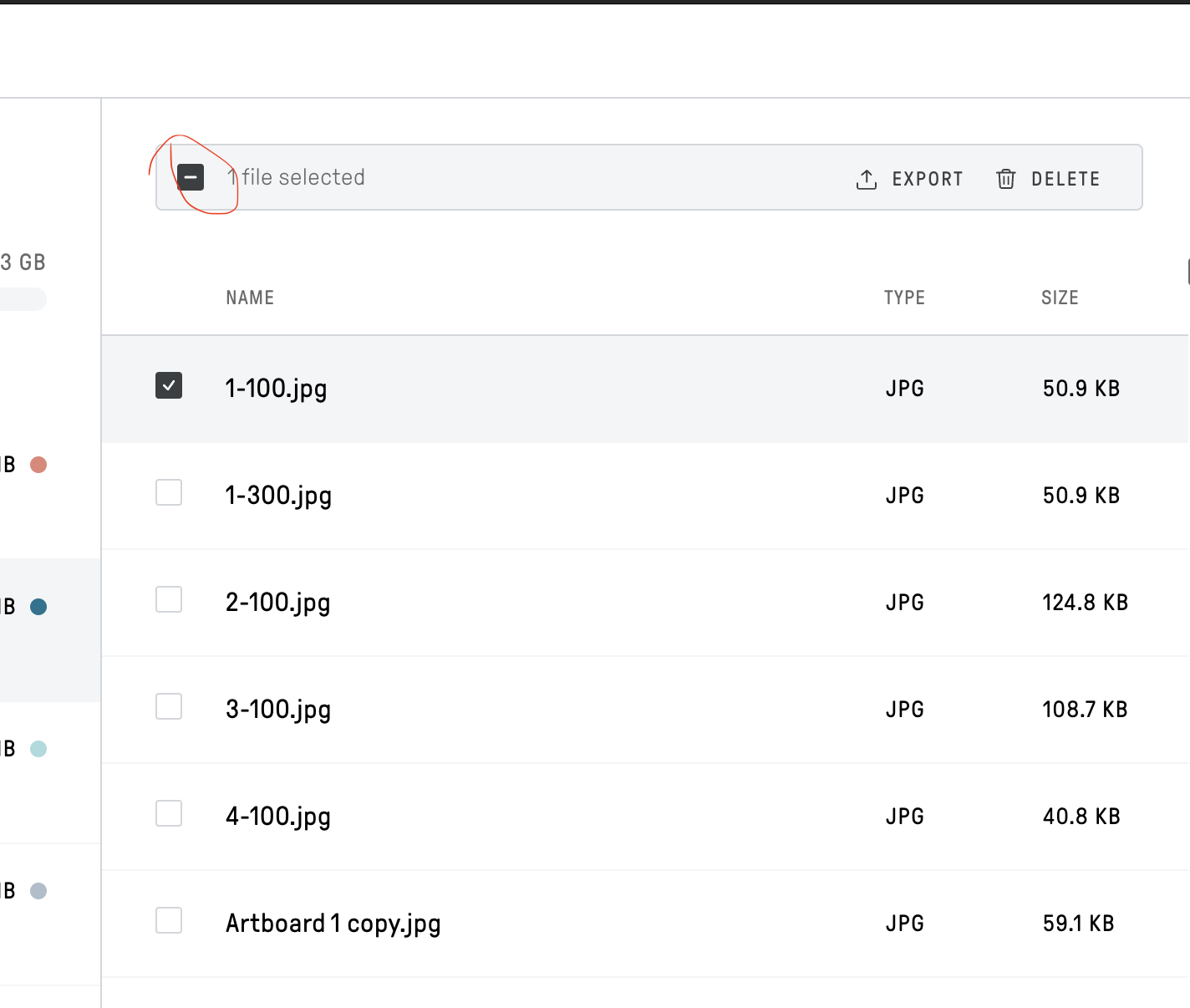
btw to Select all it works, but you have to click this.
@gezimos to the rescue again. I can’t thank you enough. Of course, on closer inspection, I should’ve noticed that upon selecting on checkbox, a dash appears in checkbox besides ‘n File selected’. Clicking that dash changes it to a tick and acts as a Select All.
Well, I’ve demonstrated beyond doubt that I would win the contest among this group, hands down:

 and great video !