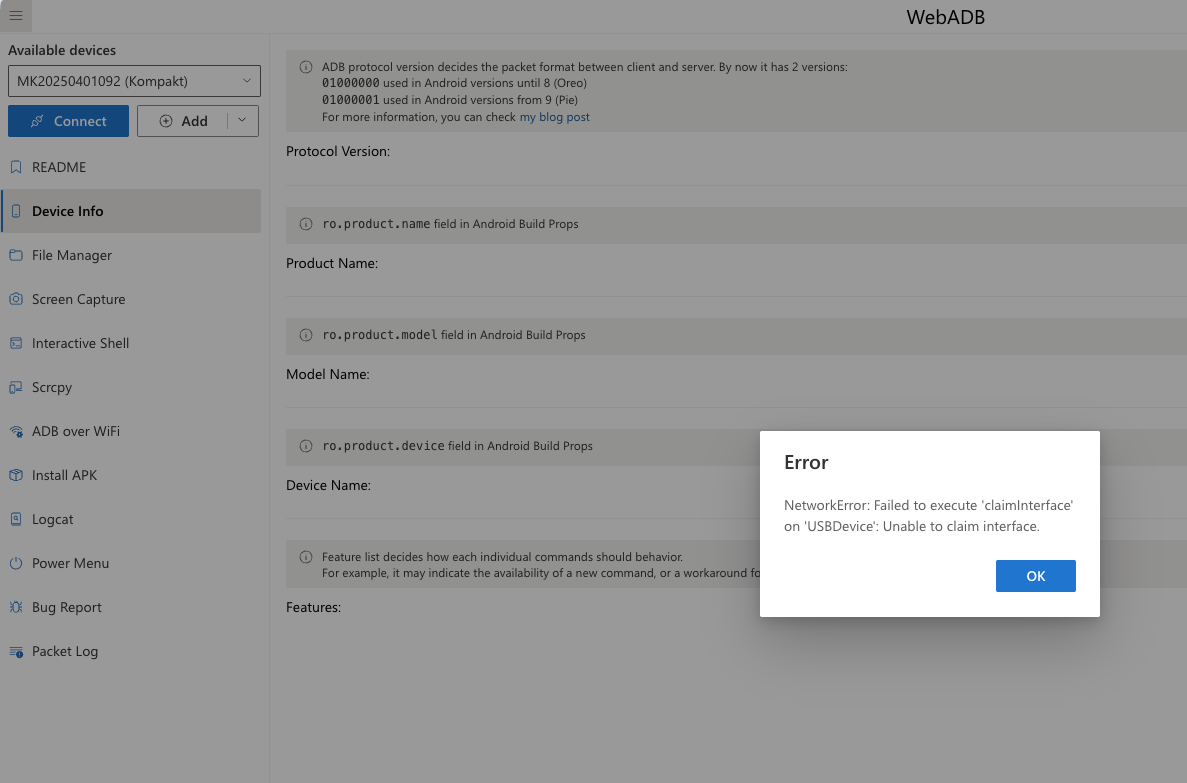
I recently got my MK and I had no trouble migrating contacts or uploading files to the MK through Mudita Center. I’m trying to follow the directions on Mudita’s site for side loading apps (in this case Aurora Store) so I can add a few non-native apps but for whatever reason my MK doesn’t appear in finder and also I get an error message when trying to connect on webadb:
Anyone have any advice? Fwiw I’ve followed the steps to a t regarding enabaling usb debugging. I’ve allowed my phone to connect. I’ve used 3 different usb cables in each of the ports in my '24 Mac mini all to no avail. I did a factory reset on the phone, restarted computer, running current OS, etc.
1 Like
Instead of using WebADB, have you tried downloading the Android SDK Platform Tools from the official Android developer website (or Homebrew if you are using a Mac?
If you are using a Mac, you can use the following command to install Homebrew and then install applications via Terminal.
/bin/bash -c "$(curl -fsSL https://raw.githubusercontent.com/Homebrew/install/HEAD/install.sh)”
Heres a AI answer to the error you are getting:
The error message “NetworkError: failed to execute ‘claimInterface’ on ‘USBDevice’: Unable to claim interface” typically indicates that there is an issue with the USB connection between your device and the computer when trying to use WebADB.
Here are some common reasons for this error and potential solutions:
1. Device Not in ADB Mode: Ensure that your Android device is in the correct mode for ADB (Android Debug Bridge) connections. You may need to enable USB debugging in the developer options on your device.
2. USB Connection Type: Check that your device is connected via the correct USB mode. It should be set to “File Transfer” (MTP) or “PTP” mode, as some modes may not allow ADB connections.
3. Driver Issues: Ensure that the necessary drivers for your device are installed on your computer. If you’re using Windows, you may need to install the OEM USB drivers for your specific device.
4. Permissions: Make sure that you have granted the necessary permissions on your device when prompted. If you see a prompt asking to allow USB debugging, make sure to accept it.
5. Cable and Port Issues: Try using a different USB cable or port. Sometimes, faulty cables or ports can cause connection issues.
6. Browser Compatibility: Ensure that you are using a compatible browser that supports WebADB. Some browsers may have limitations or require specific settings to work with WebADB.
7. Device Already in Use: If another application is already using the ADB interface, it may prevent WebADB from claiming it. Make sure no other ADB instances are running.
If you’ve checked all these factors and are still experiencing issues, consider restarting both your device and your computer, and then try reconnecting.
Good look with the sideloading!
1 Like
I appreciate your thorough response. I had already done all of the steps listed from the AI response prior to posting unfortunately. While I appreciate the Homebrew suggestion, I’m not familiar with Homebrew or using terminal and thus feel hesitant to go well beyond my pay grade. I didn’t realize this much work would be needed in the side loading process and thus it would take this much work to free myself from the smart phone. While I’m teach savvy for my own uses, having to go this far to get a new keyboard app and a couple small apps on this device feels like too much for my personal uses. I largely wanted to spend less time on devices and this initial 24h has been a case of spending most of that time troubleshooting how to get simple functions to work. Unless I can find a simpler way to side load a few applications, sadly this phone may not be for me.
1 Like
I had this problem this weekend as I was (inexpertly and amateurishly) trying to set up my uncle’s new Android phone after only one first-hand experience of my own. In the end, I had to go into Developer Options and check that ‘USB Debugging’ was on. If it’s on, switch it off and on again. This seemed to wake up webADB for me.
Good luck!
1 Like
Ya I’ve tried that multiple times throughout the process with no results. I’ve tried it followed by restarts, without restarts. Tried factory reset and starting over. I’ve exhausted all resources. It’s just a bummer to have to work so hard just to be free of big tech - I’m about ready to fold. The keyboard as is and missing a few apps isn’t doable for me.
1 Like
In case anyone runs into the same issue. After continued struggle yesterday it appears that an incomplete uninstall of macdroid from the past was running in the background or somehow interfering with webadb’s ability to connect. Completely wiping that from my system was able to allow me to install Aurora on the MK. It looks like I can seamlessly side load apps now.
1 Like