Good day.
So I’ve had the Kompakt for a few months. However, I find the maps app completely unuseful. I’m used to typing something on Google maps and quickly being able to read which metro/subway/tube I need to take, where, where I need to change, etc. The problem is, when I type a location the maps app, it can’t ever ever ever find it at all. On google maps, I type an address or a name, and it finds it. In mine, it won’t find anything. So, how am I supposed to get to where I need to go if I can’t find anything.
I’ve tried sideloading a few map apps, but they’re impossible to use on the Kompakt as well. So basically, the maps app is useless to me.
Anyone succeeded in using the maps app at all? I’m using the maps app in Paris, France; but i also need to use it in Delhi India and South America.
And the maps app doesn’t give public transport option. I don’t have a car.
The other problem is when traveling to Delhi and South America, my SIM network connection wasn’t working at all. I could not connect to any local network. When I travelled to the U.S.A it worked fine.
And lastly, how do I transfer voice notes I’ve recorded on the kompakt to my computer? I have the Kompakt app on the computer, but I don’t see any option to transfer or download audio I’ve recorded on the Mudita Kompakt. Help!
Also, any way for the device to tell you which apps are open, instead of having to guess? My battery is draining in a single day. It was supposed to last a few days or a week. I keep having to guess which apps are still open or not.
And lastly, anyone found a way yet to have whatsapp sideloaded without needting to keep your old device?
Thank you!
The Mudita Kompakt native maps app does not provide access to public transport info, the way Google Maps does. It’s an offline, privacy-first, based apps that uses the receive-only GPS of Mudita Kompakt. It requires downloading map data before traveling. It does not work like Google Maps and is not intended to.
I can totally understand how this could be frustrating since you’re used to the Google Maps experience. And most map apps (meant for traditional smartphones) use constant screen refresh, animations, and multi-layer graphics that do not work well on E Ink screens. Yes, Mudita Kompakt can run them, but performance will not be what you’re used to.
This could be band compatibility + local carrier roaming agreement issue.
Some regions do not support certain LTE bands that Kompakt covers. One thing I could sugges is using Manual Network selection. It boils down to the fact that your SIM does have permission to roam, but auto-selection keeps choosing a network your SIM isn’t allowed to register on. Choosing manually sometimes can help solve the issue. However, please not that Mudita Kompakt was not tested in the areas you are having issues with, so we can’t be 100% sure.
Have you tried looking manually in your windows explorer?
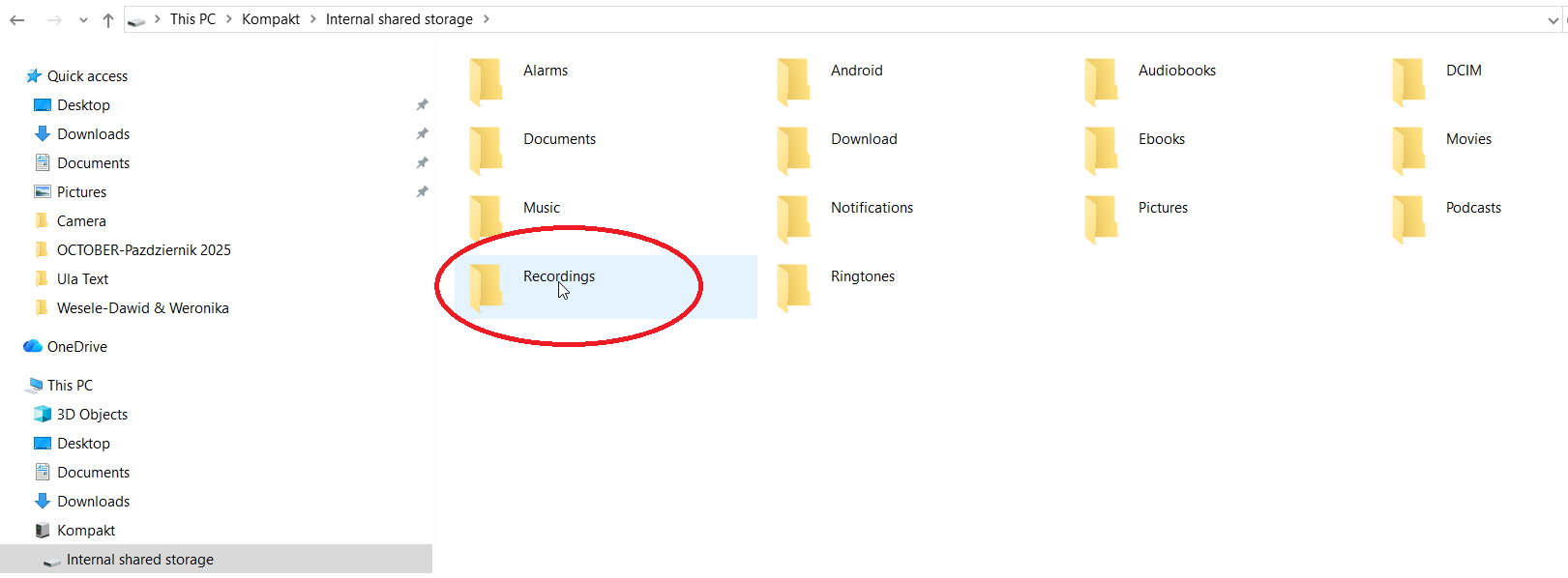
Your voice notes should me in there. Mine are.
Can you explain how someone with a Mac can transfer voice notes from their MK to their computer?
@stevenjc123 This is kinda tricky.
You can do it, but it’s not without complications and struggles. Definitely not for Basic users. The truth is Mac does not support Android phones by design.
They make it harder intentionally.
So, at this moment, Mac solutions right now for this case are:
- Using Android File Transfer on Mac (unreliable, files might be corrupted or lost)
- Using OpenMTP on Mac (little less unreliable, still issues might happen with connections)
- Using MacDroid (haven’t tried yet)
- Using Airdroid (its ok but privacy is a question)
- Sideloading another Files app to move photos/files to SD Card
- Sideloading Mail app and send them through email attachment
- Sideloading some Cloud service app
- Sideloading FTP app if you have FTP server in home (advanced)
- Using clear adb commands
I’ve found the Here WeGo app is a decent maps alternative, and looks fine on an eink screen
Instead of Google maps you can use GMaps WV (from f-droid), which works well enough.
To transfer files to my Mac, I use an app called PlainApp (also from f-droid), which makes your phone accessible by simply using a web browser and connecting it to the same WiFi network.