I wonder how that is possible. Only the wizard of OS can do magic like that 
2 Likes
@gezimos You know Mudita is hiring, right? 
1 Like
Here some more wallpapers for Katapult. They include the ones posted above plus a few more. I hope they work for everyone. Download while it’s hot, because it will expire in 6 days. If there are any issues (images covering icons etc), or if anyone has a request, let me know.
3 Likes
I am a new Mudita user switching from the light phone 2 and just want to say that I love this community, and it seems like everyone here is really talented and I think it’s amazing seeing what everyone can do with this device and still keep mindfulness a priority. I have a question; excuse my ignorance for I am not a tech savvy person lol. but I saw on another post someone mentioned that after downloading inkOS they had an FM radio and a “WebView browser” installed. I saw your reply saying how it can be hidden. my questions are what a WebView browser is, as I am pretty adamant about not having any browsing options on this device. That being said, when I “hide” these, are they hidden from the entire OS or just hidden from the apps page? Love the work that you have put into this device and I’m very interested in downloading Katapult. Thanks!
2 Likes
FM radio and WebView are just elements of Android, which are usually hidden by Mudita by default. inkOS just chooses to show them. If you don’t want to have them shown, you can hide them, but that doesn’t remove them from the device or from the OS. Several browsers are based on the WebView engine, but if you’d rather not have a browser, just hide it and forget about it. If you don’t use something, it will not use any resources, that’s what hiding apps from the list is for
3 Likes
Thank you so much for replying so quickly and thank you for clearing up my confusion!
2 Likes
Welcome to the Mudita Community Forum, @Rustychip . Enjoy your time here (and your Mudita Kompakt, of course )
3 Likes
anyone else seeing their launcher swap back to default every time the phone locks?
1 Like
Thank you! I love this phone so far, hands down better than the light phone 2. it has everything I loved about LP2, plus everything I missed about my flagship device! couldn’t be happier with the Mudita team!
2 Likes
Are u on the latest Mudita OS 1.4.0 ? If not update your OS first (in previous versions the default launcher needed to be disabled with adb commands) but that has been fixed in 1.4.0.
If you’re in 1.4.0 and still is happening make sure u have set Katapult as a default launcher, longpress inhome to go to Katapult settings and scroll to 2nd page which has a setting called “set as a default launcher”.
1 Like
@gezimos I changed my default Calendar to Fossify Calendar as I can’t get the Mudita default Calendar to sync with Caldav (DaVx5 - is this even possible, or doesn’t the Mudita use Android natives calendar at all? CardDav and Contacts work fine though). I don’t why but I was expecting that the icon would stay the default icon, but it has changed to the Fossify Calendar icon (which is white on black) and this looks less nice. Will the next version also have an option to keep the icon default, but only change the app it starts?
1 Like
Thank you @gezimos so much for the quick reply!
That solved the problem. Thank you! 
2 Likes
@anon43857326 I’m not sure I don’t use the Mudita Calendar so it could be it uses it’s own database.
Can u send a screenshot, I’m having a hard time understanding what is happening here.
@kirstenlriiber No problem, glad u solved the issue!
1 Like
@gezimos thank you so so much!!! I am PSYCHED to try this. I’m not a fan of the text based launchers so I’ve been hesitant to try a mudita alternative. This looks like it solves all my aesthetic and notification complaints. You’re the MVP.
3 Likes
Hi, currently using this as my primary launcher and loving it!
A few thoughts:
- Installing apps shift your pre-existing icons over one spot. I suppose if you’re really concerned about organization, you would have to reorganize anyway if the app you installed needed to be placed in a certain area. It just seems like it would make more sense for fresh sideloads to pop up at the end of the app list instead of at the front.
- It would be nice to be able to disable notification indicators on a case by case basis in app. When I first turned it on I had to go through and manually disable some notification settings so I wouldn’t get indicators for apps that shouldn’t need to notify me of anything at all.
- Double tap to adjust brightness is a great idea. Would it be possible to implement it so you could long press and drag up or down to get a specific level of brightness?
- I like the button system for navigating apps. I’m sure the location of those buttons could be difficult for some people depending on the size of their hands, how they tend to hold their phone, etc. It might be nice to offer multiple options for navigation or at least the option to shift the buttons to the top of the screen or the middle if possible.
- In-app wallpaper adjustments would be nice. I’ve got Lord Buddha there now but the clock is bleeding in to his top knot making it hard to read and obstructing the image. Ink OS allowed for offsetting so there wasn’t a need to edit the image or find some sort of work around. Also, my needs aside, there are people on this thread creating wallpapers to fit the constraints of the Katapult’s home screen. Wouldn’t it make more sense to develop around that?
- Have you considered adding folders as a feature? I haven’t seen it done well with the Kompakt yet and it seems like it would be a happy middle ground between swiping through pages of icons and just doing away with icons in favor of a search bar and a list.
I know you can’t make everyone happy, but there has to be a middle ground where customization and quality of life meet with minimalism. They shouldn’t get in each other’s way and they definitely aren’t mutually exclusive components. I think the Kompakt out of the box is too dumb for it’s own good and has been saved by how easy sideloading is. It’s apparent when you look at the amount of people that immediately asked for more autonomy and started swapping out apps and making the phone theirs with little (and big) changes.
To get to the point, I really like this launcher and will probably continue to use it. I am excited to see what’s coming next though. You’ve made a thoughtful piece of thoughtful software that I think will shape up and fill out a little more over time.
Thank you!
Much Love.
1 Like
I’m happy you’re enjoying the launcher
This is a bug, I’ve fixed it for the next release. The bug is that if u have a re-ordered app, let’s say you moved Whatsapp to the place of an App that starts with A, then any new app will appear before Whatsapp instead of appearing alphabetically.
This has been fixed so it will just keep the re-ordered apps, any new apps will take their place alphabetically.
You can do that when you longpress in an app / notifications / disable the notifiation dot. I’m not going to add such filters in the launcher settings, the android setting works and stops them at a source without the Launcher having to do its own filtering.
That is possible, but I’m not going to add it.
The buttons are optional you can still just swipe left and right in any part of the screen. I’m not going to add options to move the buttons.
No the point of this launcher was to fix the basic flaws of the default launcher. I’m not going to add Wallpaper editor to it and in fact it’s going to be removed from inkOS v0.5. It might come back as a seperate app in the future, but not sure when.
You can always take a screenshot of your home, put it in an editor and then draw your wallpaper around the widgets and app icons.
There’s another trick to make wallpapers work even if it’s touching the clock. It requires enabling “high contrast” which is located in Developer Options. But in order to be able to hit that setting you need to increase “smallest width” to 400+ (default is 361) this increases the dpi of the display (makes everything smaller) then you can tap on the high contrast button (which you can find in developer settings by searching). Then go back to the default 361 smallest width.
What this does, it adds a white stroke to text elements which increases the contrast so you can still read text even if it’s over a wallpaper, for example:
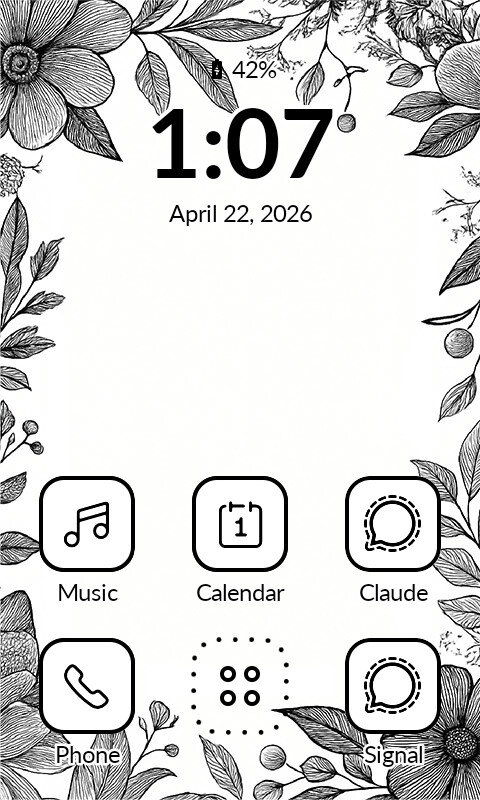
I have considered it, but I’m not going to add it.
Thanks a lot for all of your detailed feedback. For all the replies that I said" “not going to be added”, it doesn’t mean that they’re not good ideas.
Simply they’re out of the scope for this project. It’s not that I don’t like to make everyone happy, just that is not feasible to maintain and iron out bugs that can appear after every added feature.
So most of the fixes that will come are related to the existing features:
- There will be a clear notifications buttons
- Adjustments to the notification reader.
- The fix for icons to access the monochrome icon of some apps which makes them useful
- The option to add icons from the existing presets or import your own.
5 Likes
How about an option to hide the buttons? I wouldn’t mind having another row of apps instead.
1 Like
Hiding yes, I’ll consider that is easy. But you’ll not get 5 rows of apps. There’s no space
2 Likes
Hi Marco,
CardDev en contacts works fine for you?
I got the Caldev with Fossify working but my contacts don’t sync, do you have a tip for me to get it working?
By the way, are you from Utrecht?
Groet,
Alfred
2 Likes
Ahh okay, then it’s not that important. Because then it’ll be just empty space
2 Likes