Turned out I had to restart the phone and then it worked perfectly, thanks! I have two other questions:
i probably overlook it but I can’t find a way to remove an app from the home list .
2… When I swipe to notifications. Ideally I only see notifications from signal/whatsapp/sms. But now I also see notifcation of something downloaded or adjusted (for instance the notification that I deleted the app fleksy). Can you help me with that?
You can just again longpress and replace it with a different app.
2 Re-order app list you can move an app for example move an app that u want to keep in its place and put the app that you want to remove in the last place. (Settings/Home/Re-order apps)
3. Then In Settings/Home lower the number of apps.
4. You can set it as “empty space”.
Those might have been cached before you added apps to the allowlist, so dismiss them and they shouldn’t appear any notifications from apps you don’t have there.
After resetting and going through all the settings again to set it all back I realized that there is a mobile data shortcut available. Which is great! So using that as well now. I also figured that using “settings search” is better than “developer options” for enabling NFC. I added both “mobile network” and “settings search” to the home apps list and very happy. Also easily available app drawer allowed me to reduce number of apps in the home list which I like a lot as well. So after all settings reset helped me to improve my setup even more
I have it set up to open the alarm app and tapping on the clock widget doesn’t do anything. I’ve tried other options for clock click also, as well as date click, and they don’t respond. Double tap works and the swipe gestures work, but the “click” gestures don’t seem to.
If so, there’s probably leftover preferences cached that are not allowing you to do this (@nilstzh user reported this issue with tap on date widget). Because originally it only allowed to open alarm app, and on v0.2 I’ve added a lot more features to it.
I’ve added a precaution on this for v0.3 coming soon that will clear the older prefs and allow you to set any app.
So if you want it to work now try clearing the data in inkOS Settings/Advanced but make a backup before u do so.
Okay, I played around with it, including settings clearing (didn’t help).
After fussing with settings, I figured out that I think it’s because I’m using Empty Space for the top two apps on my Home Screen, which are overlapping with the clock widget. So the empty space is interfering with tapping on the clock and date.
Oh sorry I didn’t even think about the empty apps.
Anyway in v0.3 i’m bringing a solution for this, I’ve added Y-offset for the apps so u can push them lower
Hello all,
here are some additional wallpapers for Gezimos’ excellent InkOS launcher. I hope Gezimos is ok with this.
Download wallpapers and some fonts that go with them here:
The files will expire in a few days. If needed, I can re-upload them again.
Both files are .zip files. Just unzip them and you get a couple of folders with various themes. Just install wallpaper and fonts of your choice, then adjust the font spacing to match the wallpaper, and that’s it.
I hope this is useful for everyone who uses InkOS.
If anyone needs any adjustments or even a custom image, just send me a message.
Of course! Thank you for sharing them, a lot of great stuff in there
Gonna try some of the fonts myself when I get some time, I’m curious for the Typewriter look!
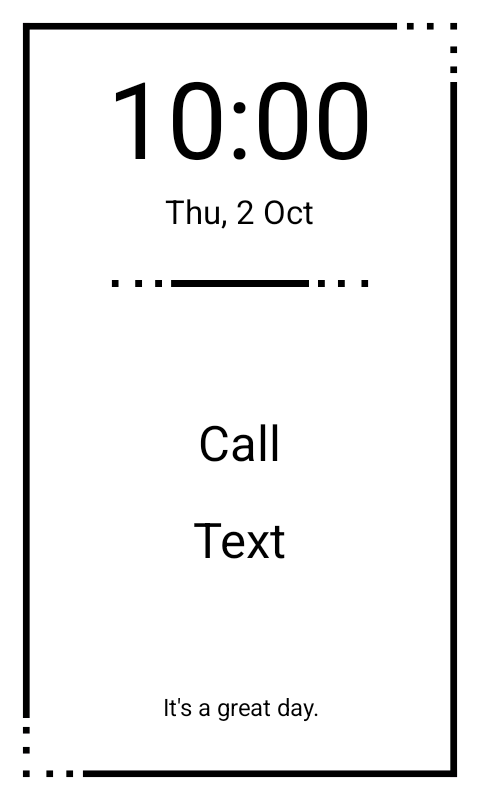
You win the Mindful award for only having call and text in home !!
After I get back from my holidays I’m going to build a simple site for FAQ/tips and tricks and I’m thinking to have a form where people can submit wallpapers and links to cool fonts.
V0.3 coming tonight with bug fixes and Y-offset for home apps
Exactly what I’ve been waiting for Thanks for your excellent work. Can’t wait for version 1.0
P.S.: Does the refresh in e-ink quality mode have to happen all the time ? Is it not possible to have it just once in the beginning, and then just leave it like that ?
I have renamed that to E-ink auto mode in v0.3 to avoid confusion. It’s basically uncontrollable by me. It’s just the only e-ink mode that I was able to tap in with the app without requiring root. The other e-ink modes are controlled by Mudita Service App and it won’t let non-system apps to access it without root.
The refresh happens usually when it detects changes in UI, but it’s pretty inconsistent because it tries to clear the screen from artifacts and make it “quality” but that results in these refreshes. It happens less if you’re not using a wallpaper.
So if the refreshes bother I recommend turning that off and just adding “manual e-ink refresh” in the gestures/actions to any of the settings just so u can clear ghosting manually for example with double tap or clicking on quote.
But then it doesn’t look that good. I wish Mudita allowed access to all the e-ink modes. The smooth text makes a huge difference. Too bad it’s only available on the home screen.


 !!
!! Thanks for your excellent work. Can’t wait for version 1.0