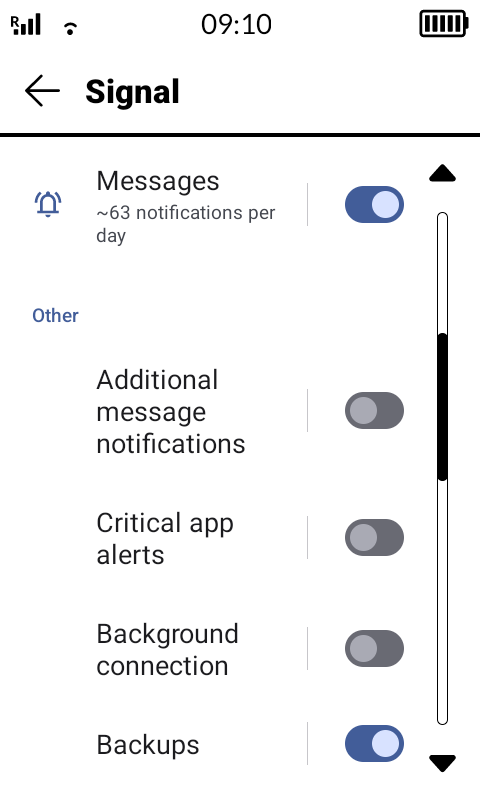
in App notifications shortcut in Signal I pretty much disabled most of them,
I left Messages, Calls, Voice Notes, New Device Linked, Backup. I turned off the rest.
So I rarely get sms but I haven’t had SMS not show up. Just keep in mind even the Mudita SMS app has it’s own notification channel and it has its quirks doesn’t work like the AOSP message app or other Android SMS apps.
For example I’ve noticed that even if a new SMS comes in, it won’t update the old notification unless you open the old one first. This only happens with the Mudita SMS, it works properly with other phones.
To confirm these issues I always use Notification Log because that’s where all the system notifications are saved. If it doesn’t appear there inkOS won’t be able to show it to you.
It’s a similar case how Signal or Whatsapp sometimes stop sending notifications, inkOS can’t do anything about that because it’s due to Kompakt’s lack of Google Play Services.
You need to open the apps once in a while to keep them “engaged” in order for Android to see the notifications and then for inkOS to read them and present them to you.
So I finally did it.
Had to farkle a bit because « activate notification log » was not in the same post then « activate app notification ».
But it’s done.
Wanted also install Vividly given by wander but seems that my Linux distribution don’t know what to do with a .zip folder.
Too bad, I know now what I exactly want to « create ».
You need to extract the zip package and only get the .ttf or .otf file and send it to your device using adb like I guided above or openmtp.
Another way is using localsend which is multi-platform, u install the apk in the Kompakt and the app in windows/linux/mac/ios whatever and u can send files to the device wireless.
Yes, I know that. But my Linux was unable to extract properly.
I have to find an app that can do that. But in the store of my distribution I only founded app to manage archive. Is that the term for a .zip? Don’t think so.
I use Elementary OS.
Even with the Terminal I couldn’t unzip the front file. So I though there was a problem with it. So I downloaded it again and this time, with the right click, I get the « unzip here » in the menu.
Copy/pasted the file in webADB (not sure exactly where) and it was done.
After that a little farkle in the settings and I finally could get that.
Not really perfect cause I don’t have an app that allows me too delet or displace some stars.
Having the time a bit higher and it would be perfect.
But now when I go in the center/files/pictures I have now 2 folders.
And the pics taken this afternoon with the camera didn’t appear in my MK.
@shadock You want me to move some of the stars for you ? I can do that. Just send me your orginal wallpaper image and tell me which objects you want to have moved to where. Or leave it to me, it’s not so hard to figure it out
Great wallpaper Le Petit Prince
Thanks @YYZ for contributing and helping people with wallpapers!
The Vividly font looks great but the bad thing it doesn’t support diacritics so just the English alphabet is possible. It replaces è, ë and others with the system font.
Yes very nice from him.
He send me a new version that I will test tomorrow.
Ah that’s why « téléphone » doesn’t look so great.
I will replace « é » with « e ».
Did a re-start, now all his good.
Did finally found the phone/tablett version of the forum (had problems with the reply) and how to do multiple quotes.