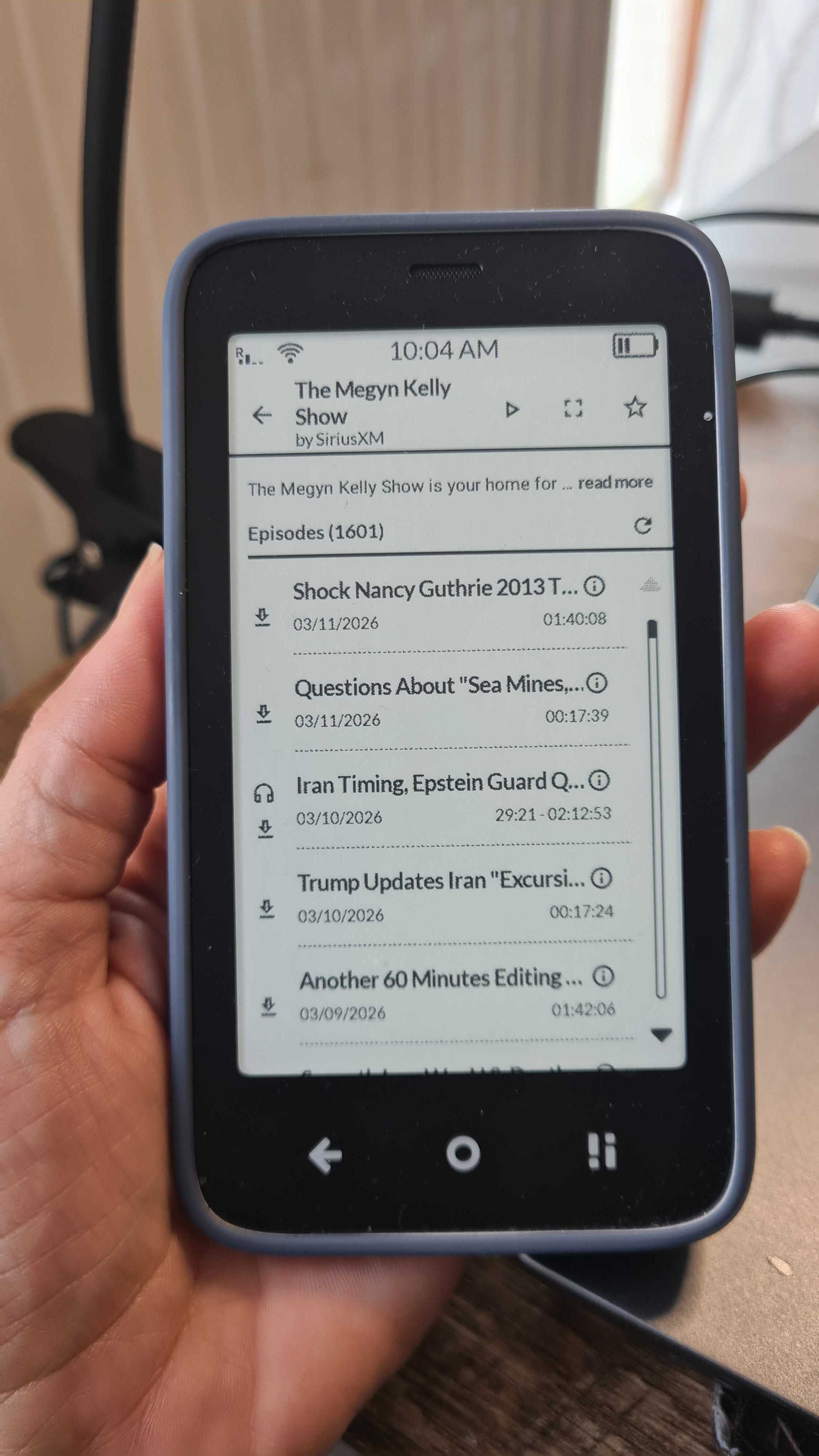
I sideloaded AntennaPod last year on my first Kompakt, which I sold with MuditaOS K at v1.2 because of missing-but-basic-in-the-USA group-messaging and voicemail features.
I liked AntennaPod on my first Kompakt, so I installed it on a deGoogled smartphone that replaced my Kompakt.
Given that MuditaOS K provides full group-messaging support in v1.4, I plan to buy a Kompakt again after Mudita also enhances its voicemail features, which Mudita now plans for Q3 2026 and which should include both a voicemail-waiting indicator (VWI) and one-key access to (long-pressing [1] to dial) voicemail.
Curious about @davidray’s CalmCast and wondering whether it will become my go-to podcast player on my second Kompakt, I installed it on the same deGoogled smartphone and compared it to AntennaPod there.
Here are seven impressions.
Kudos
Easy to Learn
- For example, CalmCast’s “Following” tab is equivalent to AntennaPod’s “Subscriptions” tab.
Better on Kompakt
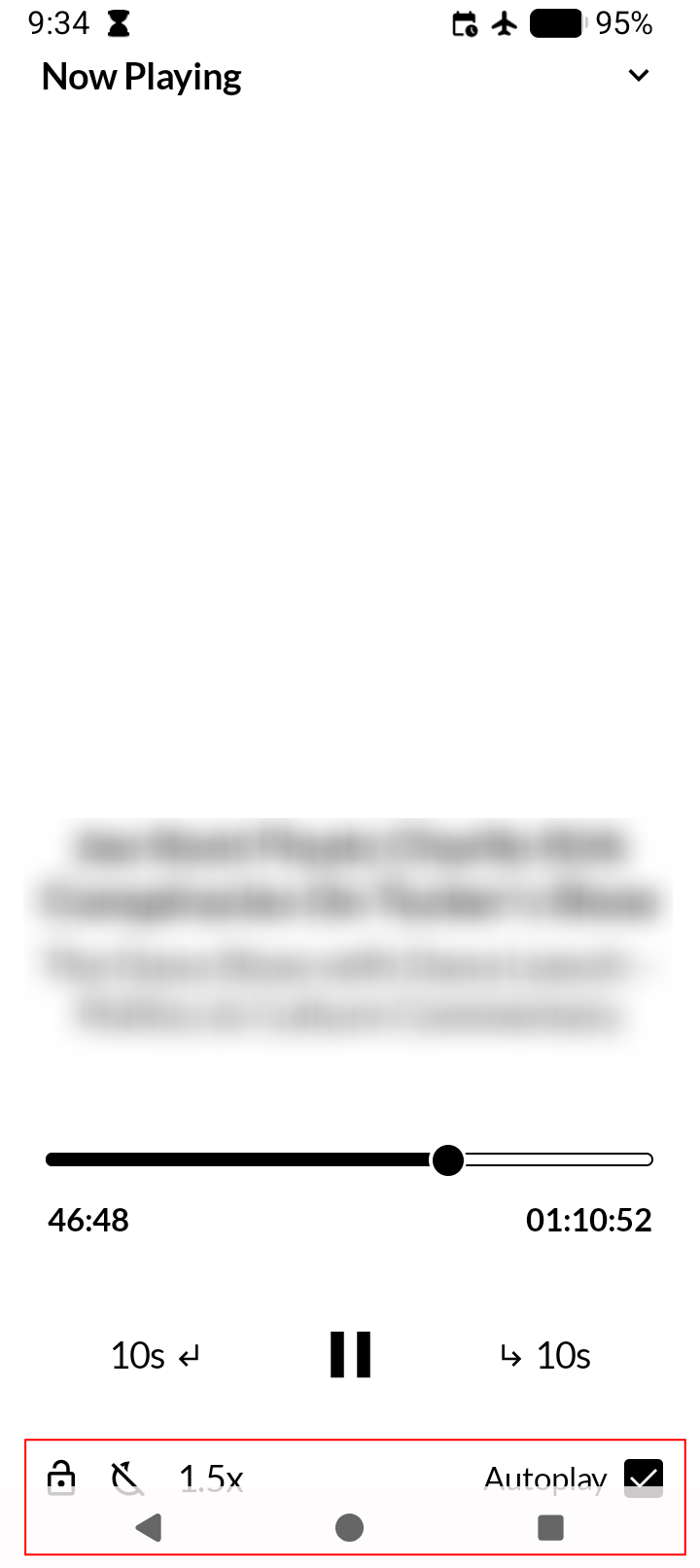
- I wonder why the bottom half of the bottom set of icons (lock, player speed, etc.) in the CalmCast’s “Now Playing” screen gets obscured by the Android Navigation Bar on my deGoogled smartphone, but I assume that they are fully visible on the Kompakt – the specific AOSP-based cellphone that @davidray is targeting!
Something Between 1 and 1.5
- I hope that CalmCast one day will let users pick more playback speeds, such as 1.25x (which I use almost always on AntennaPod).
Queue in the Queue
- I look forward to CalmCast getting the roadmapped “Queue” feature, given that the “Downloads” tab does not let users arrange downloaded podcasts in a particular order (which I do daily on AntennaPod’s “Queue” tab).
Instant Scrolling → Instant Love
- I love CalmCast’s “instant scrolling” (which works well anywhere) vs. AntennaPod’s “momentum scrolling” (which does NOT work well on the Kompakt). Instant scrolling should be mandatory for every Kompakt app that requires scrolling!
Goodbye, Depression. Hello, Calm.
- Others have written on this Forum about putting their smartphones in grayscale mode (e.g., via Settings > Display > LiveDisplay > Reading mode enabled) in anticipation of switching to the Mudita Kompakt. But, I must say that using AntennaPod with my deGoogled smartphone in grayscale mode is DEPRESSING to me, given that it renders as black-&-white photos what I KNOW are eye-candy-colorful podcast covers, so I have disabled grayscale mode on my deGoogled smartphone. In contrast, I can tell that using CalmCast on my next Kompakt will be CALMING, given the clean formatting of its text-only “Following” and “Downloads” tabs, with pure-black text and icons and controls on a pure-white background.
1 Like
I’m gonna add my two cents here because I absolutely LOVE CalmCast. It’s easy to use, the interface is clear and super simple, just podcast names & episode lists- nothing fancy, no distracting graphics. And the issues that caused AntennaPod to stop playing when the screen timed out are not an issue. I have a 15sec screen lock time out & CalmCast just keeps playing in the background.
10/10 would recommend
@davidray You’re a legend! Thanks for this 
2 Likes
Thanks for taking the time to write this up! It’s really cool to see people compare it to some of the bigger apps in the space.
More playback speeds will be coming soon as well as custom speeds. The Android navigation bar covering ui should be an easy fix that I can look into.
3 Likes
@davidray:
Auto-delete after playing a podcast would be awesome!
I became accustomed to this with AntennaPod.
I miss this when using CalmCast, which challenges me to identify the just-heard podcast to delete when looking at several podcasts on the Downloads tab – especially when I have 2+ podcasts on that tab from a given podcaster.
2 Likes
Can I ask what degoogled smartphone and os, you are currently using
1 Like
Interesting …… it was a strong contender for me also, I went with a used pixel & installed graphene os, as I didnt want to give up on the Kompakt completely. How do you find the brax phone?
1 Like
Fast. Private. Global.
I plan today to keep it as a PC substitute during travel outside the USA – access to email, Web, Session, etc. – given that my future Kompakt will be the North America version and that I can access email, Web, Session, etc., from a PC when at home here in the USA.
1 Like
How is it on battery life, that has always been a problem with every pixel I’ve owned. The Kompakt is outstanding in that regard, obviously totally different device but it’s great to go 5 days between charges
1 Like
Its battery life is better than the battery life of either my earlier Pixel 4a or my later Pixel 6 – deGoogled in each case.
1 Like
Hey David, thanks for CalmCast, great work! Everything works pretty much fine, the only thing its missing is (in my opinion) a search function withing a chosen podcast, so that I can search for topics of interest. Do you have any plans for this?
1 Like
Here is an example (in the red rectangle) of the Android Navigation Bar obscuring the bottom half of the bottom set of icons in the CalmCast’s “Now Playing” screen on my deGoogled smartphone:
2 Likes
CalmCast > Settings > Downloads > Wi-Fi Only enabled
@davidray: CalmCast > Settings > Downloads > Wi-Fi Only enabled also let me download podcasts with my cellphone’s Wi-Fi disabled but with a USB-C-to-Ethernet-RJ45-jack dongle connected between my cellphone and an Ethernet cable connected (through a router) to my Internet Service Provider’s gateway.
Cool!
2 Likes