For best battery-life, should Duraspeed be enabled with all app disabled in it? Do I understand it right?
1 Like
Correct. Just your apps might go to sleep, especially sideloaded ones. Probably it has a “recipe” to boost system apps, but as we’ve seen reports with the alarm, it’s not doing a great job.
I’ve disabled it entirely on my device
2 Likes
I have used it twice, it hasn’t worked, and I gave up on it. Thank you for reminding me that.
BTW @ploum would you say that alarm not going off is also a feature of minimalism? Or the design so unclear that you haven’t been aware that it’s possible to set the alarm to the minute?
1 Like
After testing with duraspeed disabled for 5 days, I can confidently say that duraspeed is the issue. I have not had any late or missed alarms after disabling duraspeed for this app. @urszula , if the team can begin disabling duraspeed for alarms by default, this appears to be a solid solution unless there is a deeper reason for the alarm not working.
4 Likes
@ryanness This has been passed on to our team. Thank you so much for checking.
@ryanness Our team came back with some follow-up questions:
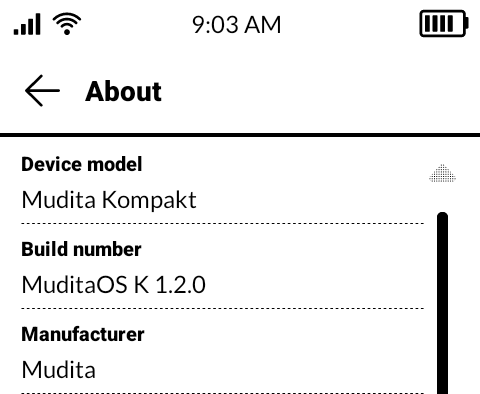
Which OS version did you test it on—was it 1.2.0 or earlier OS versions?
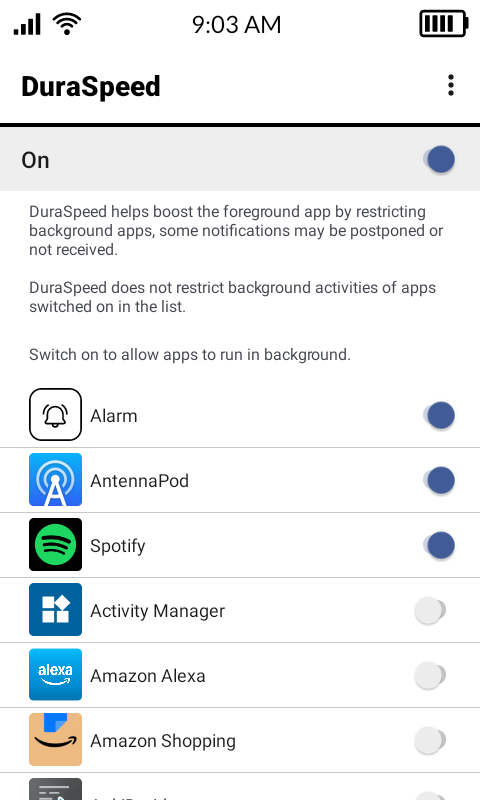
Did you disable the entire DuraSpeed, or just the Alarm?
Thanks for getting back to me. I am on 1.2.0 and have only a few apps enabled on duraspeed, mainly audio apps such as Spotify and antennapod to ensure they stay awake for background playback. The stock alarm app is also checked to allow it to run in the background with duraspeed.
2 Likes
@ryanness Our team suggested that you try this command in ADB
adb shell dumpsys duraspeed config
What does this command do?
1 Like
It looks like a kind of diagnostic/configurational report for a selected process.
1 Like
ryanness@Ryans-MacBook-Pro platform-tools % ./adb shell dumpsys duraspeed config
PlatformWhitelist: [com.mudita.dial, com.mudita.messages, com.mudita.audio.player, com.mudita.alarm, com.mudita.system.updater, com.mudita.contacts, com.mudita.weather]
AppWhitelist: [com.mudita.alarm, com.spotify.music, de.danoeh.antennapod]
ScreenOffClean: true
CleanDelayTime: 300000
MusicDelayTime: 0
NotificationDelayTime: 43200000
CpuThreshold: 85
CpuTarget: 70
FreeThreshold: 204800
PolicyLevel: 6
@gezimos any knowledge on these commands?
1 Like
So since I get the same platform Whitelist, it just showing how Duraspeed is configured by default. Basically to allow “alarm” and other system apps to run in the background.
However Android has its own battery optimization (which you can access through activity launcher or inkOS v0.2). And there the alarm is “optimized”.
So there might be a conflict somewhere between Duraspeed (Mediatek chipset optimization) and the Android Battery Optimization that might cause the issue of Alarm still being restricted and delays happening for some people.
3 Likes
That command is asking the device’s dumpsys tool (a system service status dumper) to report the configuration for a system service called DuraSpeed.
Unfortunately, adding the alarm clock as an exception in Duraspeed didn’t help. This morning, the alarm clock was supposed to ring at 5:00, but it rang late at 5:03.
Sure, it was only 3 minutes, but that’s not how it should be.
So please, Mudita, make sure you get this sorted out in the next update.
1 Like
I got another MK, for my wife.
Funnily, my alarm always go off on time, her was late today. And I didn’t care setting up mine. 
2 Likes
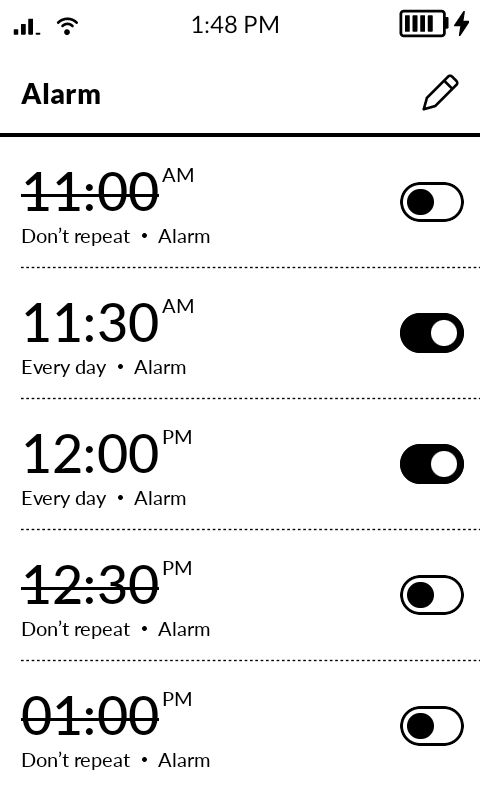
Following up on this as well. Another week in and today all but 2 alarms went off. Somehow I made it to the later alarma successfully without the earlier two going off?
1 Like
I’m passing on all the comments to the team. Personally, I haven’t had any issues with the alarm, but I wonder if any of it has to do with setting more than 1 alarm.
Nope, me and my wife have one alarm per MK. Mine is always on time, my wife’s was usually on time but got late once.
1 Like
@buiosu Good to know. I will tell the team. Thanks for the feedback.
It doesn’t matter to me whether I set one alarm or several. The alarm clock always rings 3-5 minutes late.
2 Likes