I encountered the following issues while transferring my contacts to my Mudita Kompakt, and I’m hoping someone either from Mudita or in the community might have some insight or solutions.
What Happened
I exported my ~400 contacts from Apple Contacts in vCard (.vcf) format and then imported them into my Mudita Kompakt using the Mudita Center. All the contacts made it onto the device just fine. However, I’m now noticing two main issues:
Duplicate Contacts: After the import, several contacts appeared twice or even three times on the Mudita Kompakt. I’m not sure why this happened since the vCard file itself seems normal when I open it in a text editor.
Missing Number Labels: Another issue is that the labels for phone numbers (like “mobile,” “home,” or “office”) aren’t showing up on the Kompakt. Each contact’s number is there, but it’s unclear which number is which since all the labels seem to have been stripped out during the transfer.
Does anyone know how to resolve this issue?
Note: I cannot find a way to select all / bulk delete contacts in the Mudita Center (and do not feel like clicking 800x lol!).
Both with the duplicate contacts and missing number labels (or just one or the other?)? Working on a DAVx5 solution now! May I ask which Contacts app you suggest using in conjunction (that looks good on a small sink device like the MK)?
First missing labels. Never get a solution from Mudita.
When installed DavX5, I get all contacts in double, some triple.
So I suggest to remove all your contacts before installing DavX.
I use the build-in contacts app. Work OK.
You’re welcome.
If I remember right, you can massively delete the contacts in the center.
After, the sync with DavX I find in my MK all the contacts details I have on the others devices: labels, addresses, birth date and so on…
Thank you for sharing this additional information.
I’m also including an email reply I just now received (but have not tested - will post updates in ALL CAPS) from Mudita in case it’s of utility to others:
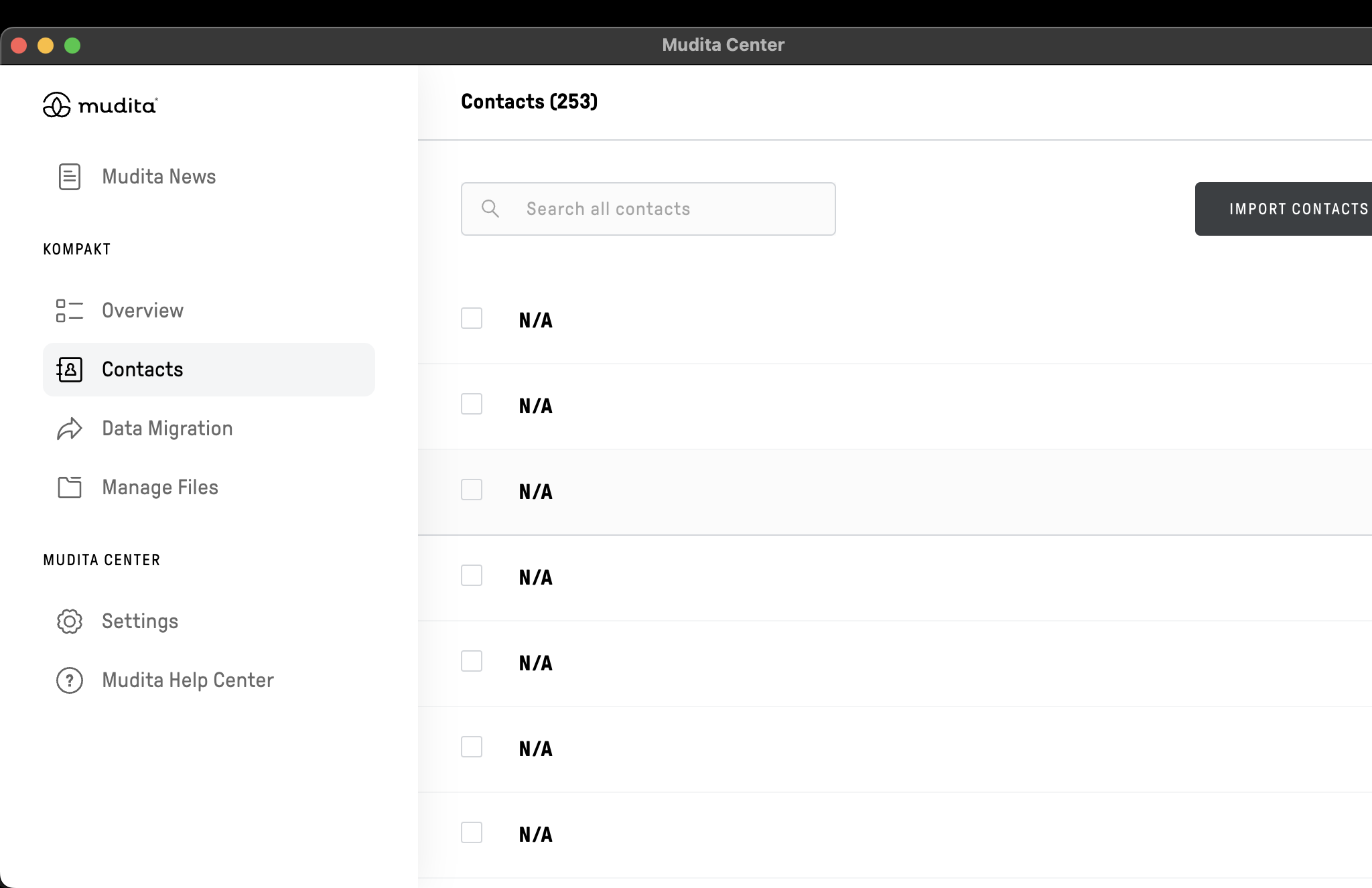
Mudita Center does allow selecting and deleting all contacts at once, although it might not be obvious at first glance. Once you select one or more contacts, you can then select all by clicking on the checkbox next to “x contacts selected” in the top part of the screen. I hope that helps you organize your contacts without too much effort. THIS PARTIALLY WORKED FOR ME. ALL OF THE CONTACTS W/ NAMES DELETED BUT THERE ARE STILL 262 PHANTOM “N/A” CONTACTS APPEARING AND REAPPEARING AFTER REPEATED BULK DELETION. I EMAILED MUDITA SUPPORT AND WILL POST AN UPDATE IF/WHEN I LEARN THE SOLUTION
I was also able to find information on what might have caused your contacts to duplicate. I’m quoting it below:
Issues including missing labels (Mobile/Home/Work) and contact duplication are usually caused by compatibility differences between Apple’s vCard format and the specific structure Mudita Center is built to parse.
Currently, Mudita Center is optimized to support Google and Outlook .vcf / .csv files. Apple’s export format uses slightly different coding for labels and contact IDs, which can cause our importer to strip the labels or misinterpret the data as new entries, leading to duplicates.
The Solution: Use a Formatted CSV
To resolve this and ensure your contacts appear correctly with the right labels, the most reliable method is to format your contact list as a CSV file that matches our supported structure.
You can organize your contacts in a spreadsheet (like Excel or Numbers) using the specific headers below (NOTE: NO SPECIFIC HEADERS WERE PROVIDED - I REQUESTED FROM MUDITA SUPPORT AND WILL POST HERE IF THEY DO), save it as a .csv file, and then import that file using Mudita Center.
Recommendation for Cleanup: Before importing the new file, we recommend deleting the current “messy” contacts from your Kompakt to avoid adding even more duplicates to the existing ones.
I exported my contacts as cvs files but re-formatting more then 200 manually was not an option for me. And even know exactly how to do it). That’s why sync should be implemented in the OS. It’s the case in the last Android versions.
I had these same issues myself when switching from iPhone to Kompakt. I ended up installing Fossify Contacts on my Kompakt (and hiding the Mudita Contacts app from my app drawer in inkOS), deleting all of my already imported contacts, emailing the single Apple VCF file of all of my iPhone’s contacts to myself, opening the email in Thunderbird on my Kompakt, then opening the attached VCF file with the Fossify Contacts app. Fossify Contacts is able to read the iPhone contacts perfectly and retains all information fields including profile photos.
After installing and setting up Fossify Contacts, I ended up also installing Fossify Phone and Fossify Messages to complete the trifecta. I set them both up as default apps via the newly accessible MuditaOS K 1.4.0 update. Unfortunately there is no option to set a new default contacts app. It would be amazing if this option were added in an upcoming software update, @urszula.
Thanks for sharing your current configuration. I’m still waiting to hear back from Mudita Technical Support re how to delete the (253) phantom/zombie contacts (screenshot attached) in the Mudita Center that refuse to delete (I mean, they do, but only to return a moment later) before attempting to introduce any new contacts into the mix. Feeling a lot less unease about the whole thing since the Kompakt is now just a secondary / experimental device and not my main phone (and I suspect this iteration of the Kompakt will never be my main phone). Fossify Contacts looks cool but I don’t think it syncs using DAVx5 (?), at least not reliably from what I’ve seen online. I’m curious at how Fossify Messages and Fossify Phone look and may differ from the native apps. Re contacts, yeah, strange that they wouldn’t allow for the default to be chosen here too…
I have zero experience yet with DAVx5, so I can’t give you any information there. Fortunately, I rarely need to update contacts. And on the occassion that I do, I’m fine with sharing the new contact card to my Kompakt and just importing it manually into Fossify Contacts. But maybe one day I’ll change my mind and investigate the whole DAVx5 syncing thing.
I ended up resolving this by performing a factory reset (but wish I didn’t have to !). I now sync my iCloud contacts using DAVx5 and the issue seems to have resolved itself.
@stevenjc123 I talked to my team about this & they also told me that Mudita Kompakt does not fully Apple Contacts .vcf format. This might have been the issue you encountered.
@shadock actually both. I had a situation where some contacts imported from my SIM, which I’ve had for ages, but then the layout/labels were also different, so that caused some issues for me.