Switched the phone on today and it was at 72% and said “More than 6 days left”. Did some app testing for about 15 minutes. Suddenly it’s at 69% and says “6 hours and 19 minutes left” (!!!). From 6 days down to 6 hours in 15 minutes ???
2 Likes
I think it’s based on what you consume the last 15 minutes. So if you continue so, 6h. But I you leave the phone, you perhaps will have 5 days left.
1 Like
But seriously… just playing around with apps for 15 minutes cannot drain the battery that much. And today I just let the phone sit there for a while, doing nothing at all, and it now shows “5 hours 55 minutes left”  Why does it not auto-correct back to 6 days or 5 days or whatever ? Just because I used the phone ONCE for 15 minutes, it crumbles from 6 days to 6 hours and never recovers ? Then something must be wrong.
3 Likes
Yeah the battery indicator is pretty wonky and doesn’t seem very useful when predicting how long it’s going to last.
1 Like
@bone_naga I have to agree. It’s not an exact science.
@urszula downloading podcasts instead of streaming them has tremendously improved battery utilization! I had no idea streaming was eating into it that much. Plus I just us eInk Bro and download them straight to my Kompakt and sort into playlists as need with update 1.4. Have also started doing this with music but overall best battery utilization improvement practice I’ve made!!!
1 Like
@blazemiller1989 Good to know. I don’t stream on Mudita Kompakt. I’m Old School. I don’t even have a Spotify account LOL
1 Like
I downloaded FUTO keyboard, but can’t figure out how to remove it. I checked on Aurora Store and F-droid and it doesn’t say I have it installed. I tried to check on the Mudita desktop app and it doesn’t show as installed either. Is it impossible to remove it? I am thinking this may be draining my battery, even though I’m not using it anymore.
1 Like
how did you install it?
1 Like
i use WEBADB - https://app.webadb.com/
Step 1: Open webadb, connect your phone, and click on the “Interactive shell” option.
Step 2: Get a list of the packages (apps) you’ve installed. To do this, type the following (and then hit enter afterwards):
pm list packages -3
This should show a list of everything you’ve installed - e.g. com.whatsapp is whatsapp, or com.aurora.store is the aurora store. You’ll need this name for step 3.
Step 3: Uninstall the app. Just type pm uninstall followed by the package name. For example pm uninstall com.whatsapp will uninstall whatsapp.
3 Likes
Thank you so much! That did the trick! 
1 Like
I’ve observed much the same with WhatsApp and Molly (Signal): both devour battery life.
I developed a Python script to monitor and adjust parameters like RUN_IN_BG, Doze mode, wake locks, and the like—per app—paired with a quick ncurses interface to disable them. Yet, given the Kompakt’s lack of a native battery saver, I question whether any of this matters in the end.
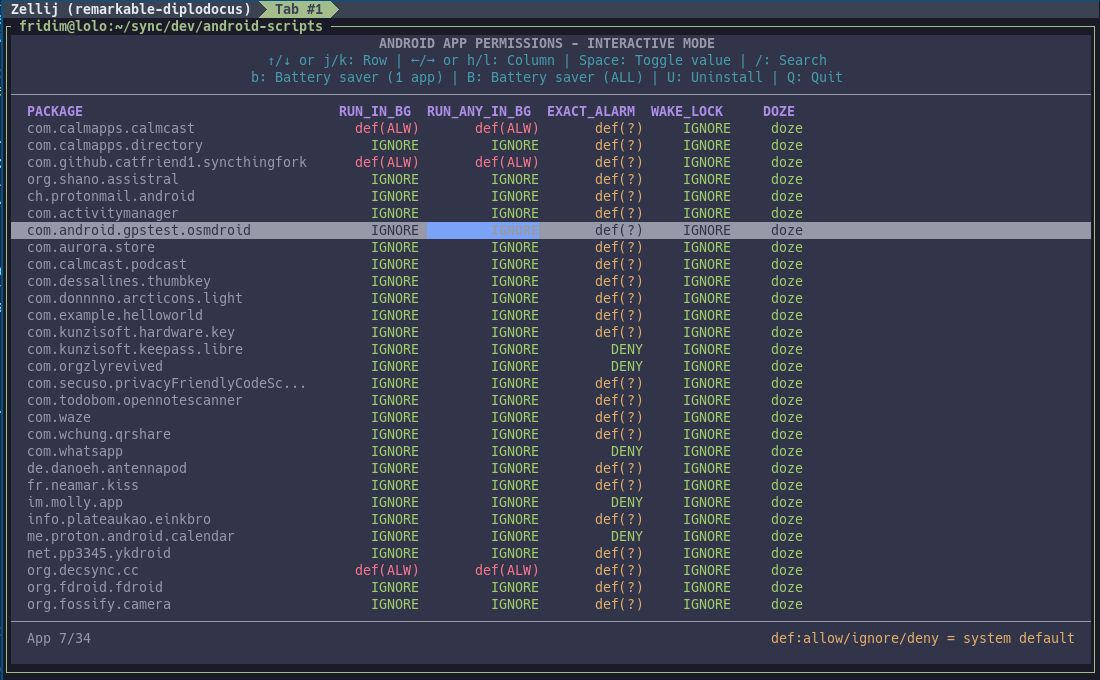
After weeks of testing, it’s clear these tweaks are insufficient for meaningful autonomy. My battery still falls from 80% to 10-14% within 24 hours—a single day’s use, nothing more.
I attempted to force Android’s battery saver via ADB, only to find the dark mode seemingly hardcoded, resistant to override. A petty but persistent obstacle.
Recently I installed: https://superfreezz.gitlab.io/ which helps group-killing unwanted apps.
You can define strategies (auto/smart, freeze, ignore) for each app and with one button kill them all.
I don’t know if that can be made automatic, i haven’t been successful in doing so yet.
But so far, that seems to be the most efficient way to preserve battery.
Once all the apps are killed, the battery seems steady and doesn’t drain so fast. I’m hopeful.
Has anybody successfully automated something like this?
IIUC, one of the cleanest way would be to fix the “battery saver” mode so it doesn’t go dark mode in a lot of places (like settings, etc, which are barely readable when it’s on), right?
i tried Low power mode on Kompakt - #3 by jalucky13 but for me it’s not enough to fix the dark mode
1 Like
is there any possibility that in the future the offline+ switch could also include mapping of force-killing frequent apps that may be open in the background? While I know it wasn’t the initial intention, and there is access to force-stop apps in the settings, it seems like an improvement that would help improve battery life, as the apps (while not supported officially) may still be running in the background.
4 Likes
Would be nice to allow mass-kill once Offline+ is flipped, don’t try this at home though. 
4 Likes
I haven’t found this posted but for anyone finding their Mudita battery draining faster than before or expected… check your “Unrestricted Data” (search that in your System->Developer Options) for default and side loaded apps that are enabled for unrestricted data usage…which I guess is those apps constantly using data…after making sure all mine were turned off (I did find a few) I’m back to 3-5 day battery depending on how much I hotspot
3 Likes
I also found that FUTO keyboard is very taxing on the battery of the phone as well. Has anyone else reached this same conclusion?
2 Likes
Thanks to this thread, I have been able to go from 2.5-3 days battery life to 6-8 days. I used to leave on the wifi and bluetooth, and use mobile data as needed-- habits from previous iphone use. Now I only turn on wifi/mobile data and bluetooth to download podcasts or use the GPS, then I turn them off and close the apps when I’m done with them.
I use FUTO and haven’t noticed it draining the battery much,
Something curious with the battery happened last week. It was down to 2 bars and I left the phone in the car for a few hours to go walking with a friend. When I returned, the phone’s battery indicator showed full. It wasn’t plugged in. So that time the phone went 12 days without charging.
1 Like
Something curious with the battery happened last week. It was down to 2 bars and I left the phone in the car for a few hours to go walking with a friend. When I returned, the phone’s battery indicator showed full. It wasn’t plugged in. So that time the phone went 12 days without charging.
I think we have to talk about this problem. I suspect the mudita team is behind all this.
They hire people in different strategic locations to go behind our back and charge the Kompakt while we’re not watching.
And then people go on and on on the internet and forum about how great the battery life is on this device.
(joke aside, was the kompakt on the induction charging deck of your car by any chance ?  I have one in my car i didn’t know about until i saw the phone charging)
4 Likes
@T9Pilot This is definitely an out scenario? Do you have one of those induction chargers in your car?
This is definitely an out scenario
yes, just kidding
do you have one of those induction chargers in your car?
Yes i do, it works fine, but i prefer to use the USB-c cable, seems more reliable.
1 Like