Tuning Fork review by wander

Tuning Fork — Community App Review
Version: 0.1.3

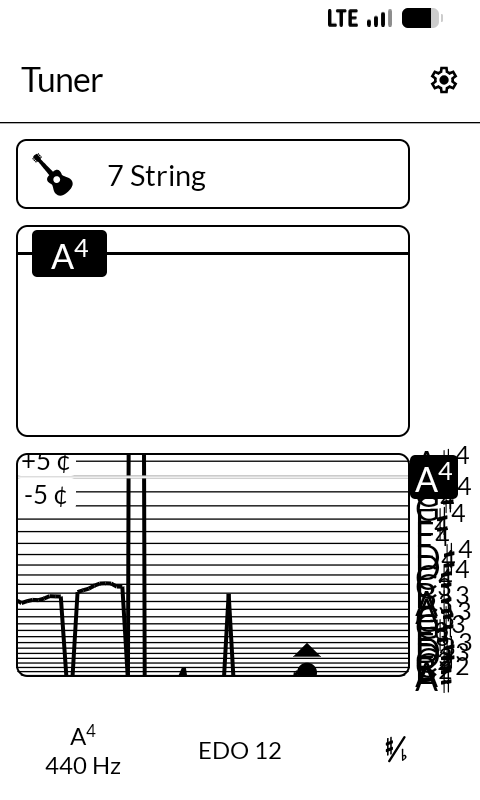
Tuning Fork is a tuner. Chromatic, or set to an instrument — guitar, bass, ukulele, violin, viola and the rest, each with its open strings — with a cents readout, a plot of the pitch as it settles, and stretch tuning for a piano.

It goes well past equal temperament. Just intonation, meantone, Werckmeister, Kirnberger, the equal divisions from five notes per octave upward, and an editor for any scale you want to enter yourself.

Two things are different here from the app it comes from, and both are about the screen.

In tune is not green. Upstream says in tune and out of tune in green and red; on sixteen greys those arrive as two near-identical mid-tones, so the app would be saying nothing and saying it confidently. Both are black now, and the reading is the needle against the centre line — which is how a tuner worked before displays had colour.

The screen stays on. Upstream makes that a setting and defaults it off. It is still a setting, and it now starts on: a tuner sits on a music stand and is glanced at between phrases, and you cannot put down a bow to wake a phone.

The pitch detection, the temperaments, the note naming and the instrument definitions are all Michael Moessner’s, unchanged — that is the substance of the app, and about ten thousand lines of it. What I have done is what it looks like and how it behaves on this panel.

What I am unsure of is the plot type size. I set it larger than upstream because this is read from a stand rather than held in the hand, and I have only my own arms to go on. Is it right at the distance you actually play at?

Source, and the licence it inherits: GitHub - wanderwildwood/onsa: Tuning Fork — a chromatic and instrument tuner for the Mudita Kompakt. Black on white, and it stays awake while you play. · GitHub — GPL-3.0-or-later.
3 Likes

Review for version 0.1.3
User rating: ★★★★★

Fantastic. Now I don’t have to charge my iphone to use the fender tune app. Was thinking about buying a physical tuner, but this works well!

1 Like

Review updated by @wander

  • Version: 0.1.3 → 0.1.6
  • Checksum: dcdb45ae2d966ae7bf7b231341db28f01195a76891f475823feb1fe7fcd51019 → a6be715180ce0d8ed17d9d05ec9de4c89952d612704e68626470648aa45e2e3c

View current review

Review updated by @wander

  • Version: 0.1.6 → 0.1.13
  • Checksum: a6be715180ce0d8ed17d9d05ec9de4c89952d612704e68626470648aa45e2e3c → 2779194d2851e14b37e6053177d4ca7589e1f4efa6a9ee7d1227b891f2b2296c

View current review

Review updated by @wander

  • Version: 0.1.13 → 0.1.14
  • Checksum: 2779194d2851e14b37e6053177d4ca7589e1f4efa6a9ee7d1227b891f2b2296c → 05bb71d59ef84dbe4896df85c15372ea6d0e7ca98eef0f93bc9a96023f2ba042

View current review

Review updated by @wander

  • Version: 0.1.14 → 0.1.15
  • Checksum: 05bb71d59ef84dbe4896df85c15372ea6d0e7ca98eef0f93bc9a96023f2ba042 → ec31abea8ea2c39da06212837e5febd9b59adc62d69961f2422859417507e418

View current review

Review updated by @wander

  • Description updated

View current review

Review for version 0.1.15
User rating: ★★★★☆

Hey I just made a fork of this that adds banjo! it also adds a new way to edit/add tunings/ instruments but only in the banjo section! It wont let me post the github link for some reason? so heres the broken one
http s://github.com/heavencanthandle/onsa

Review updated by @wander

  • Version: 0.1.15 → 0.1.16
  • Description updated
  • Checksum: ec31abea8ea2c39da06212837e5febd9b59adc62d69961f2422859417507e418 → dd6b2325331e6cf1cfe82d4776d46647a178dc30e04bfa3a6a50ec1d21a5fba9

View current review

Review for version 0.1.16
Author’s rating: ★★★★★ · Author of this review

@carefulcarpenter Thank you — the banjo is in Tuner 0.1.16. All eleven of your tunings, each its own row after the double bass with the short fifth string first, and you’re credited in the README and in About.

One thing you may want in your fork too: the app’s scale stores each black key as a sharp paired with its flat (A♯/B♭), and a string is looked up by that exact pair. A string written as just B♭ or just F♯ matches nothing, so tapping it found no note: the B♭ in G minor, E♭ in C minor, the F♯s in open D and the C♯ in open A. Writing them as MusicalNote(BaseNote.A, NoteModifier.Sharp, 3, enharmonicBase = BaseNote.B, enharmonicModifier = NoteModifier.Flat) fixes it, and a test now checks every string against its pitch.

I left your tuning editor out only because the app already has one for any instrument (the + on the instrument list), and a banjo can be built there with whatever tuning you like.

Review for version 0.1.16
User rating: ★★★★☆

Oh amazing thank you for that tip!
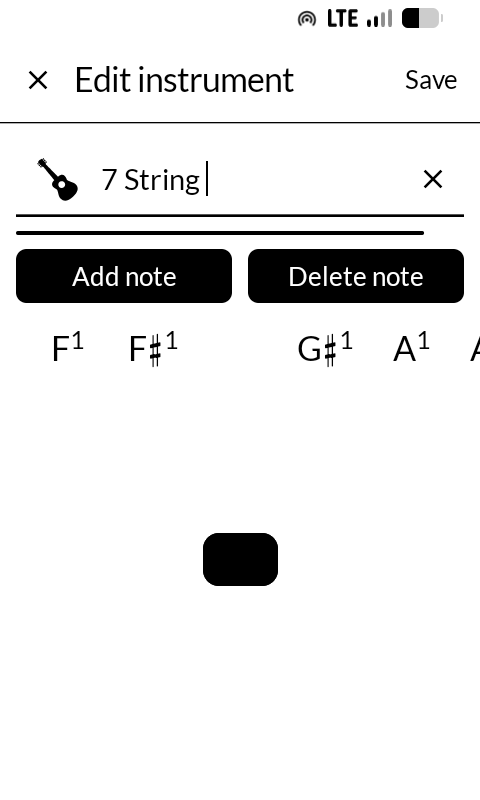
The reason I made my other editor and i guess added the banjo tunings at all is beacuase the editor didnt work at all for me. its maybe a visibility thing? but it seems like the delete note and add note buttons didnt work and its really unclear what is going on with the changing notes. I just gave it another shot and sort of figured it out but I’m still finding it very hard to edit an instrument

Review updated by @wander

  • Version: 0.1.16 → 0.1.17
  • Checksum: dd6b2325331e6cf1cfe82d4776d46647a178dc30e04bfa3a6a50ec1d21a5fba9 → f9193f5451097dacdf50e9b2f92e7b0bc60814ebff427ade27cda6e52500c164

View current review

Review for version 0.1.17
Author’s rating: ★★★★★ · Author of this review

@carefulcarpenter You weren’t missing anything: the editor was broken. The row of notes under the buttons was stretching to fill the rest of the screen, which squeezed the strings above it down to a thin line. So Add note and Delete note did work, but there was nothing left on screen to show it. And a swipe along the notes slid them past without changing the string.

Tuner 0.1.17 fixes both. The strings show in their box again, with the one you’re editing in black. Tap a string, then tap or swipe to a note, and the string takes it. Add note puts a copy of the chosen string just after it, ready to change, and Delete note takes the chosen one away. Thank you for saying so twice. Without that I wouldn’t have looked.

Review for version 0.1.17
User rating: ★★★★★

I also had problems with this. Now I have managed to add the baritone ukulele, and it’s working great!

1 Like

Review for version 0.1.17
User rating: ★★★★☆


@wander is this the issue y’all are describing to in 0.1.16?

Review for version 0.1.17
Author’s rating: ★★★★★ · Author of this review

@Little-User Yes, that’s the one. In 0.1.16 the note picker filled the whole editor, so the strings collapsed to that line, and swiping didn’t choose a note. 0.1.17 fixes both: the strings sit in a box at the top with the selected one highlighted, and the note row under the buttons moves with a swipe. If yours still looks like your screenshot after updating, tell me and I’ll keep looking.

@Lavurso Thank you, and I’m glad the baritone ukulele works now.

Review for version 0.1.17
User rating: ★★★★★

Oh yeah nice! works great! I personally prefer not having all the banjos on that first screen cause it feels so cluttered.. and like my edit instrument a little better so im gonna keep running mine, but yeah thats awesome! i also really like the recent detected notes feature! i might try to implement that on mine as well :smiley: love your work!

Review updated by @wander

  • Version: 0.1.17 → 0.1.18
  • Description updated
  • Checksum: f9193f5451097dacdf50e9b2f92e7b0bc60814ebff427ade27cda6e52500c164 → 962211b2f24604cd75e174236422025e76d772abbbcc1bb39b038a4e33dd03d4

View current review

Review for version 0.1.18
Author’s rating: ★★★★★ · Author of this review

@carefulcarpenter Glad it works, and you were right about the clutter. Tuner 0.1.18 is up and the card is updated.

The list now shows each instrument once. Banjo is one row that says “11 tunings” and opens its own page of them, and the same for Guitar, which has eight now (drop D, D standard, half-step down, DADGAD, open D, open G and open E besides standard) and for the two basses. An instrument with a single tuning is still one tap. The row of the instrument you are using is marked, so you can see where you are without opening it.

Your own tunings can go under an instrument too: the editor has an Instrument row, so a banjo tuning you make sits on the Banjo page after the eleven built-in ones, or stays on its own as before.

Keep running yours by all means. Thank you for the push.

1 Like

Review for version 0.1.18
User rating: ★★★★☆

In the custom tuning page, it seems like every note is crammed in simultaneously. v0.1.18