Hello,
I was wondering if there was a way to track which app consumes the most battery on the Kompakt.
This could be through something hidden but available in ActivityLauncher or, maybe, through a sideloaded app from F-droid.
Mine is drying quite quickly and I was wondering if it was one of the sideloaded app.
(2hours of wifi hotspot consumend 20% of the battery, that’s quite high)
2 Likes
How many apps have you sideloaded? Which ones?
That is not high at all, quite reasonable. Hotspot uses a lot of power in any device, and the SOC in it is a bit older and not as efficient as flagship phones.
PowerUsageSummary dialog is what handles it, it’s visible in the Activity Launcher but it has been disabled by devs.
Even using ADB, You can’t launch it :
adb shell am start -n com.android.settings/.fuelgauge.PowerUsageSummary
However in Activity Launcher you have an activity called App Usage, that only shows the memory used by apps. It’s not power consumption but it can be a good guess what app is staying the longest in use.
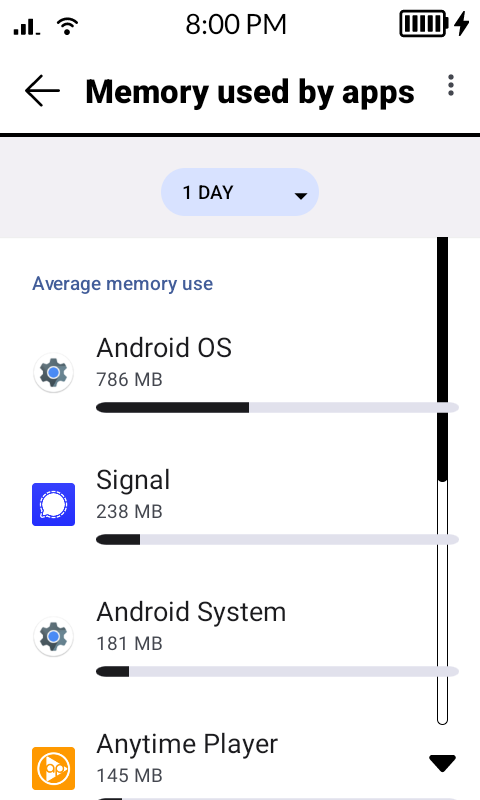
4 Likes
I have F-Droid, Aurora Store (for which I enabled battery optimization), Bandcamp, Garmin Connect, Wahoo Elemnt, Molly (Signal client), Komoot, Proton Drive, Proton Calendar and Tresorit.
The application that are not optimized (searching for Battery optimizaition in Activity Launcher):
- Alarm (to solve the missing alarm bug)
- Phone
- SMS
- Wahoo ELEMNT (bike GPS)
- Garmin connect
- Molly
1 Like
Thanks a lot for the tip ! (but how do you take a screenshot ?)
Besides Molly, the only sideloaded app running suspisciouly high is Bandcamp. That’s strange because I don’t really use it much and battery optimization is enabled.
I will try to uninstall it to see. That’s too bad that PowerUsageSummary is disabled. That would be really helpful.
PS: is there a way to create a shortcut in Activity Launcher or are you forced to always make the full query to launch something ?
1 Like
Adding a small feedback : it would be nice to have the battery percentage visible on the home screen. It is tedious to always check in the battery setting to see if you must recharge today or not.
1 Like
You need a launcher that supports shortcuts. Like Nova Launcher for example. And through that you can create any shortcut you want from Activity Launcher, but u can only launch it from Nova Launcher.
I tried to include this feature on my app but I wasn’t able to make it dynamic, so I’m manually including some of these hidden activities as shortcuts within my inkOS app.
Looking at your app list, Garmin Connect might be spending a lot of power because this phone doesn’t have Google Play Services so Garmin will try to stay on the background all the time to send you notifications instead of Google doing it for Garmin.
2 Likes
Thanks for the reply. I’m trying to keep the stock launcher.
I’ve enabled battery optimization for Garmin.
My comparison is with the Hisense A5 I got in 2020. I had a lot more apps, no Google services. Plenty of chinese spywares trying to connect all the time and that I was blocking with Adguard. But I had better battery life than the kompakt, which is quite surprizing.
1 Like
You can keep the stock launcher, and still have a third party launcher for stuff like opening shortcuts or for uninstalling apps, or to access hidden apps like FM radio.
The most power hungry thing is the SOC, and Kompakt uses a pretty old SOC (a variant of MTK Helio A22) that was introduced in 2018 or so I forget. The Snapdragon that u used in the A5 was more power efficient 12nm node.
2 Likes
Thanks, very informative !
1 Like
@ploum The culprit is likely Garmin Connect and the bluetooth syncing your watch 24/7. When I have my bluetooth turned off (not syncing my watch), I get the 3-day battery people talk about here. With my watch, I get 1.5 days.
2 Likes