Textboxes in MMD

Hello fellow software engineers,

I recently got my Mudita Kompakt and wanted to start developing for it (first time android developer). I wanted to go the kotlin + MMD route. However I have some trouble really mimicing some of the controls I see in apps like the phone app like text boxes. The component overview does not describe them at all (Mudita Mindful Design)

However there is a TextFieldMMD, but when I do something like this

            TextFieldMMD(
                value = firstname,
                onValueChange = { firstname = it },
                label = { TextMMD(text="Firstname") },
                placeholder = { TextMMD(text="John") } ,
                singleLine = true,
                modifier = Modifier.fillMaxWidth().padding(bottom = 16.dp)
            )

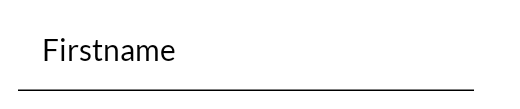
It does a transition when the focus goes to the textbox and away from it

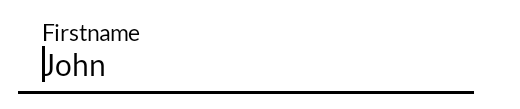
and looks really different than the when adding a contact in the phone app. Does anyone know how to get a similar style for textboxes without transitiions and a label that always sits above the text input?

1 Like

I asked Google - it wasn’t helpful. I don’t know the answer.
Open source? I would look at someone’s code for the function code.

TextFieldMMD inherits Material 3’s floating label (which we don’t want) and there’s no parameter to pin it. But if you leave label = null and stack a plain TextMMD above the field yourself, the label stays put and your placeholder shows while the field is empty. Here’s a small wrapper that does that:

@Composable
fun LabeledTextFieldMMD(
    label: String,
    value: String,
    onValueChange: (String) -> Unit,
    modifier: Modifier = Modifier,
    placeholder: String? = null,
    singleLine: Boolean = true,
) {
    Column(modifier = modifier) {
        TextMMD(
            text = label,
            style = MaterialTheme.typography.bodySmall,
            modifier = Modifier.padding(start = 16.dp, bottom = 4.dp),
        )
        TextFieldMMD(
            value = value,
            onValueChange = onValueChange,
            label = null, // keeps MMD's floating-label machinery out of the way
            placeholder = placeholder?.let { { TextMMD(text = it) } },
            singleLine = singleLine,
            modifier = Modifier.fillMaxWidth(),
        )
    }
}

and

LabeledTextFieldMMD(
    label = "Firstname",
    value = firstname,
    onValueChange = { firstname = it },
    placeholder = "John",
    modifier = Modifier.fillMaxWidth().padding(bottom = 16.dp),
)

I too am a noob , so not sure this is the best way to accomplish this, but it should work.

2 Likes

@chadp thanks for the snippet. Yeah I guess that would work! The only thing I may lose this way is a press on the label does not put focus to the input. I guess this can be coded as well, but I am wondering this is not possible with the eInk optimized component to begin with?
I’d also like the MMD page to be expanded. The guidelines (Mudita Mindful Design) are still pretty minimal and I think the components section (Mudita Mindful Design) would benefit from more code examples that are aligned with the “Design” tab or the configuration section. E.g. Mudita Mindful Design shows dotted lines all over the place, but the code section does not show how a dotted line is created on the contrary, other projects seem to implement it on their own, e.g. calm_sudoku/app/src/main/java/com/cbaier33/sudoku/stats/StatsScreen.kt at master · CBaier33/calm_sudoku · GitHub or CalmCast/app/src/main/java/com/calmcast/podcast/ui/common/DashedDivider.kt at main · davidraywilson/CalmCast · GitHub

2 Likes

Totally agree that it’d be helpful for MMD to be expanded, especially since Mudita has announced there’s an app store coming in MuditaK OS 2.0.

Tagging @urszula so she knows it’s on our wishlist.