I got the 1.4 Mudita K OS update today. The non-functionality of MMS has been a major challenge with this device since I got it a few weeks ago, so I was very happy that this was getting fixed. I sent a MMS to three other people after the update - an iphone and two androids. I just spoke to them in real life and apparently they have been sending MMS back through that group and I’ve gotten absolutely nothing.
I’m really liking the Kompakt on the whole, but I cannot use a phone that unceremoniously drops communication with no notification to either party. When people send me messages that appear to be delivered and I don’t actually receive them, I look like a jerk.
I need this to get fixed immediately or I cannot keep using this phone. How do we go about fixing it?
@ericksonla8 You probabably want to check your APN settings. I’m going to assume this was a carrier issue all along (and not due to the lack of group text before 1.4).
What carrier do you have? You can probably find recommended settings online.
Thanks @jiuik96 and @paxristi. I’m hoping to solve this without having to factory reset, but I’ll keep that option in mind if I can’t get anything else to work.
@paxristi, I have Verizon service (US) (for now…). I wasn’t familiar with APN but from what I’m reading it looks like you usually have to input those carrier settings in your phone if it doesn’t get set automatically. Verizon is clearly trying to get me not to use this phone so I’m guessing they didn’t set it automatically. I don’t see anything in the Kompakt documentation about how I might set them though and can’t find anything that seems wrong just hunting through the settings on the phone. Would be be able to share any more details?
I would check your APN settings on your Kompakt and set them according to the documentation found here. You’ll find these settings by navigating to Settings > Network and Internet > Mobile Network > Advanced > Access Point Names.
@ericksonla8 I’d be glad to help. I haven’t tested the below settings, but I did create my own APN for my own and followed similar steps. I linked the sources I used below to find information specific to Verizon. Make sure to turn your phone off/on after changing the APN.
On your Kompakt, go to Settings → Network and Internet → Mobile Network → Advanced → Access Point Names.
Click the + to add a new one.
Aha, thank you @stephenshutters and @paxristi very much! This definitely looks like the problem. I hadn’t spotted the “Advanced” button down at the bottom there and hadn’t made it into the Access Point Names part of the menu.
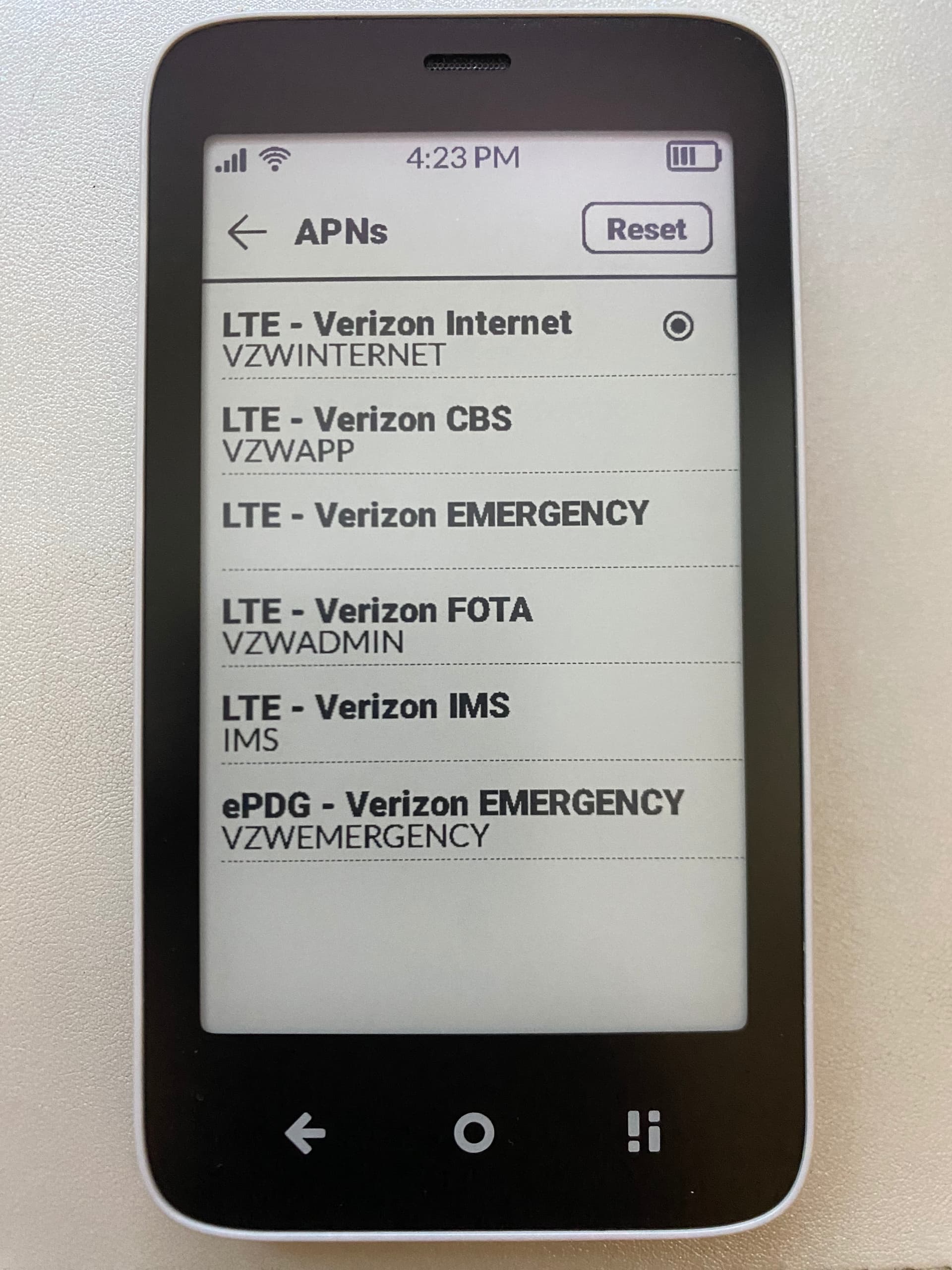
Once I get into The Access Point Names as you suggested, I see:
Inside the selected APN,“LTE - Verizon Internet (VZWINTERNET)”, I see “MMSC: Not set” and “MMS Port: Not set”. This seems to be the core of the problem I think. None of the other options fully match the recommended settings either.
However, I don’t see a “+” as @paxristi suggested I should and I can’t seem to edit the existing ones. Is this a limitation implemented by Verizon? Is there a way around it? Do I need to contact them? Or is there a something I can do on the Kompakt that I’m missing?
I haven’t solved it yet, but I’ve got a plan and a backup plan. I’m making it a bit more complicated than it needs to be to keep my options open. I am hoping to give the Kompakt a month of testing to make sure I really like it before committing indefinitely. To do that, I’m trying to stay on Verizon for that month, which is adds complexity.
Verizon seems to intentionally make it hard to use their service with the Kompakt. I cannot request a new SIM via their website because its an officially unsupported device. I am going to go into the Verizon store as soon as I can (today or tomorrow) and see if they can help me in person.
If that doesn’t work, I’ll switch carriers. It sounds like several Kompakt users in the US have reported Mint Mobile working and they seem to have good coverage where I live, so I was going to try their service.
@ericksonla8 This is not true. If you want to get all services (including MMS) working on Verizon I’d recommend going to a different shop and trying the approach shared above. Specifically beginning with Step 2 so that, with the test SIM, so they can see it (MMS) work at the very start of the process. Good luck!
Your experience was definitely different from my experience, though we used a similar approach (minus the payment). The Verizon employee I talked with appeared interested in helping me but was adamant that they only had a single type of physical SIM card which had all the settings locked with MMS disabled. I asked four different ways and he just kept telling me there was nothing he could do.
In the end, for me, the pain of switching carriers and abandoning my backup plan was lower than the pain of arguing with a $170B company that they need to take my money for a service they clearly don’t want to provide. I’m glad it worked for you though.
I’ve been really enjoying my Kompakt for almost 2 months. But this past week and a half, thanks to the holidays, I missed out on messages from people, and I don’t know who it was. All group messages and photos messages came as undeliverable and I have no idea who sent any of them, except 2 that my wife was also part of.
Anyone else having problems since the update?