If anyone listens to albums on the native MK music app, songs are only in alphabetical order, which means you have to rename tracks to 1. [title] 2. [title] etc. DON’T DO IT MANUALLY. I found a tool that helps so much: Mp3tag. Maybe some people will say this is obvious, but I didn’t know such tools existed. It takes no time to install and will rename your files, artists, song titles (these are the ones the MK will show), and more. I used ChatGPT to help figure this out, and I recommend you do the same. I just thought I would post this because it’s been so useful to me.
2 Likes
I need to follow up on this… I am fascinated by the eccentricity of this device. My entire music library is properly tagged and named like 01 - track01.mp3. 02 - track02.mp3
My hope was that I could use folder navigation in the stock music app, but I was wrong! When I copy my music to an SD card, insert the card into the Kompakt and open the music app, it scans through all the files and even removes the numbered prefix in the navigation. In fact, the app ignores both the file name and the track number ID3 tag, resulting in the tracks being listed in alphabetical order again. It does look like the app reads ID3 though, it shows artist and album. 
Honestly, I couldn’t help but laugh when I saw that. I love you, Kompakt, but what on earth is going on?! Is everyone here using the stock app and am I missing something?
I mean, come on Mudita, please use your own apps! 
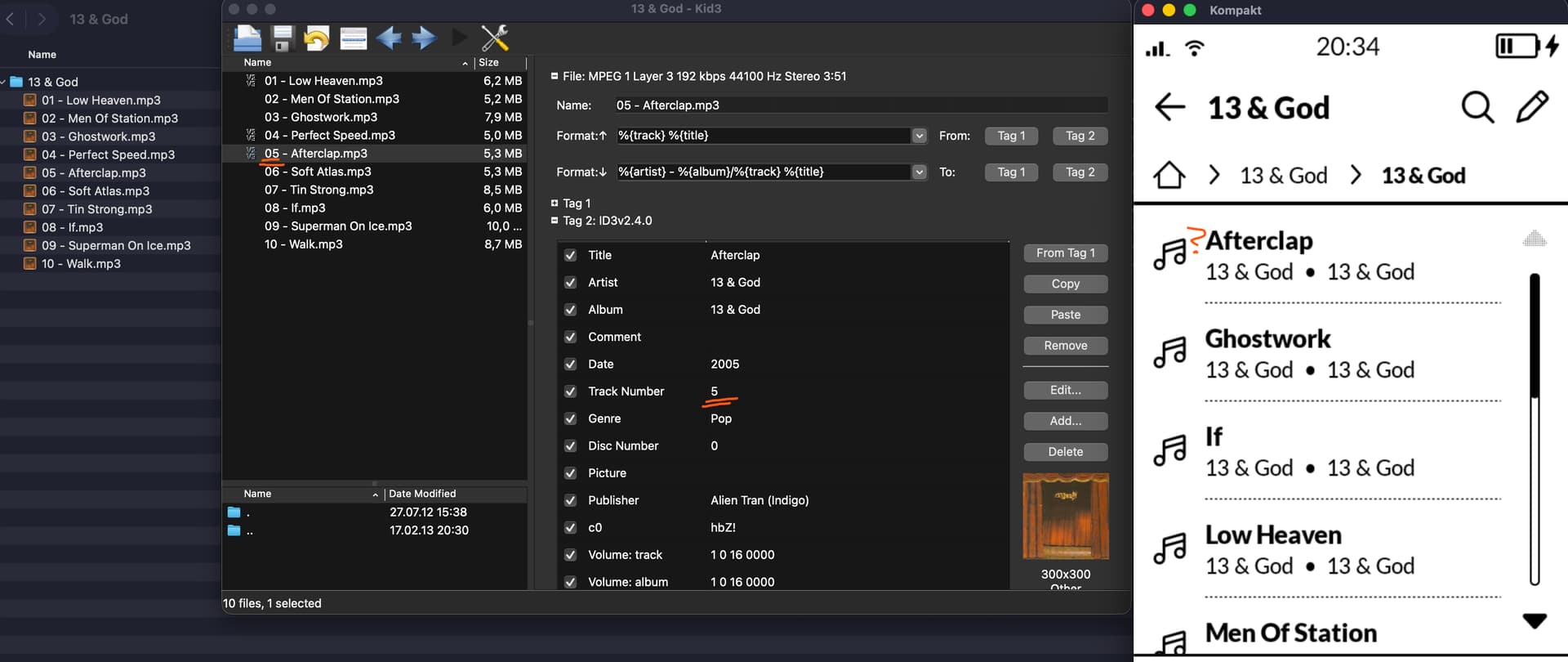
PS: I saw someone on the forum suggesting to change ID3 tags so the track title contains numbers but this was in May already with 1.1? What does folder navigation actually do in later versions?
5 Likes
I’m about to not be helpful at all but hearing this issue makes me feel less crazy. I listen to music through my car by using a thumb drive and it’s the exact same issue of seemingly removing the numbers from the file name and THEN alphabetizing. Maybe that’ll at least make you feel better that its not only Mudita lol.
2 Likes
@csllr Thanks for this detailed feedback. I’ve reached out to our team about this for some clarification.
1 Like
@csllr
So, our team told me that right now, the Mudita Music app prioritizes sorting by Artist and Album, but within those albums, the sorting logic unfortunately defaults to Alphabetical by Title.
It currently does not index the ID3 “Track Number” tag or the filename numbering (01 - track…) to determine the playback order.
We agree that for any music lover who listens to albums (rather than just shuffled playlists), this is (to put it mildly) an unconventional listening experience. It is not an intentional design choice to disrupt the artistic flow of an album, but rather a limitation of the current, basic iteration of the player.
Since Mudita Kompakt supports sideloading, we strongly recommend installing a dedicated, open-source music player that is better suited for managed libraries.
1 Like
Thanks for the clarification and thanks for reaching out to the team @urszula , as always! 
It’s sad to hear because I really want to use the Kompakt with as many stock apps as possible. I do hope this feature is on the roadmap and the app will receive track number support with one of the next iterations.
6 Likes
It’s as if the Mudita music player was designed by someone who has never listened to music. 
3 Likes
Will Mudita work to fix this issue? I just do not want to sideload any app. I am an N of 1, but I only want to use the native apps and hopefully this is an easy fix next year.
Best wishes over the holidays and a happy new year to the entire Mudita team!
3 Likes
That’s what I thought too. I wish I can long press on a song to add to queue or to play next
2 Likes
@jppelt Music player improvements are coming in 2026- as per the Mudita Kompakt Roadmap.
Unfortunately, the team has not provided the specifics yet.
4 Likes