Remote turns the Kompakt into a Bluetooth remote control, keyboard and mouse.
It pairs the way a Bluetooth keyboard does, so nothing has to be installed on the other end. It was made for Android TV, and works with other devices that take a Bluetooth keyboard, such as Kodi on a Raspberry Pi with LibreELEC.
The remote screen has:
a d-pad, or a touchpad to swipe on instead
play, pause, rewind and forward
volume and mute, channel up and down, and the number buttons
back, home, menu and power
a mouse pad, for anything a d-pad can’t reach
The keyboard sends what you type, or works key by key, in seventeen layouts. The phone’s volume keys can be set to send volume, brightness, the arrows, or page up and down. A device you use every day can be set to connect by itself when the app opens.
It is a fork of Atharok’s BT Remote, redrawn in Mudita Mindful Design: black and white, Lato, a black edge on every button, and nothing that slides.
It talks only to the device you pair it with, over Bluetooth, and has no internet permission.
If select does nothing on your device, turn on “Use the Enter key for selection” in settings.
Crazy! it feels like you are looking straight into my head . Another app fitting perfect in my situation (I have an rpi 4 with LibreElec connected to an old crt tv).
Is it possible to make it connect over Wifi as well? Bluetooth seems to drain battery a bit faster … I guess …
Review for version 0.1.0
Author’s rating: ★★★★★ · Author of this review
Thank you, and good idea. Wi-Fi is in now. Remote 0.2.0 finds Kodi on your home network, or takes its address by hand, and drives it with the same buttons, no Bluetooth needed. Turn on “Allow remote control via HTTP” in Kodi’s Settings → Services → Control first.
I’m putting a Kodi box together here too, which is half of why I wanted a remote, so Wi-Fi control is a welcome one for me as well.
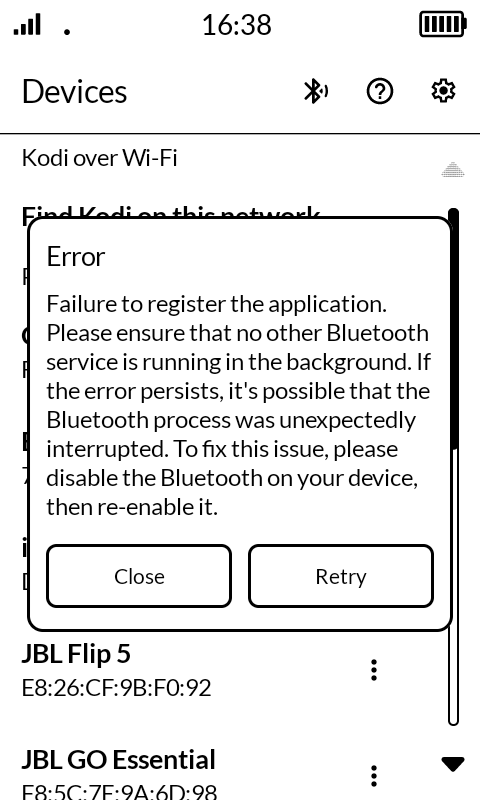
The remote is working great connecting my laptop with the Kompakt when watching a movie. The only issue I am getting is, that when I lock the Kompakt while the remote is connected (Bluetooth) it gets disconnected and cannot connect back without switching bluetooth on and off again. When I unlock the Kompakt or reopen the app I get the error in the screenshot. Is that fixable?
Review for version 0.1.0
Author’s rating: ★★★★★ · Author of this review
Thanks for the clear report and the screenshot. When the phone locked, Bluetooth let go of Remote’s keyboard registration and Remote never asked for it back, so it stayed stuck until Bluetooth was turned off and on. Remote 0.2.21 registers again by itself and reconnects to your laptop after you unlock. If it ever still shows that error, I’d like to hear.
somehow since the update, I cannot connect to my computer anymore. I click on my laptop in the bluetooth list, it says connecting to “computer” but nothing happens. Any idea why that could be happening? The connection used to work without any problem. I also tried disconnecting (from phone side and computer side) and reconnecting.
Review for version 0.1.0
Author’s rating: ★★★★★ · Author of this review
Thanks for telling me, and sorry for the trouble. I could make the same thing happen here. Updating Remote while it was connected left Bluetooth on the phone holding on to the old Remote, and the laptop then stopped recognizing the phone as a keyboard. Remote just said “connecting” without saying why.
This should get you going again:
On the Kompakt, turn Bluetooth off and on.
Open Remote.
On your laptop, remove the Kompakt from its Bluetooth devices, then pair it again while Remote is open on the phone.
Remote 0.2.22 now says when the other side doesn’t answer, and what to do, instead of waiting forever. It also tells you while it’s still getting ready after an update.
 . Another app fitting perfect in my situation (I have an rpi 4 with LibreElec connected to an old crt tv).