I have an LP2 that I continue to use for specific use cases - it is MUCH easier to type/text on the Kompakt.
1 Like
@beep my issue was resolved via a different thread so I’ve cooled off a little. I switched from the lp2 because of a cracked screen and sideloaded gboard on the kompakt. The texting experience with Gboard is on par with my old iPhones. The kompact is a slightly smaller screen than iPhone, but it’s miles better than the light phone in that regard ofc.
The kompact has been exactly what to be looking for in a dumbphone and I’m really hoping / excited for future updates to work out small bugs.
4 Likes
100% this. Excited about the future. The OS designed around the specs is to me, just what one needs. I like the long life battery. I do not need the sideloads. Updates are never as fast as we want them but this is not google with 1000 engineers working one problem. As Jean de la Fontaine reminds us: “Patience et longueur de temps Font plus que force ni que rage.”
5 Likes
@urszula I’d like to drive your team’s attention to the Maps in 2026, hopefully H1. 
Two issues:
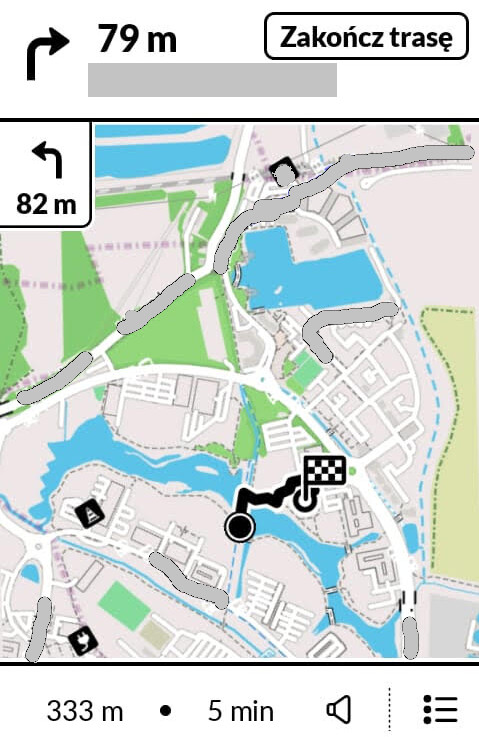
- Double next-step symbol and distance - they are confusing because typically out of sync, and the one on top updates slowly - fair enough for walk/bicycle, not good for a car ride
- Feature request: if the path is smaller than the current map view, zoom in automatically.
The screenshot below shows both issues, I was walking and the map didn’t zoom in for details. I could zoom in myself but then it was advising me to get back to navigating and when you click, it zooms back out.
2 Likes
Hello! Trying to get this to work for killapps and despite the having given the permisions through ADB and checking it to make sure it was active, when I try to close an app with it, it brings up the accessibility dialogue. Is it possible it doesn’t work with every app or did I mess up somewhere? I got the accessibility setting from my other phone and everything.
1 Like
Please run this command and share your output.
adb shell settings get secure enabled_accessibility_services
1 Like
I’d like to bump this, I don’t get the logic behind two turn indicators. Now I started some walk for test, and the top one says move ahead 10 m, the one underneath says turn right in 62 meters.
1 Like
My understanding is the second indicator is what is coming next. In the screen shot you posted, it indicates a right turn in 79m then a L turn 82m later.
Yeah, I took a drive with it now and so it seems. How obvious! I should’ve guessed that myself. ^^’
Thanks!
2 Likes