I mentioned in the inkOS topic that I wasn’t happy with any of the existing podcasts apps for small devices/e-ink devices. They have too many features and sometimes it takes up to 5 clicks to start playing. They also don’t look good in e-ink screens.
I started by analyzing open-source podcasts apps to modify them, but I found out it’s easier to make a simpler one from scratch than to modify them since none of them are Kotlin.
I do have a working prototype. And I wanted to hear from people that use AntennaPod and other Podocast apps what features they use in the Kompakt, or what features they’re willing to compromise for to keep the app simple.
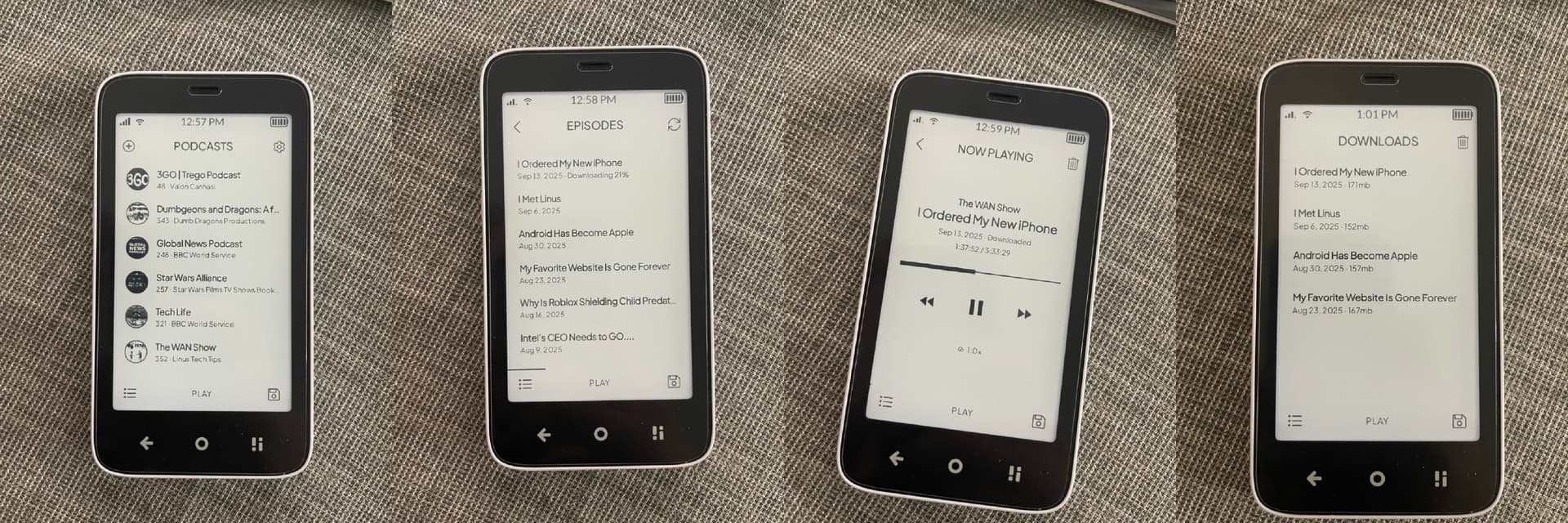
Preview:
Add podcasts works with a search through PodcastIndex and will be adding rss for manual additions.
You unsubscribe to a podcast by longpressing on it. (same way to subscribe in the ad podcast page not shown in the image).
Episodes:
You download them by longpressing, You can delete download by longpressing
You can tap to stream directly (opens the player)
Features that I’ll be adding:
Sleep timer
Continue listening (not shown here but there’s WIP).
Some indicator for new episodes after u refresh them
Export/import
Features that I won’t be adding:
Podcast description
Episode description
Queue
Mini Player
Features that I maybe will add:
Some sort of automatic fetching (optional), currently it’s only manual.
A dedicated page for new episodes from all your subscribed podcasts.
Discovering podcasts in a small phone feels claustrophobic, and the point of this podcast app will be to add podcasts that you already know, it won’t be an app to find new ones. Descriptions are full of ads those won’t be added.
‘Bookmark’ podcasts I already know (=‘subscribe’), so I can easily find new episodes of podcasts I’m interested in.
Check manually those podcasts for new episodes when I want to listen to something.
Pick episodes I’m interested in to listen next (I do use the description for that, even though bloated and filled with ads)
Download those episodes (I listen on the bike and don’t always have 4G)
Make a queue of those episodes so the next one plays automatically, because I don’t usually have my hands free when I’m listening.
Delete podcasts from queue, mark as played, and delete from downloads when I’m done listening to those.
The last one is a step with a lot of actions and could be automated with some assumptions (end of podcast = listened to = delete from queue = delete from downloads). Likewise, one could argue that the app should download episodes in queue automatically until a certain treshold (2 hours, 200Mb,…?)
I very often use the functionality to skip forward 30 seconds (sponsor messages) or go back 10 seconds (I missed something important). Sometimes I do use the possibility to listen slightly accelerated or slowed down, because some podcasters speak annoyingly fast or slow.
Bookmarking/subscribe happens with longpress, same as unsubscribing.
Fetching happens manually, just need to add indicators to show which podcasts number grew.
Episodes you pick by longpressing and they’re added to downloads, if you just tap it will stream it instead (but you can download it inside the player).
It automatically is marked as played when end of podcast is deteced.
Downloads, trash icon deletes all podcasts, or longpress to delete each one manually.
But your comment brought me some perspective for the queue, I personally only listen 1 podcast max and it’s usually before sleep or on a bus/train, but might be a good idea to kinda combine downloads & queue, have a multi select switch then those will be added to the player and will play on the order of selected.
Just because I hate the standard podcasts apps that you have 4 different windows where podcasts start.
Skipping forward/backward works, I’ll fix the setting to allow to change the skipping time. And also fix the delete after playing.
The Nothing playing window will become home screen, and I’m thinking to add continue.
Just not sure about the descriptions, because I don’t want pop ups or dialogs at all. Within the player it would be easy I could add Podcast description on Author name click, and episode description page linked to the title of the podcast.
Any time frame when your podcast app will be released ?
Honestly no idea, my work-load fluctuates quite a lot and I’m going for Holidays in October so I don’t have a lot of free time to dedicate on this.
What you saw in the video it was done in 1 day, to me it’s more than functional and I’ve been using it for a week. But I can’t share that yet as it has my API key, and I need to learn how to fix a few more issues before I can share a beta with the community.
@gezimos , sounds like another impressive undertaking.
I suppose I’ve grown used to using Pocket Casts. I use it on MK. There are a few key things that any alternative podcast app would need to have to tempt me away:
Skip/forward options – essential to skip ads
Auto-skip intro/outro – also essential to skip ads – customisable duration
Add to playlist/up next
Reorder episodes in a playlist/up next – dragging up / down
Archive / Unarchive episodes – swipe left/right
Episode descriptions – sometimes podcasters add valuable information in the description which they don’t publish elsewhere.
I think that’s it. All combined, that makes it quite a tall order and would, I suspect, take up a lot of your time.
That is true. I don’t have the time to make all of these features, but in the other side I’m trying very hard to simplify them on purpose.
Skip/forward essential and is already there(with configurable skip time), but adding auto-skip will require to add custom data for each podcast.
All of these are great features to have, and I’ll happily use them in a desktop/tablet but in a small phone with a slow screen I want to focus in making listening quicker.
Add to playlist/upnext, the current UX in all apps that I tried causes me “digital claustrophobia”, I want to try something simpler. Like a unified downloads/playlist/upnext/queue.
In the Episode page give priority to description, I might add a “info” icon for description since tap already is set to play and longpress is to download.
Bizarrely, I’m finding that Pocket Casts is crashing a few times a day now, for some reason. I’m on the forum to post about it. So, who knows, I may find myself using your stripped-back podcast app after all.
Out of curiosity - I am not much of a podcast guy. I used to listen 20 years ago to some podcast related to a hobby of mine, but now information is everywhere, so…
Nevertheless, early this year I tried to listen to a “podcast” on Spotify (more of a recorded lectures of father Alexander Schmemann).
I never had the chance to finish them, but now I might do it on the Kompakt.
Here comes the question - where does one find and download new podcast to upload to the Kompakt?
It’s the api that I’m using for the podcast app that I started. It allows you to search podcasts from all platforms, download them as well and you can add them as music files if you don’t want to install apps
They are called “Schmemann Speaks”. I found them on Spotify, but they are probably all over the internet.
Good content, strong voice, superb sense of humour!
Must listen
I would say that for me, you’d definitely need for the app to recognize subscribers. Pocket Casts knows I pay for a few podcasts and works seamlessly. I tried another couple and they were always delinking me as a subscriber. Thanks! And yeah…you should work for Mudita.
That would require to establish some online infrastructure for authentication, and I want to keep this app offline as much as possible for simplicity and privacy reasons. I even thought not having a search function, and only allowing RSS feeds. But that is a bit of a hassle for most users, so probably search will stay or become optional.