I’ve noticed that some light phone iii users in the UK are now able to use the Curve wallet app to make contactless payments - https://youtube.com/shorts/hF898kZfZfY
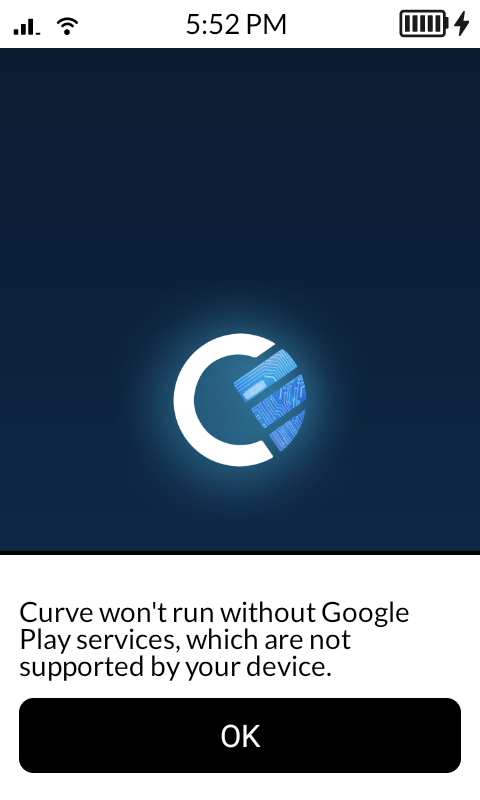
It seems like the Curve app doesn’t require access Google Services either!
If this is the case, would the NFC feature on the Mutida be equipped to make contactless payments via the Curve app too? // are contactless payments in the roadmap at all?
I was curious of this claim, and decided to try it myself because I couldn’t believe a payment app is not requiring Google Play Services. And it turns out i was right to be doubtful.
What that user might have done is install MicroG, an alternative to trick apps into thinking you have Google Play Services.
While technically the NFC in the Kompakt could support these payment apps, the Googless nature of this device and the old-ish android system tells not to.
Based in EU, I now spoofed the AuroraStore to the German language and this one doesn’t even launch to say, just shows “invalid service” and crashes after a bit.
Might have worked without playservices before, but that doesn’t seem to be the case now. Plexus is just user reported, it might have worked before.
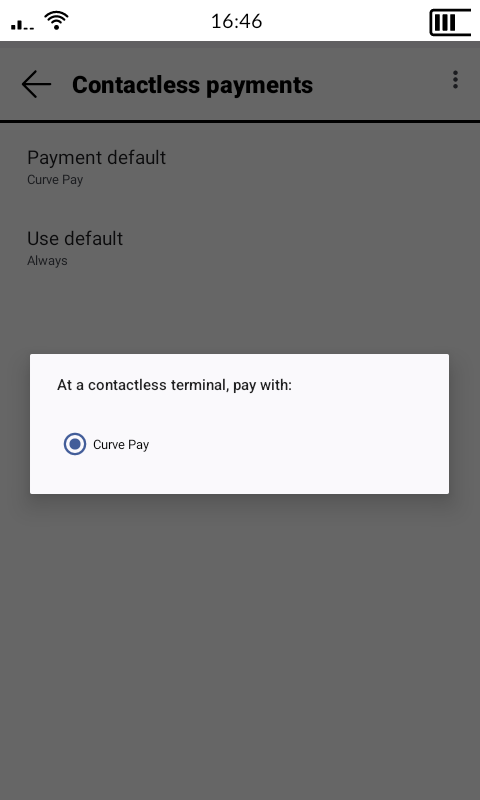
You need to go into Developer Options and search Use NFC, and turn that on.
When you log in to Curve, navigate to the ‘Launchpad’ and you’ll see a ‘add Curve as default wallet’ (not verbatim). It is a bit buggy. What I’ve found is setting your screen turn off for 30 minutes, and just keep trying to add it as your wallet. Restarting the app/phone. It eventually works. Sometimes straight away, sometimes after a bit of trying.
You can delete the AppGallery afterwards, and update the app through Aurora Store and it continues to work. Bear in mind if you log in to Curve on another device, you have to re-add the default wallet to the Mudita.
Honestly, it has kept me on the phone since launch (except for a week away after a buggy last update).
@anon86727033 That is very cool, thanks for the explanation!
Personally I’m very ok with users doing what they like with their device, especially if you know what you’re doing
But just posting this for less experienced users that might see this and get too excited .
Mudita doesn’t recommend installing finance/banking apps in the Kompakt
You need to keep in mind that the workaround through Huawei Store can be closed randomly
You need to keep in mind that Google is cracking down on sideloading and trying to close android as much as possible and by next year you might not use this app without Play Services.
Also there must be a reason why this app has a 3/5 in Google play store, that is not a great rating.
@gezimos
I agree that less experienced users shouldn’t get too excited. Just a few points:
I understand the finance risks - I guess Curve might be a little different (?) as it’s not a banking app per se, more just a card that links to other cards. The cards it’s linked to are obfusticated in the app. I’m not saying it’s safe on the Mudita, and appreciate the risks it might entail for users
It’s not necessarily a workaround; the Huawei store version doesn’t need google services at all, there is no prompt on start up compared to the google play version.
As above, the Huawei store version doesn’t require google services at all
In the Google Play store I see a rating of 4.1? The reviews are more complaints from users having issue with their card rather than the app - I know their customer service doesn’t have the best reviews - So I’d recommend people doing their research on if they’re happy with Curve as a company.
@anon86727033
Thanks for the follow up! I appreciate it
Could be regional rating, on my Google account when I checked their app it shows 3.1/5 in Google search preview it shows rounded at 3/5
And the GooglePlayServices issue I meant Google might force all apps to require GooglePlayServices if they want to stay part of PlayStore, which could make developers quit allowing third party stores or their apps which will lack that option.
Huawei is already moving to their own HarmonyOS with their own Kernel, and only in this transitional period they might still support Android apps through a translation layer or in their older android devices.
So for inexperienced users or for folks like OP who intent to buy this phone to use this feature, I wouldn’t recommend it because they could randomly end up disappointed.
Oh, I guess that makes sense - and also I guess that goes for all apps that don’t currently require google services, right - that could be a pain/random disappointment for all Mudita side loaders? I wasn’t privy to this - these companies love their walled gardens!
@buiosu Android 12 is only due to old SOC and lack of drivers from MTK for newer Android. And this project was started long before Google announced any plans
@nmm Technically no, you’ll be able to sideload. Simply they are asking for developers to register with Google even if they make an app that won’t be in Google Play store, but who knows what other steps they might take and go the Apple road.
Hi I just got my mudita kompakt and have sideloaded various apps. One of the important apps for me to be able to use was a NFC payment wallet of some kind. I already had Curve from my previous android so have followed the suggestion above about how to access it. Everything has gone accordingly, but cannot make Curve the default wallet. Can’t find any such instruction ‘add Curve as default wallet’ under Launchpad. When I search NFC under developer options, Contactless payments is there but underneath it notes ‘To use, first install a payment app’. Have tried ‘restarting’ and ‘force closing’ Curve app, to no avail. Any suggestions?