So, first and foremost, congrats with the launch to the team! I am sure it has been a whole lot of work. I personally also want to thank the support team, and Robert Gwarek specifically, for the help (I am living in Israel which is outside of the Mudita shipping range, but after some back and forth I was able to pre-order my Kompakt to the hotel address and pick it up during my recent stay in Poland).
I wasn’t sure if there is a need in another “1 week review”, but 1) I personally was glad to read those while waiting, and 2) I decided to add my voice to the feedback. I split it in sections and tried to stay concise in my bullet points (each bullet point marked with “⊕”, “⊖” or “○” for positive, negative and neutral points respectively).
Screen
⊕ I love e-ink. in a well lit environment it is great and very relaxing for eyes
○ I understand why there are some complains about resolution, but for what I’m willing to do on Kompakt it is enough
⊖ cold white backlight is irritating for me (one another reason to use phone less in the dark I guess…)
Audio
⊕ speaker it is loud enough
○ and very simple (I might be unhappy with it if I would want to use it a lot… but I don’t)
Maps
⊕ GPS works well (needed to switch it on-off couple of times in the beginning though)
⊕ offline is great
⊕ lack of navigation made me pay more attention, to e.g. street names (first learning: proper addresses are a thing and a paper notebook for noting route details in advance is a friend)
⊕ greyscale is hard at first… but map design optimisation for the e-ink is good so I got used to it quickly
○ maybe a bit more contrast would be good
○ ability to save places (addresses and/or locations) would be very useful in the future
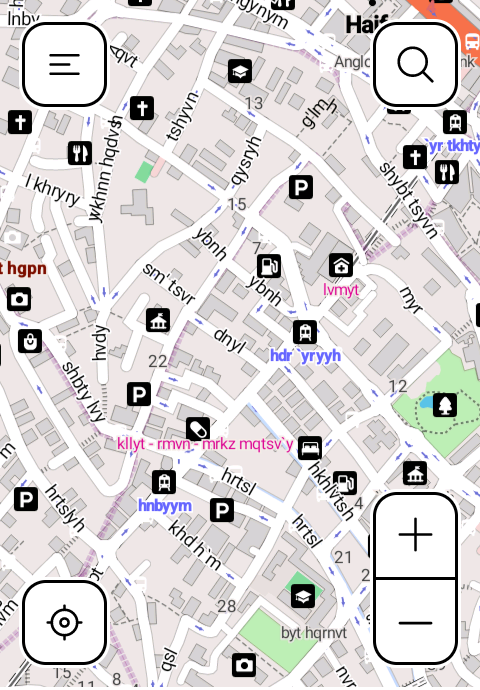
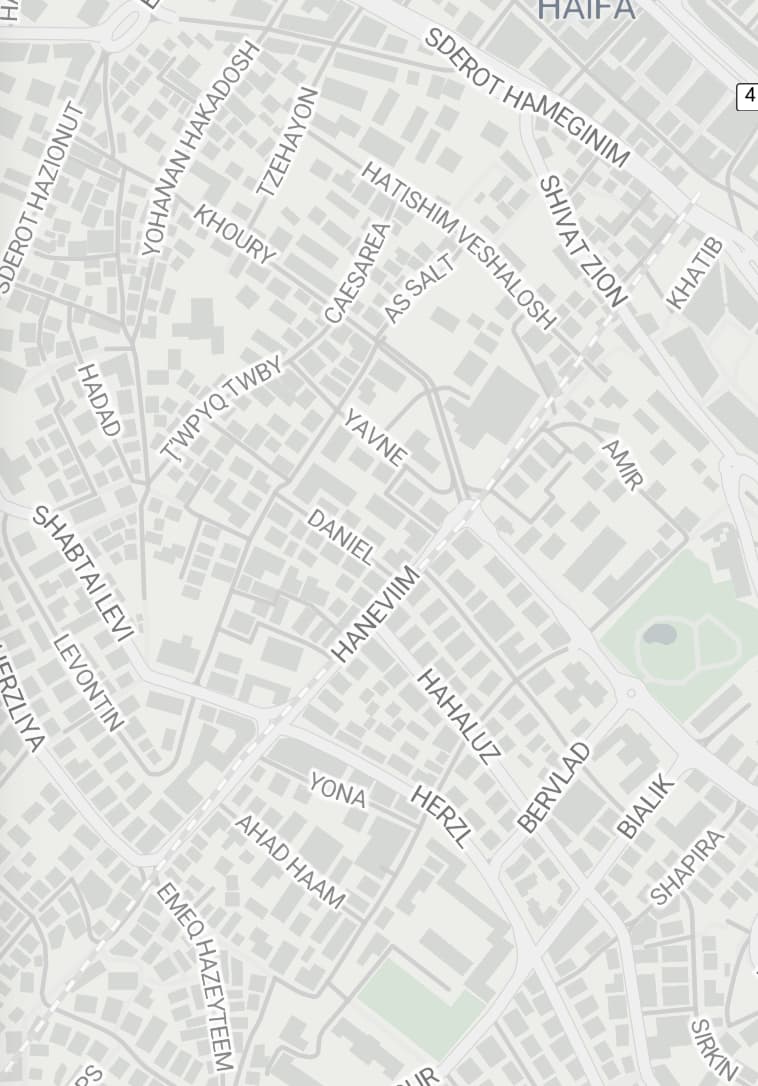
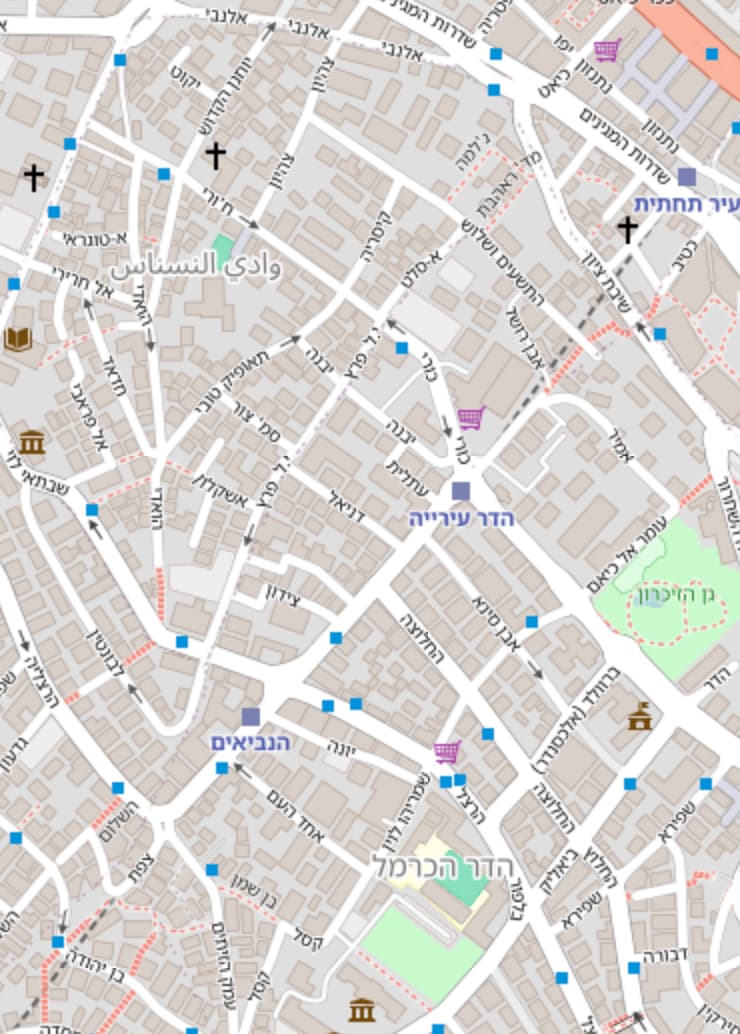
⊖ (this one is huge for me) transliterated toponyms are a horror (particularly in Hebrew, as most vowels are skipped in writing, but potentially in other languages as well) – they must be either spelled directly in the language of origin or use proper English spelling! (Reading Hebrew is already hard enough for me, but trying to navigate in a new city using completely broken names is extremely painful.) I will add screenshots from maps on Kompakt and alternatives to showcase the difference (also I will open a support ticket for this as this is the only real issue I have).
Notifications
⊕ I had no issues with notifications from apps (neither stock nor Signal) – work as expected
○ thought I need a solution for notification badges for Signal at first, but realised that I do not need them as I’m reachable by phone/calling for anything urgent
Launcher
○ barebones but still better then alternatives for me (tried a bunch via sideloading – all feel laggy)
○ an ability to use plain text instead of icons in the launcher and to have a one click access to more than just sms/phone would be nice in the future (but not a necessity)
Offline+
⊕ I like the idea
⊕ I can see it useful when with family for example
Camera
⊕ making photos is more intentional and somewhat inconvenient (in a good way)
⊕ it does the job
⊕ I like that I’m forced to go through photos on the computer to see them (that’s when I decide what to keep/delete, my cloud storage used to be a graveyard of forgotten pictures)
Typing
○ Installed Futo keyboard right away (besides of performance I needed a keyboard with Ukrainian language) – it is great
○ It is still slower than what I am used to (it can be annoying but being discouraged from excessive typing is a part of e-ink experience IMO and not a bad thing)
Connectivity
⊖ Microphone doesn’t work on my gen. 3 airpods (I know this one is on apple but still a pity as they are the first pair of earbuds that actually fit my ears)
⊖ OpenMTP unfortunately works in ~10% of time for me (again the apple issue I guess)
⊖ Mudita Center is too limited for now
○ for transferring files I found LocalSend to be a good solution at the moment
⊕ hotspot was a requirement for me so I wanted to mention it here
⊕ I know it is a default now, but as someone who spent last 5 years with lightning iPhone, I’m happy about the type-C
⊕ I didn’t have a 3.5 audio jack on a phone for a while and it is great to see it included (just listened to a song with my pair of Sennheiser’s – and feel like I need more of that in my life!)
Reader
⊖ settings for font size have to big step (“small” is tiny and “medium” is too big)
○ sideloaded Lithium for epub
○ and MJ PDF for pdf
QR codes
○ sometimes there is no way around those unfortunately so I sideloaded Binary Eye for now
–––
In general I’m very happy with the Kompakt so far (except for the toponyms transliteration thing). It definitely requires some adjustments but I expected it to be the case. Also I feel like my expectations were right which helped not be disappointed with the certain aspects of the experience. I’m looking forward to the future updates and can see myself to be a satisfied Kompakt user for the coming years.
I might post in this thread later on if I have anything to add.
 but since I am keeping my setup kinda minimal it wasn’t a problem for me so far (stuff I use regularly or even semi regularly fit in 12 apps page, and I don’t mind extra taps for those 2-3 apps I might open once a week)