First up, a quick overall positive review before more details on requests: I’ve had my Kompakt for a few weeks now. Just got the 1.4 update which was very important in making it feel like a functional device. Overall, I replaced my iphone with the Kompakt to eliminate the feeling of always wanting to check my phone and it has been very successful at that. I no longer just pull my phone out of my pocket just because I am not actively doing something else and I really appreciate that.
The music app is the most important app beyond phone/sms for me. The music app pre 1.4 was pretty hard to use when full. I’ve loaded about 1400 songs on it so far and have many more to add. I pretty much just had to shuffle all of them. Even making playlists on the device without any organization system was tedious and I only made a couple short ones.
The 1.4 update is definitely a huge improvement. I’d say it took the app from too frustrating to use much to essentially functional.
I hope we can continue getting some more updates though. Three requests quickly jump out to me. First, I have my music organized in folders in a standard Artist (folder) / Album (folder) / Song (file) structure and I really wish the Kompact displayed/played songs in track order instead of alphabetical order. Standard formatting across all the sources I pulled music from seems to be that the track number is prepended to the file name. So even if the folder was just sorted by file name instead of alphabetical song name that would work better.
Second, I wish there was a way to make a playlist on my computer then sync it to the Kompakt. It’s still tedious to search through all my music on the device and build a playlist. It would be much easier to do it on a computer and then just have it sync. I’m not sure how the playlists work on the backend, but I imagine its something simple like a text file with a list of file names to include. Even if we could just edit those files in Mudita Center, that would be easier.
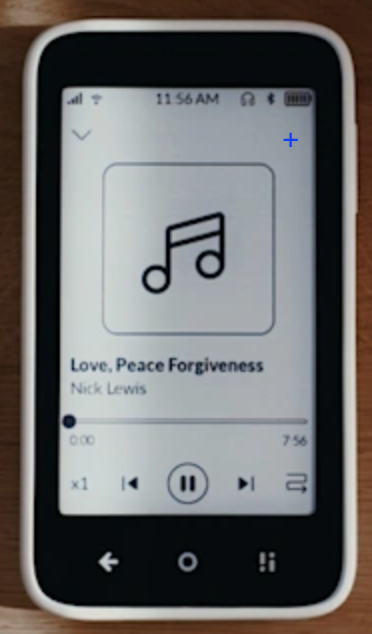
Third, I wish there was a way to push songs to playlists from the song interface. I imagine this could look like a button on the play screen that currently shows album name, a giant music note image, song name, artist name, a playback tracker bar, and playback controls that allows you to add it to a playlist.
Finally, a tip for others - I find it vastly easier to do data transfer via the microSD card than by plugging the Kompakt into a computer and using the Mudita Center. I pop the sd card out of the phone, pop it in my computer, and use the stand file editor on my computer. The file transfer is 90% faster and its a lot easier to move, edit, and organize files. When I put it back in the Kompakt, it loads up reasonably quickly and performs the same way on the front end. Importantly, I can just drag and drop my entire music collection and my computer figures out which files are duplicates and only keeps one copy, unlike the Mudita Center uploader. Music management has gotten much easier since I figured this out.
I’d also love to hear others’ tips, tricks, and requests for the music app! Thanks!