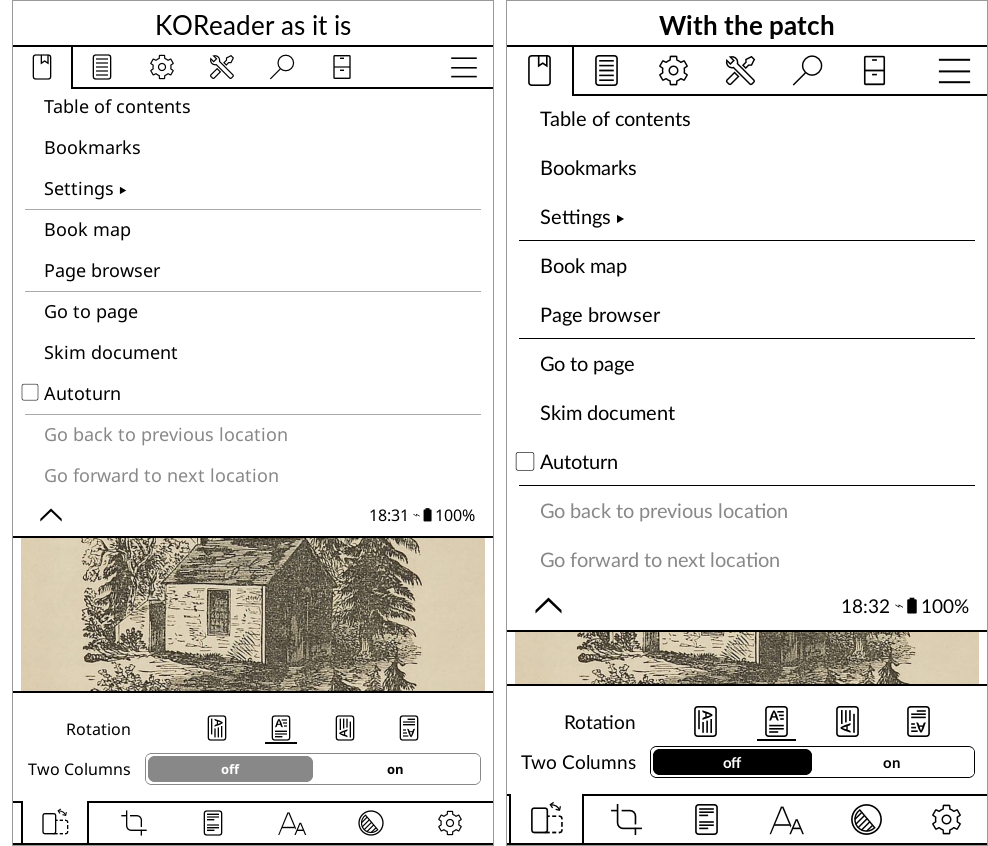
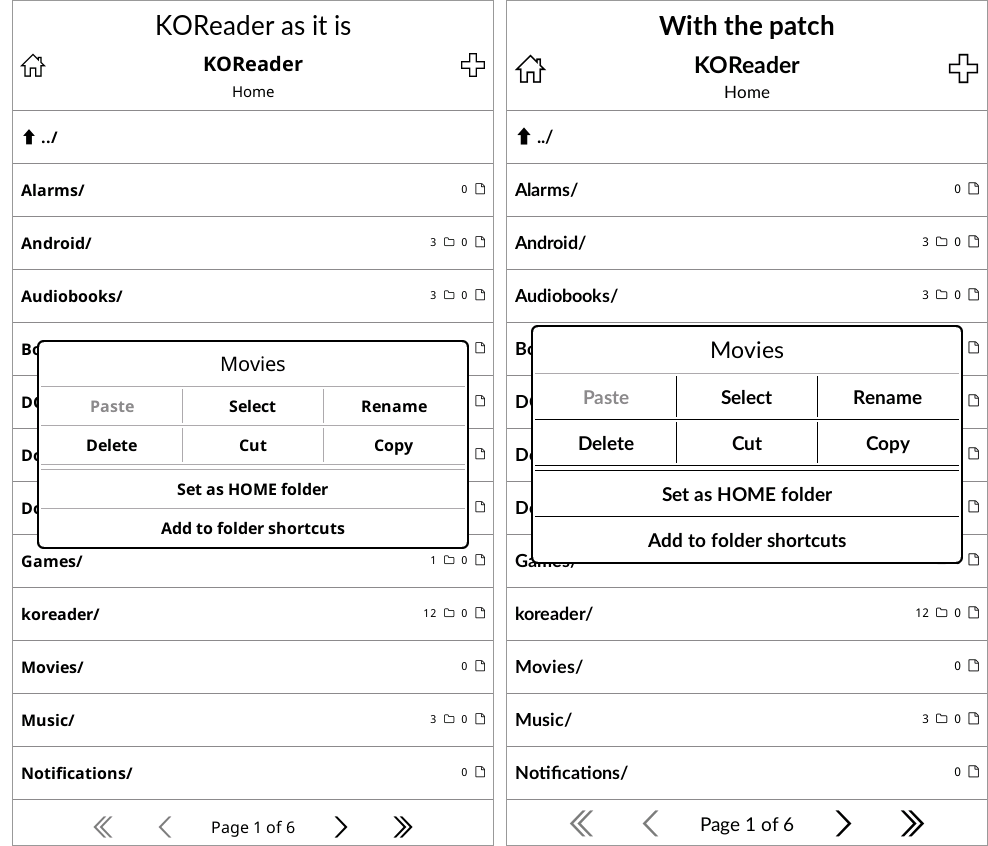
KOReader is the best reader there is for an E Ink phone, but it was drawn for Kindles and Kobos. On the Kompakt its menus come out in small grey type, with tight rows and small icons that are hard to read and hard to hit.
This is one small file that changes that. KOReader runs any file it finds in its own koreader/patches/ folder when it starts, and this is one of those, so KOReader itself is untouched and keeps updating as usual.
What it changes:
the interface in Lato, the typeface of the Kompakt’s own apps
all interface type a size larger: menus, lists, dialogs, the status bar and the settings panel
larger icons in the menu bars and the settings panel
taller menu rows and dialog buttons, so a thumb finds one
lines and switches in black instead of grey, which on this screen is dithered into a faint speckle
dialogs with a firmer edge, and file sizes in Lato rather than a typewriter font
The text of your books is not touched; that stays whatever you set in the book. Nothing is written into KOReader’s settings, so deleting the file puts everything back exactly as it was.
To install, download koreader-kompakt.zip from the release page below. Copy the patches and fonts folders inside it into the koreader folder at the top of the phone’s storage, then close and reopen KOReader.
Honestly, I was waiting for you to make an E-Reader app, so this is amazing, as I am already using KOReader.
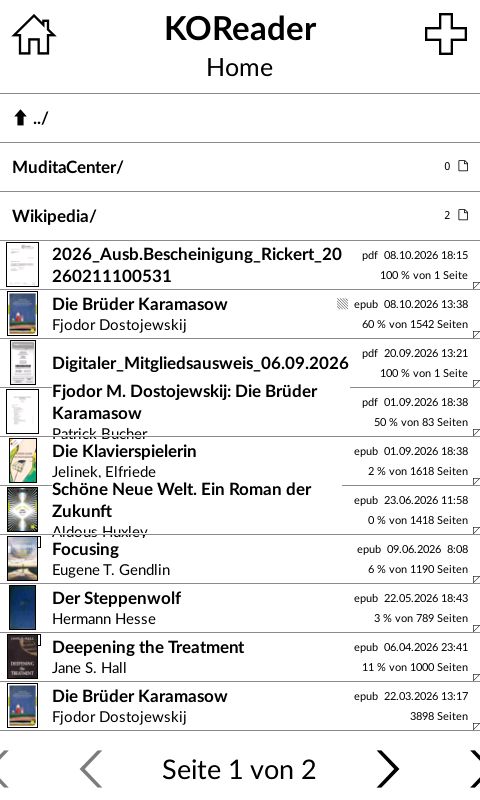
An issue that I am facing since installing your patch is that longer titles are overlapping the lines (or is there even a way to have a better looking first screen?)
And a second issue I am having with KOReader (dont know if you can do something about that) is that I prefer the landscape mode for reading but I always have to set it anew when I start the app. I marked that the rotation should be saved, there is a little star on it and I ended the app properly but after some time (not every new start) it jumps back to horizontal orientation. Is there any fix for this?
@hanswilli Thank you, and for the screenshot, it showed exactly what went wrong. 0.1.1 is up: the lists with covers now keep KOReader’s own type size, so the patch no longer pushes titles over the row below. Replace patches/2-kompakt-look.lua with the one in the new zip and restart KOReader: Release v0.1.1 · wanderwildwood/koreader-kompakt · GitHub
Your list also has “Shrink item font size to fit more text” turned off. With it off, KOReader still lets a two-line title run into the next row, patch or no patch. It is in the file browser’s menu under Settings → Mosaic and detailed list settings; with it on, each title steps down until it fits. Fewer files per page, in the same place, gives every row more room.
The rotation is KOReader’s own, and not something the patch reaches. The star sets the default for books opened from then on, but a book you have read before can keep the rotation it was last read in, and the file browser has a rotation of its own as well. If it still flips back after that, the KOReader developers on GitHub would want to hear about it.
@YYZ Thanks for trying it. Nothing changing at all, not even the typeface, means KOReader isn’t finding the patch. The zip has its own koreader folder, so the usual slip is ending up with koreader/koreader/patches/…. The file needs to be at koreader/patches/2-kompakt-look.lua, with the two Lato fonts in koreader/fonts/, beside the folders KOReader already has.
Then close KOReader from its own menu (Exit) rather than just swiping it away, and open it again. If it still looks the same, tell me where the file is and which KOReader version you have.
@YYZ Thanks, that rules out the folders. KompaktOS shouldn’t matter; it’s the same Android underneath, and I test on the same KOReader version you have. One thing does: the F-Droid build of KOReader skips user patches entirely, by design. If yours came from F-Droid (or a store that uses it), that’s why nothing changes. The build from KOReader’s GitHub releases (the arm64 APK) runs them. It needs the F-Droid one uninstalled first, but your books, settings and history live in the koreader folder and stay put.
To check: in the file browser, Tools → More tools → Patch management lists the patches it found and how many ran. Also make sure “Disable external plugins and user-patches” isn’t ticked.