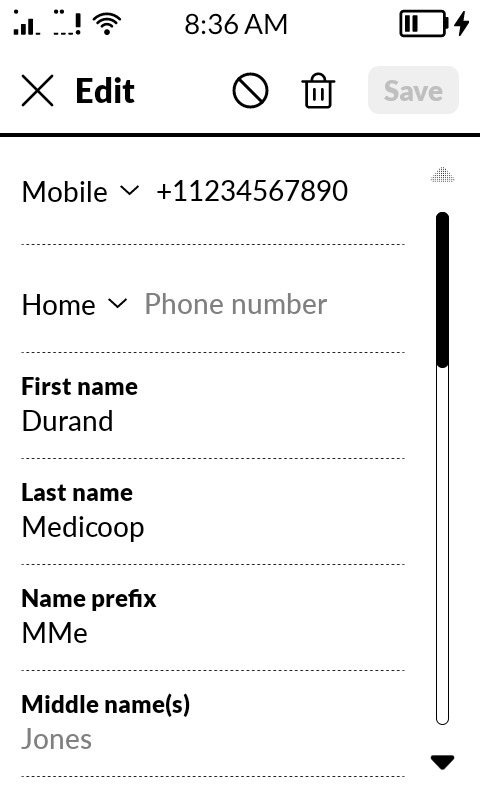
I have noticed a strange bug in the address book. It’s the first time I notice it. Looking up a contact usually works – I can type any part of the name and it will be displayed.
I have just added a new contact with just a phone number (Mme xxx xxx)
When I type anything being contained in this name, it is displayed a fraction of a second (if I am fast) with the letters I have typed in bold, and then disappears as if there were no relevant entry.
I am not sure I should disclose the name here so maybe I could PM someone from the team ?
Has anyone encountered such an issue ? I have a very recent clean installation with only a single sideloaded app (WhatsApp)
I tried to reboot the phone, to no avail.
Thanks for your help !
Edit : maybe there is another preferred way of filing bugs reports ?
@bidinou I spoke to our team & I have some feedback for you.
The detail you provided about having a clean installation with only WhatsApp sideloaded is actually a massive clue. It is highly possible that WhatsApp is the direct cause of this search glitch.
Here is why: WhatsApp heavily relies on reading and syncing with your phone’s native address book to figure out which of your contacts use their service. When you add a new, minimal contact (like just a name and number) and immediately try to search for it, WhatsApp’s background syncing process can conflict with the system’s search filter. This causes the system to momentarily display the result, and then the app “refreshes” or intercepts the list, causing the contact to vanish from the screen. Troubleshooting Steps To help us isolate this bug for our development team, could you please check two things for me?
1. Default Messaging App Which app is currently set as your default messaging app on the Mudita Kompakt? 2. You could test if issue is caused by the phone original apps or system only by removing Whatsapp and changes it mades to contacts database, which unfurtunately means - Factory Reset is required.
Does the contact stay on the screen without disappearing when WhatsApp’s permissions are revoked?
Hmm, actually, I have not found the “default messaging app” setting ? As for the authorizations, Whatsapp has “contacts” enabled, and “SMS” disabled.
Oh, I guess I could reset. Would just have to store my contacts beforehand. (I have removed everything from my Google account
I removed the “Contacts” authorization and it makes no difference.
Here is what happens. I changed the name for privacy reasons but it begins with “Mme” (Madame) with 2 subsequent names, for instance “Mme Durand Medicoop”.
If go to the address book (via the phone app) and type
“Mme”
the entry is displayed in bold.
If I type “Mme Durand”
it is still displayed
if I type “Mme Durand Medicoop”
still displayed
if I just type “Durand”
it is displayed a fraction of a second in bold and disappears (or does not even appear if not fast enough)
if I type “Medicoop” : same, quasi instantly disappears after being displayed in bold (indicating if was filtered properly in the first place
Thanks ! Actually, I decided, meanwhile, to backup, reinitialize then restore a backup to see if the issue persisted.
However, for some reason, the Mudita Center App is extremely slow on my Linux PC. (Manjaro based). Still stuck in “restoring messages (14%)” after 20 minutes – direct files transfers from my file manager are super fast, though.
I had already noticed this when sending the whatsapp APK, it had taken about 20 minutes.
Okay so : the issue persists, after a factory reset + backup restoration. Even with new contacts.
At least this ruled out the WhatsApp interaction hypothesis !
Eh, also, this gives me a new chance of NOT using sideloaded apps. I have my Boox Note Max e-ink tablet for that
Edit : still, it would be super important to be able to export the address book from the Mudita Center to .vcf…
Edit 2 : hmm, I stumbled upon something strange. There were tons of duplicate entries in my address book, in the Mudita Center (which were NOT visible from the contacts on the phone itself). So I deleted them before making a backup. Now, on the phone, I can see those contacts are missing and had to re-create them.
However I remember that, before doing this, when I wanted to send an SMS to someone, it would ask me between 2 numbers as if there really were duplicates (sometimes they were indeed different number as in the Mudita Center listing… Hmmm). BUT I couldn’t see the duplicate entries in the “contacts” section as if they were either hidden or merged. And, my Google address book I synced the phone from didn’t contain duplicate. Oh man !
(I don’t know if it gives any indication at all to know I use a French locale)
Let’s try this with setting the default messaging app:
Settings → System → Search icon → Search Default apps → Default apps should be empty
Settings → System → Search icon → Search Default apps → Manage apps → See all apps → Whatsapp → Permissions - You already did provide us with details from this screen.
Here is what happens. I changed the name for privacy reasons but it begins with “Mme” (Madame) with 2 subsequent names, for instance “Mme Durand Medicoop”. If go to the address book (via the phone app) and type “Mme” the entry is displayed in bold.
Bug starts here. We cannot reproduce this bold behavior on MMe.
We used “Name prefix” field for Madame. As this is correct place for this prefix.
When moved Madame into First Name field - we also cannot reproduce your issue.
We only make Last name bold (Medicoop will be bold at all cases you described)
Are you sure you are using latest Mudita OS K Software update?
Is this contact on your SIM Card memory instead of Phone internal memory? (Indicated by SIM Card icon in Phone app → Contacts tab)
We suggest removing the contact and adding it again.
If it happens to all contacts - it seems to us like your contacts database was imported improperly. Did you use some external tool to import contacts?
Could you please provide us with a picture of manually added contact with data changed on which you can reproduce the search issue.
I have the feeling the bug is triggered when there is a compound name in a given field.
For instance, if the first name is “Marie Angélique”, I cannot filter with “Angélique”. Can you replicate ?
I actually expected the search to consider any substring in any important field (first name / family name).
In this specific case, for instance, I had put everything “Madame / Name / Company” in the first name field. Because it was faster to enter quickly, and also because I want to be able to filter it, for instance, by typing the company name (in the case I have forgotten the family name, for instance).
Another example : medical professionals. Sometimes I know I want to call the dentist but I might have forgotten his/her name, so I’ll try to filter the address book entry by typing “dent”.
(In the music player, I can type any text string, which is part of a larger string, and the search does display the results accordingly, regardless of the position of the substring inside the name)
Another problem : accents are considered as distinct characters. It can help reduce the number of displayed entry, but sometimes you just want to call someone quickly and will filter his/her name without adding the accent.
As for my second issue : the fact the device seems to see several entries in the address book for a lot of my contacts ; and actually asks for which one I want to edit / call ; but actually when I delete on of those contacts, both disappear. (and they are only listed once when I open the address book)…
I had imported my contacts with Mudita Center : import from Google Contacts.
It seems that, most of the contacts I imported in the Mudita Center, from my Google account to my Kompakt were turned into 2 contacts.
Each contact has 2 versions : the original one, with a compound name in the first name field. An auto-duplicate, where each part of the first name were used to fill other fields.
Ex : “John Doe” → if I try to edit it on the phone, although I see only one in the contacts list, I am asked if I want to edit “John Doe” (Device) or “John Doe” (Device) !
The first has : First name “John”, Family name “Doe”.
The second only has : first name “John Doe”. Both have the right phone number…
If I remove one of them on the phone, both disappear -after all, there was only 1 entry in the contact list !! Please noté, deleting a duplicate removes both, from both the phone and the Mudita Carter, making it difficult to rectify.
To conclude : both issues occur when using the "first name"field with compound names ; consequences differ : incorrect filtering, duplicate entries.
@bidinou It’s a bit difficult to picture what is happening exactly with just your description. Is it possible that you could take a picture or video & send it to me in the DMs, so I can pass it on to the team?
Bug #1 : showing that, when you create a contact with a compound name, the search feature only searches for the beginning of the string, which is annoying when you have a complicated name you only remember a part of, or when you store relevant data to filter in the name (ex. “Arnaud - Susy’s father” “Dr Rodriguez - Dentist”).
Bug #2 : it shows that when you have duplicate contacts, deleting one removes both so you are stuck with duplicates or have to recreate the contact. — I still don’t know why there are duplicates on the first place. I hadn’t seen them on my Google account. As if they were created by the import process ? Sometimes, compound words are divided in the 2 contacts (first name “x y” in the first contact ; in the second contact first name “x” last name “y”) , but in the case I show here, that is not the case… Would not be such an issue if deleting the duplicated worked.
(same behaviour in the Mudita Center : when I delete a duplicate, both disappear :-/ - So I have to re-import the contacts)