Hi all!
I was thinking about trying out inkOS, how is the battery consumption?
I do in average, by chargin till 80%, 1 day and a half.
What’s your opinions about inkOS?
1 Like
Is this your battery consumption WITHOUT InkOS?
Yes. I have sideloaded whatsapp and spotify and the battery last at most, without using it a lot 2 days (I do charge till 80% not 100%)
Can’t spreak to battery consumption but I use Katapult as of today, designed by the same dude. I just found as someone with adhd I was going into inkos settings way too much and tweaking things out of boredom lol. I like katapult, especially the ability to tap the screen to turn on the backlight that is a very useful tool. I think any battery drain for any of these launchers can’t be that bad. At the end of the day I think its pretty hard to kill the battery of the Kompakt
1 Like
My battery has also averaged a day and a half, from the beginning. I currently run Katapult and a fair number of side-loaded apps but even when I had almost nothing (I sideloaded Signal from the very beginning) the battery was around that.
Also have this problem with adhd lol, one of the things I love about the Kompakt is the limited ability to customize things
1 Like
Yeah with inkos I was just fiddling around with the kompakt all the time lol, with katapult which I have on the phone since morning I have not been doing that at all. Love this launcher
I saw you mentioned Whatsapp and Spotify as your apps. Those are what actually spend power as they’re connected to network at all times. Whatsapp looking if somebody sent you a message, and Spotify while streaming.
inkOS works fully offline, during initial setup if you’re using icons it might spend some more power when it creates and caches icons after that it should have no impact in battery life. It has no animations it doesn’t process anything big in particular.
It simply works as a bridge for your notifications that are there but are inaccessible to you. If you ever wondered why you can hear notifications that aren’t there:
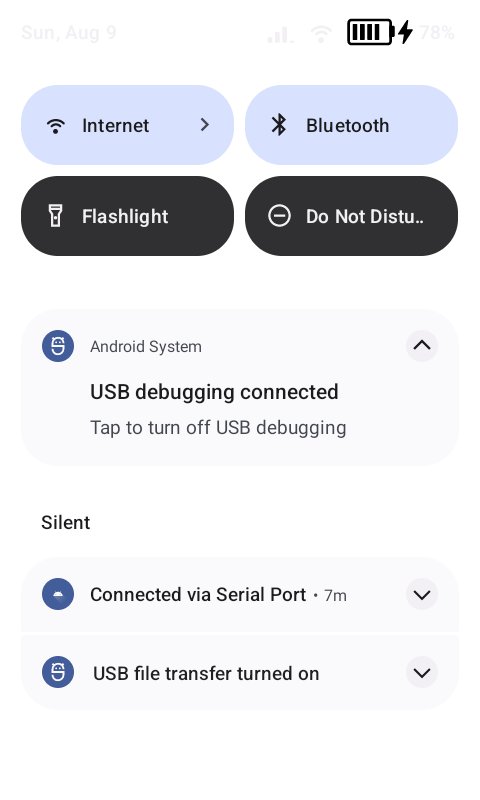
The android notification tray it is there in MuditaOS, it has just been covered by the Quick Settings page as an overlay. inkOS basically can read these and show them to you (it doesn’t communicate with the apps directly, only with Android system itself).
Just showing this to tell that inkOS is not doing anything magical or big, the info it presents to you is right there under 
1 Like
I’m surprised how quickly the battery drains on this phone.