As the title asks. I’ve been trying to transfer my whatsapp chats from my iPhone to the Mudita Kompakt for ages. I have a wire between them, have tried installing the Android Switch app but I am not sure if it is working with the Mudita. Does anyone know how to transfer chats?
2 Likes
I don’t think you can. The AndrodidSwitch app is a Google utility and can be used only during fresh setup of a phone, and by that I mean a phone that uses Google Play Services.
The other app SmartSwitch is Samsung dedicated so won’t be working either.
The only method i’ve found to work is keep the Whatsapp in iOS and setup whatsapp in the Kompakt as a companion device.
During Whatsapp setup in Kompakt press 3 dots on top right and click set as companion device. The OG will still remain in your iPhone but Whatsapp will be synced between both devices but u are required to open Whatsapp in the iPhone every 2 weeks to keep them synced.
1 Like
Thank you for replying!
Does setting up the Kompakt as a companion device mean that chats will be downloaded off the iPhone? And if so doesn’t that solve the problem, and I could just change it to be the main device?
Is there no way that I could upload my whatsapp chats from my iPhone to Google Drive and then download them on the Kompakt? Or the same with iCloud? I assume as you say you’ve only found the one companion method that you’ve considered these things, but I am distraught! 
1 Like
- On your New Phone: Install WhatsApp, agree to terms, enter your number, and verify. Allow network access when prompted.
- Scan: On your old phone, go to WhatsApp > Settings > Chats > Chat Transfer, and use its camera to scan the QR code on your new phone’s screen.
- Transfer: Keep phones near each other, unlocked, and don’t leave WhatsApp until it says “Transfer complete”.
1 Like
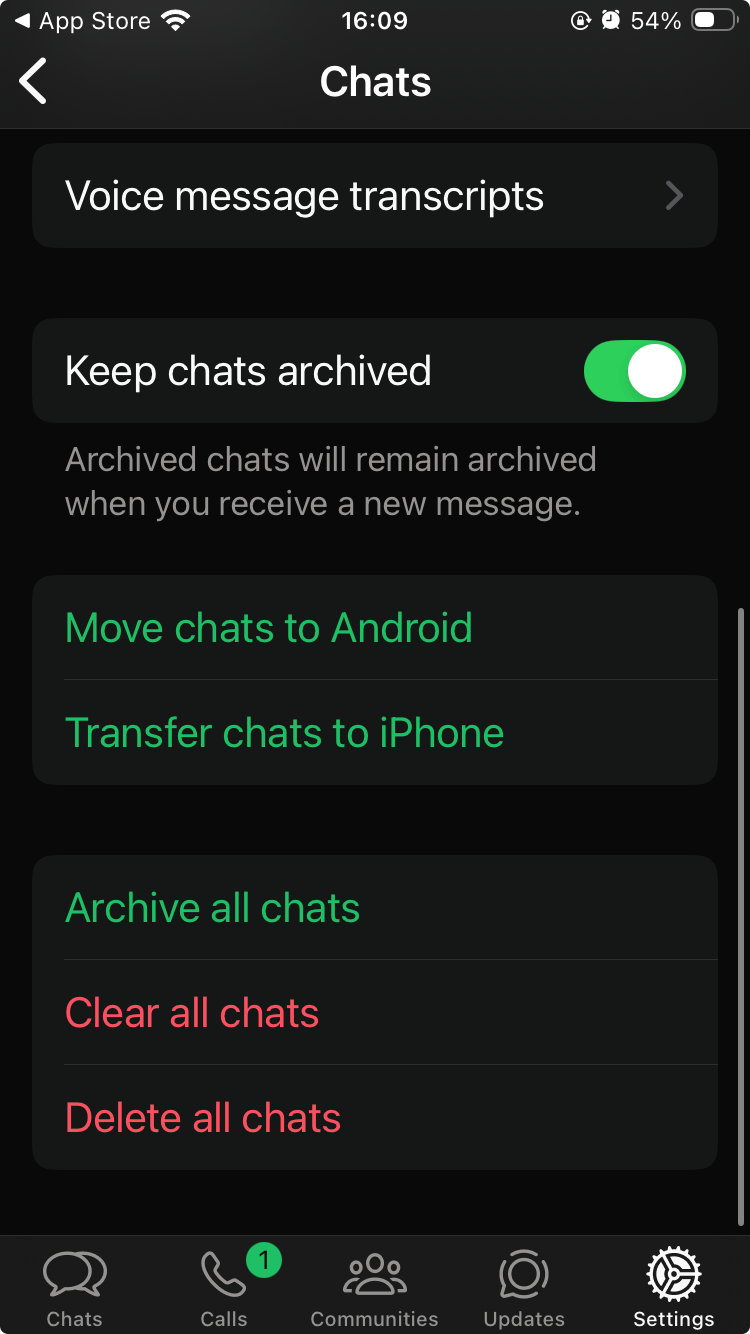
Hi, @esquared. When I go to whatsapp settings on my iPhone these are the only options I see. When I follow the transfer to android button it doesn’t give me a QR code, instead telling me to follow the instructions on the android device (there are none on the Mudita), even when connected with a cable.
1 Like
Google drive route doesn’t work either because it requires google play services.
The cable route / qr code route didn’t work for me when I tried, that’s why I went the companion app route.
1 Like
Spitballing here, what about transferring the iOS whatsapp backup to a typical android device, and then transferring it from there to the Mudita. Absolutely absurd that any consumer would have to do that, but will update if I have success.
1 Like
Try the Transfer chats to iphone option and then scan the QR Code with your Kompakt. Kind of like what they are doing in this video but you will be doing it from an iphone to an android phone. https://www.youtube.com/watch?v=lSbv_RNwFGo&t=21s
1 Like
So i have an android that allows Whatsapp clones and I tested this, I was able to transfer chats from that to the Mudita Kompakt. The transfer failed a few times, even though that chat transfer had a few messages only but in the end it worked.
1 Like
@gezimos Would you be able to explain how to do this? I’m trying the emulator at the moment but running into an issue when transferring. When prompted to scan the QR Code (displayed on the Android), my iPhone opens Whatsapp ‘Transfer chat to iPhone’, and when I press start, it fails immediately.
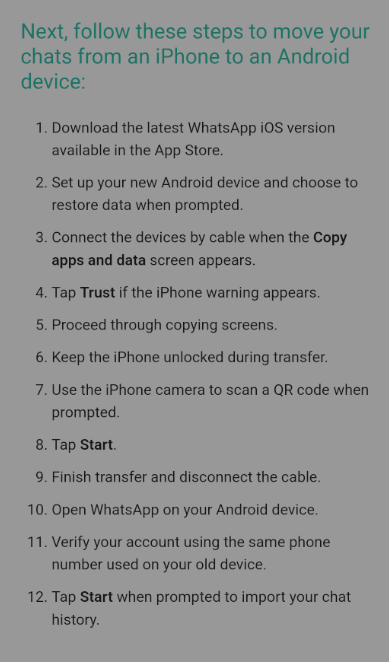
I tried (on iPhone) Settings > Chats > Transfer to Android. But when it is finished it instructs me to load Whatsapp on the Android and disconnect the cable when it says, except the Android does not detect the iPhone and I am given no QR Code to use. This is the problem I have run into when using the method you describe, @esquared.
1 Like
1 Like
I know this is an old thread but chiming in because I’ve seen it come up a LOT of times in search / AI overviews. I think the info is outdated, and I wasted a lot of time looking for workarounds because from reading this I assumed that you can’t do a direct WhatsApp chat history transfer from an iPhone to a degoogled Mudita. Well I was WRONG, you definitely can!
What’sApp has a direct chat transfer feature that works over local WiFi, which does not require google services, doesn’t require any other migration apps, and doesn’t require a “intermediary” phone with play services.
What worked for me:
- On your iPhone, go to Settings –> Chats –> Transfer Chats to Android. You will be presented with a QR scanner. Just keep it open for now, we’ll use it later.
- Install WhatsApp on Mudita. Your SIM should be inside your Mudita phone!
- Go through the entire setup. I.e., validating your phone number, etc. You basically need to be mid-setup on Mudita in order to get the QR code.
- You will eventually reach a step that will ask if you want to transfer your history. Say yes. This is when you’ll get a QR code, which you should scan with your iPhone.
- You’ll be asked to connect to a local wifi network, like “DIRECT-WHATSAPP-##”. Say yes. This might require a couple of tries! The network dropped for me the first 2 times and it dint’ work. But on the 3rd try it was fine. Try turning your WiFi on and off. Make sure the iPhone is allowing WhatsApp to connect to local networks and you don’t have a VPN running.
That’s it, the transfer gets done and is pretty seamless honestly. Hope this helps someone / info gets updated.
2 Likes
@mpr Thank you for sharing this. I’m sure it will help many users who have been struggling with this.
Thank you so much. This was exactly the guide I have been looking for  It worked perfectly!
1 Like