Camera review by wander

Camera — Community App Review
Version: 0.1.7

Camera takes photos and video, laid out the way Mudita’s own camera is: the viewfinder, and below it the last picture, the shutter and the flash.

Above the shutter, one line switches between photo and video, turns HDR or Night on, and opens the settings. HDR keeps detail in a bright sky; Night gives less grain in the dark. Each takes a few seconds to save. While a video records, the shutter turns into a square and the line says Recording; there is no running clock. As a photo is taken the viewfinder blinks white, and the picture appears in the circle on the left; a tap there opens it in Gallery, if Gallery is installed. Flash cycles through automatic, off and on in place; on is a steady light, so you can frame by it. Tap the viewfinder to focus there, and pinch to zoom.

It reads QR codes as you point at them. The code comes up on a screen of its own, drawn clean, with what it is (a web address, a Wi-Fi network, a contact, a phone number) and the one thing to do with it, in the app that does that. Save to Wallet keeps it as a card in Wallet, when Wallet is installed. Nothing opens until you press.

Nine settings, including turning QR reading off and writing where a photo was taken into it. Location is off to begin with, and the setting says that anyone you send a photo to can read it.

Nothing is drawn over the viewfinder. No clock, level or histogram, because on this screen whatever is drawn there is redrawn with every frame.

Underneath it is Open Camera, by Mark Harman, which does all the work of a camera: focus, capture, recording, saving. Its own buttons are still there, hidden, and every press here calls the same thing its button would. Photos go to DCIM/Camera.

When the switch on the left side has turned the camera off, the screen says so.

It has no internet permission.

I would like to hear how it does in daylight, and which QR codes it misses.

Source, and the licence it inherits: GitHub - wanderwildwood/shashinki: Camera (写真機 shashinki) — photos and video on an E Ink phone: the viewfinder, and below it the last picture, the shutter and the flash. Open Camera underneath, Mudita's face on top. · GitHub — GPL-3.0-or-later.
Review updated by @wander

  • Version: 0.1.3 → 0.1.4
  • Description updated
  • Checksum: de1cbbd32a5c77f74f3ffdd21283cf1eb90a6fafc6cce192a1073af7e4324a0b → 6fa8db4ca8d9aabd7219692a73b38ba724e0300eac991410761510200a23820b

View current review

Review for version 0.1.4
User rating: ★★★★★

again, looks clean and works very good, thank you!

1 Like

Review updated by @wander

  • Version: 0.1.4 → 0.1.5
  • Description updated
  • Checksum: 6fa8db4ca8d9aabd7219692a73b38ba724e0300eac991410761510200a23820b → 4c7cead65d74c801e8ead95733fafbe9bb9a21aec3ed6af5264a00804245b85c

View current review

Review for version 0.1.5
User rating: ★★★★★

Only just downloaded and still experimenting but so far I really like it! The speed is already an improvement over the native camera.

1 Like

Review updated by @wander

  • Version: 0.1.5 → 0.1.6
  • Description updated
  • Checksum: 4c7cead65d74c801e8ead95733fafbe9bb9a21aec3ed6af5264a00804245b85c → 6cfc1a8d8a9e4e7cf752ab24dfc4bbc68b8d6a3ed59956f12aee47235e81cd95

View current review

Review updated by @wander

  • Version: 0.1.6 → 0.1.7
  • Description updated
  • Checksum: 6cfc1a8d8a9e4e7cf752ab24dfc4bbc68b8d6a3ed59956f12aee47235e81cd95 → 419ef3a7243ad80bc3a16d584ae746bd5ffa2079a15ac821e2192f86f5c60349

View current review

Review for version 0.1.7
User rating: ★★★★★

Definitely better than the native app.

I’ve replaced almost all the default apps with the ones you created. I appreciate your work and hope the apps continue to receive updates; so far, I haven’t noticed any bugs with this one. I’ve added each app to Obtainium and am enjoying the super-smooth performance and enhanced usability of the Kompakt.

3 Likes

Review for version 0.1.7
Author’s rating: ★★★★★ · Author of this review

Thanks for your comment!

I use this phone every day – most, if not all, of the apps were created because my partner, son, or I needed that app (and we all use the MK). I love the Kompakt hardware: the eink, offline+, form factor, and open source spirit. I truly appreciate that we can shape this device into the simple tool many of us are seeking, with the quality of life features that maintain the minimalist/utilitarian aesthetic.

So rest assured: I’m all in (I’ve been here since the kickstarter), and the updates will keep coming as long as we keep finding room to improve these apps.

8 Likes

Review updated by @wander

  • Version: 0.1.7 → 0.1.8
  • Checksum: 419ef3a7243ad80bc3a16d584ae746bd5ffa2079a15ac821e2192f86f5c60349 → 92b233d672171d95b61fa0e4b30eb50eb93b455bd0a5bb08ff78cc95a9e5a7e4

View current review

Review updated by @wander

  • Version: 0.1.8 → 0.1.11
  • Checksum: 92b233d672171d95b61fa0e4b30eb50eb93b455bd0a5bb08ff78cc95a9e5a7e4 → f452f0460ccaf3047b76e2d617aa9c3865c94b9454da67cfa7819b31b34414a9

View current review

Review for version 0.1.11
User rating: ★★★★★

It’s great to be able to shoot short videos now using your alternative app. They actually turn out pretty well, though the lack of optical image stabilization in the Kompakt’s hardware specs is definitely noticeable. On the screen, it’s hard to spot much difference between Normal, HDR, and HDR+ modes. Which mode do you recommend for the following types of shots: (1) landscape, (2) outdoor portrait, (3) indoor portrait during the day (no flash), and (4) photo of a paper document indoors during the day (no flash)? Thanks in advance for your advice on using HDR, and thanks for all the software updates you provide.

1 Like

Review for version 0.1.11
Author’s rating: ★★★★★ · Author of this review

Thank you. On the Kompakt’s screen the modes look much alike, since it shows only greys; the difference shows when the photos are opened on a computer or a colour screen.

What each one does:

  • Normal — one shot, as the sensor sees it.
  • HDR — one shot with the shadows lifted. Nothing to line up, so it’s fine handheld and with people moving.
  • HDR+ — three exposures joined into one, so a bright sky and dark ground both keep their detail. It takes about three seconds and wants you and the subject to hold still while “Hold still” shows.

For your four:

  1. Landscape — HDR+ when there’s sky in the frame. Leaves or water moving in the wind can smear a little; HDR is the fallback.
  2. Outdoor portrait — HDR. Faces in sun or shade get their shadows back, and nobody has to freeze.
  3. Indoor portrait by day — Normal, or HDR if they’re standing against a bright window.
  4. Paper document — Normal, with a tap on the text to focus there. Lifting shadows can turn the white page grey. If the room is dim, Night gives a cleaner page, as long as the phone rests on something.

For video, holding the phone in both hands with elbows against your body takes out much of the shake.

1 Like

Review updated by @wander

  • Version: 0.1.11 → 0.1.12
  • Description updated
  • Checksum: f452f0460ccaf3047b76e2d617aa9c3865c94b9454da67cfa7819b31b34414a9 → f351efe9d29657ec5da2a68e83aa5f810735de4fbfe69f568c18249491bb49b9

View current review

1 Like

Review updated by @wander

  • Version: 0.1.12 → 0.1.13
  • Checksum: f351efe9d29657ec5da2a68e83aa5f810735de4fbfe69f568c18249491bb49b9 → 2a5d76a966fe8c623ce8cc4e2706217cc1f1c9fe3202dee2a21218982894b0f6

View current review

Review updated by @wander

  • Version: 0.1.13 → 0.1.14
  • Description updated
  • Checksum: 2a5d76a966fe8c623ce8cc4e2706217cc1f1c9fe3202dee2a21218982894b0f6 → 705a1a9f0d3ad9b3fabace810eec14699ef03741e0bbdde6445b66f6d6ad9d76

View current review

Review for version 0.1.14
User rating: ★★★★☆

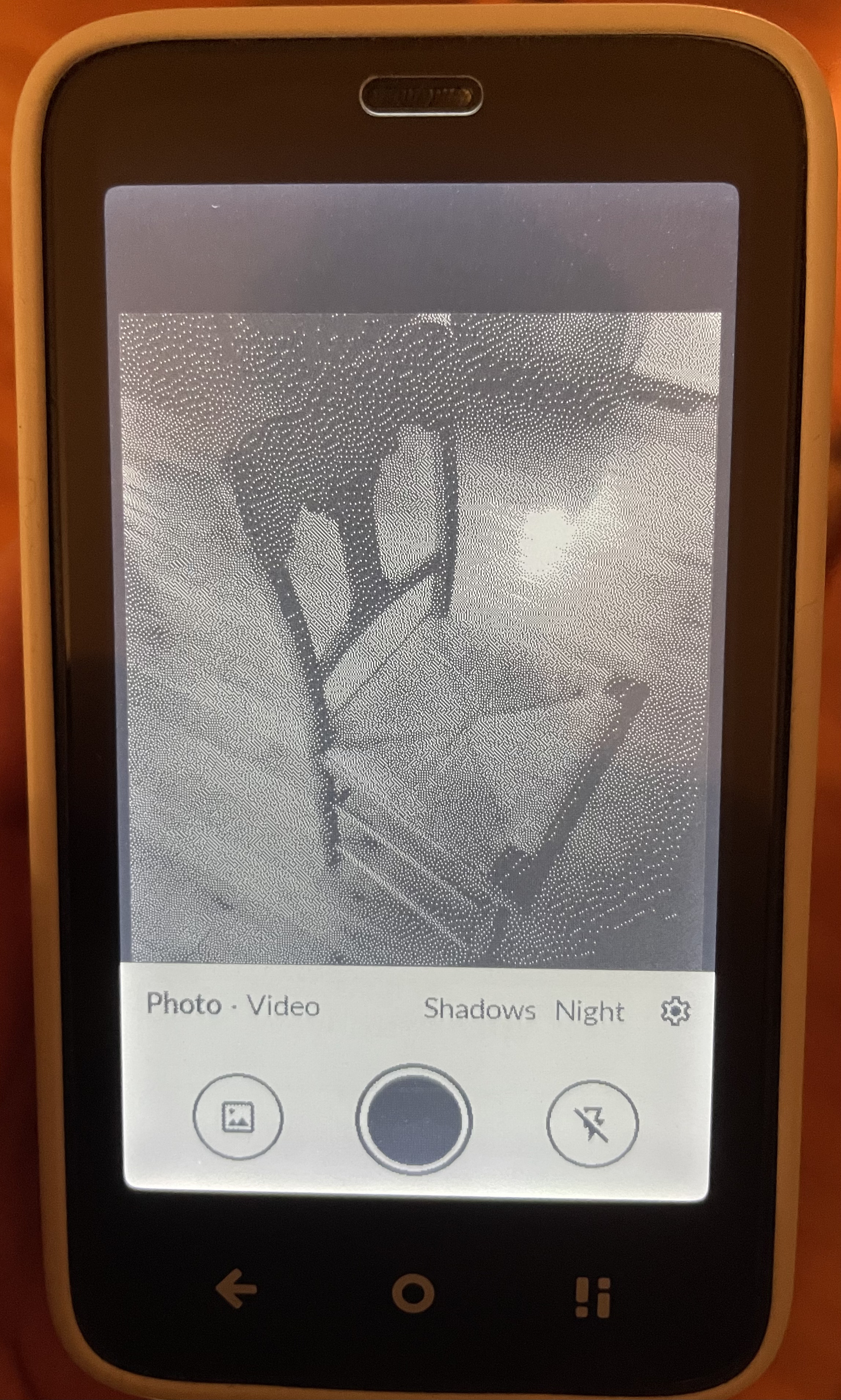
I have a strange bug with this app on my phone where the viewfinder does not take up the whole screen (as you can see in the photo below). I tried restarting the phone as well as uninstalling and re-installing and nothing seemed to fix it. Do you know why this might be?

1 Like

Review for version 0.1.14
Author’s rating: ★★★★★ · Author of this review

Thanks for the photo, it showed a real bug. The viewfinder was centered on the whole screen instead of the space above the buttons, which left that strip at the top and hid as much of the picture behind the buttons. It’s fixed in Lens 0.1.31 (the app is called Lens now), out today: Release v0.1.31 · wanderwildwood/shashinki · GitHub

Review for version 0.1.14
User rating: ★★★★☆

Thank you! This update fixed it. A few of other things I found:

  1. It would be nice to have a “flash on” option for video taken in darker settings.

  2. For some reason when I click on the little circle on the bottom left showing the last taken picture/video, it opens up the default Android picture gallery (strangely not even the native Kompakt gallery). We might need a way to specify what we want that button to take us to. I’d prefer your pictures app!

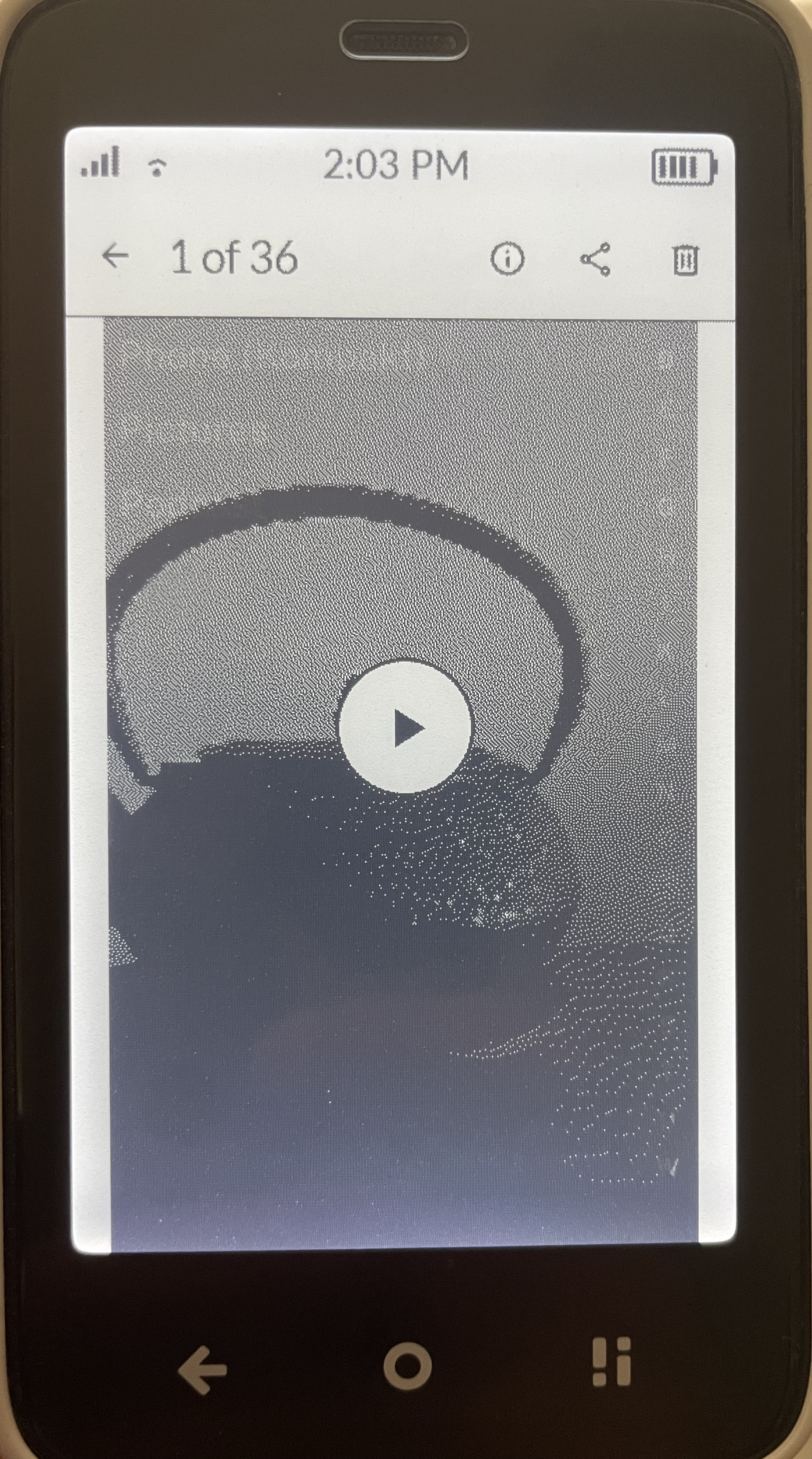
  3. I don’t know if this is a Lens or a Pictures issue, but when I take a video and go to that video in the Pictures app, the preview shows correct proportions of the taken video, but when I press play, the video proportions are played scrunched together in a distorted way (see pictures).

1 Like

Review for version 0.1.14
Author’s rating: ★★★★★ · Author of this review

Thanks, glad that one’s fixed. All three are in today’s updates:

  1. In video mode the flash button now turns the light on and keeps it on while you record. That’s in Lens 0.1.32: Release v0.1.32 · wanderwildwood/shashinki · GitHub

  2. The little circle now opens your last picture or video in Pictures, or Pictures itself if you haven’t taken one yet. It only falls back to the phone’s own viewer if Pictures isn’t installed. Same Lens update.

  3. That one was Pictures. Its player stretched every video to the full width of the screen, which squeezed anything filmed upright. It now plays each video at its own shape. Pictures 0.8.20: Release v0.8.20 · wanderwildwood/garo · GitHub