Calm QR is a minimal, calm barcode & QR code scanner and storage built for the Mudita Kompakt.
The interface and philosophy aspires to follow that of Mudita Mindful Design.
I’ve been living with my Mudita Kompakt for a little while now, and one of the pain points I keep encountering is simply needing to have QR codes – to scan and to keep for tickets, returns, etc.
I found some open source QR scanning apps (it’s a fairly rudimentary thing) but they just all felt clunky on the Kompakt. I’ve scraped this little thing together to hopefully solve that pain point for myself and others as well.
I’ve added an extra info screen for QR Codes, since some users request the ability to peer at the underlying data – I’m sure this isn’t for everyone, but occasionally QR code makers format them in a strange way, and it’s helpful to look at that stuff. I hope the little ‘i’ icon is minimal enough to not clutter up the app, but provide the extra screen for those who want it.
It’s a nice interface and I wish I could use it, but this app doesn’t seem to recognize QR codes, takes a long time to scan, and thinks everything is a barcode for some reason (even words). Not sure why since this app seems to work fine for other reviewers. Hate to leave a bad review but it must be some sort of bug preventing it from working. I tried Binary Eye scanner from F-droid and it worked, so not a problem with my phone camera.
White-on-dark QR codes now decode (always-on inversion)
Per-frame alternating binarizers (hybrid + global histogram) for harsh/uneven lighting
Tap-to-focus with animated indicator
Pinch-to-zoom
Toggleable centered viewfinder crop for targeted scanning
Capture resolution bumped to the device maximum
On a missed frame, the decoder additionally tries downscaled and rotated passes — catches close-up codes and vertically-held 1D barcodes
Save to Contacts
New action button on vCard and MECARD QR codes opens the system Contacts editor pre-filled with name, phones, emails, organization, addresses, websites, notes, and birthday
Multiple phones/emails preserved
Defaults to the local Phone account (built for the Kompakt)
Info screen
The info (“i”) icon now appears for every barcode format, not just QR codes
New “Format” row identifies the barcode type (QR Code, Code 128, EAN-13, …)
Review for version 1.3.7
Author’s rating: ★★★★★ · Author of this review
Hi @green! Thank you for this. Luckily that codebase is also open source so I was able to read the actual code to see what the developers are doing differently over there, and indeed I did find a few areas of improvement to incorporate into my app (all hail open source). Those have been implemented in the latest version of this app. If you wouldn’t mind, please try the latest version 1.3.7 and let me know if the performance has improved for you.
Just took my kids to the movie with this app, scanned my fandango-generated QR code without issue, saved it off, had zero issues scanning at the counter. All hail Calm QR!!! Perfect niche app that solves a problem we’ve all had on MK.
Review for version 1.3.8
Author’s rating: ★★★★★ · Author of this review
Thank you for the kind words! If it helped navigate ‘modern conveniences’ simply and efficiently, while remaining present with the people you love, then it’s done exactly what it’s supposed to
Sharing because I’m not sure if everyone knows this, but you can encode ~4000 characters of plain text directly as a QR code - so if you have data you need to transfer to the Kompakt from another device, you can use QR codes to do that!
I create QR codes with qrencode via my terminal (there are online generators too, though they might not all be the most secure). Then I scan the code with this app on my Kompakt and copy the text. It’s the easiest way I’ve found to get data onto the device : )
Review for version 1.3.8
Author’s rating: ★★★★★ · Author of this review
Thank you for the kind words! I’ll be honest, I was hesitant to add the ‘info’ screen to show QR Code details because I was afraid it would add too much clutter. I had community feedback asking for it, so I reluctantly added it, but now I too end up using it all the time. My CPU died on me recently, and I requested a warranty replacement, turns out the product id was encoded as a QR Code on the chip, and wouldn’t you know it, I had just the tool to quickly retrieve it.
Let me know folks if there’s some way this app can better serve our goal here of useful, simple & healthy tech and I’m happy to do my part
Hey Jacob, thanks for creating the app. I did download it, but it unfortunately took up too much space on my phone, and now I need to delete it. Any advice on how to do this?
Unfortunately the apps themselves (my app included) aren’t responsible for deleting themselves. You have to do this via other methods.
This may be the easiest method. There is an apk here for an app manager that can help you delete unwanted apps:
Download the apk file like you did with CalmQR and open it on your phone to delete apps. You can use a terminal and adb as well to delete apps, and there are guides online for that, but that gets a bit more complicated.
If you wouldn’t mind re-rating the app if your low rating had to do with the deletion process I’d very much appreciate it, since I have no control over app deletion. I hope Mudita in the future adds app deletion as standard support to the Mudita Center in the future.
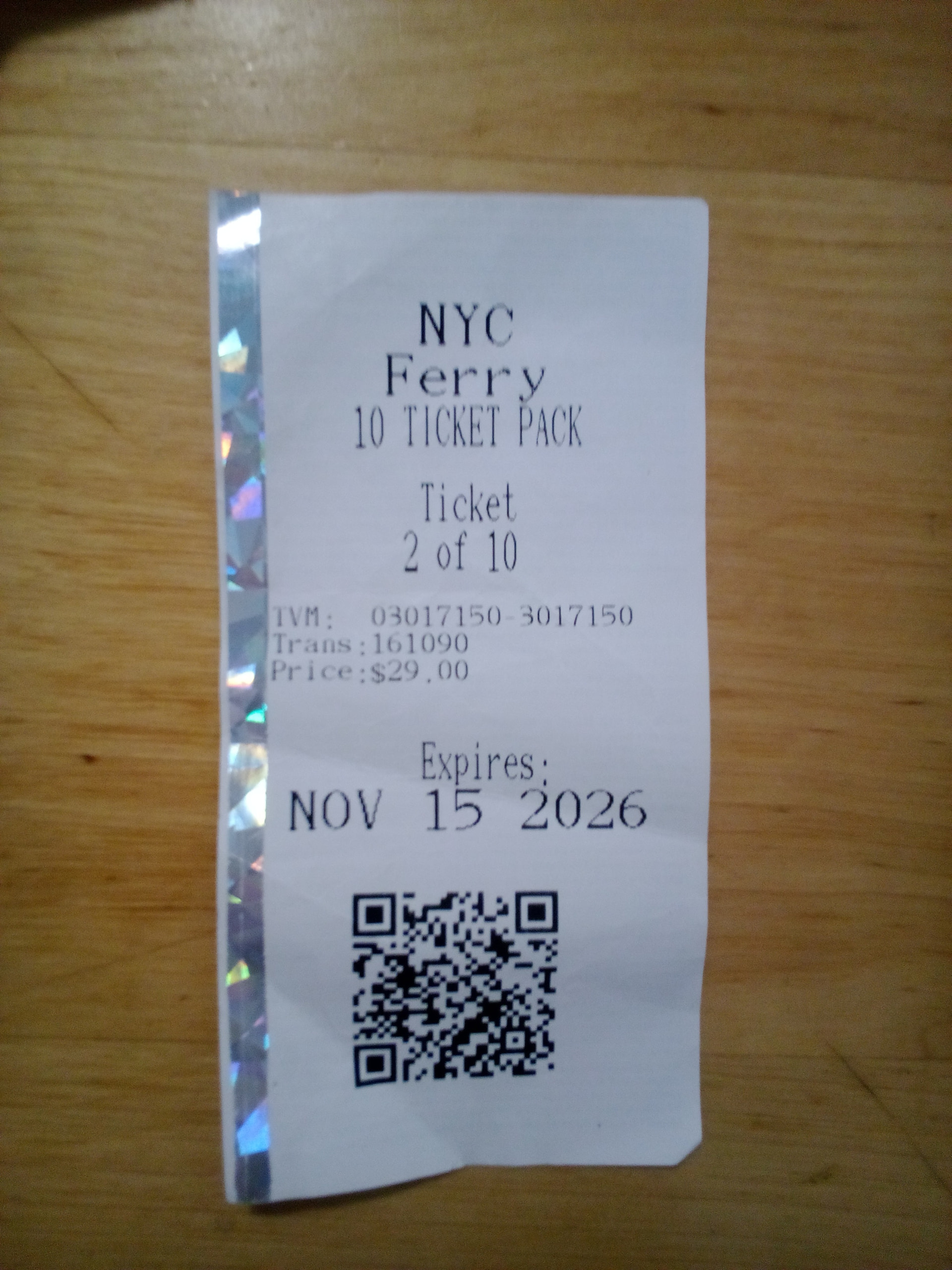
I purchased some ferry tickets from a kiosk which printed out a paper ticket with a large QR code on the bottom. Upon boarding the ferry, a crew member scans the code to validate your ticket.
When I use CalmQR, it shows a re-rendered version of the QR code that is clearly different than the tickets. The crew was unable to scan or validate my ticket using the re-rendered version stored in the app’s wallet.
Some of the printed ticket info seems to be present in the QR
TVM: 3017150
Trans: 161090
Ticket N of 10 (S=N value increments in the QR with the “N of 10” printed on the ticket)
Yes! It is an inherent limitation of the app that the QR codes don’t appear exactly as scanned – though the underlying data should be preserved. I’d be curious in fact to know more about this QR code, since it was able to be printed out. Some types of QR codes are simply not supported.
Just for my reference could you paste the data exactly as copied from the QR app? I’ll look into whether this is something I can find a workaround for.
Exact match mode for QR codes – sometimes you want to be absolutely sure the QR code is the same shape, now you can. This forces a ‘mask match’ such that the image is the exact same so that you can visually verify it was scanned correctly. This is typically not necessary as QR codes can take different masks and convey the same information, however, it may in some instances provide peace of mind.
Better reliability – I added some improvements to force validation of barcodes and QR codes to make sure they are correct in poor scanning circumstances, also added some focus nudging in case it’s needed (tap to focus typically still works best and I recommend just habitually tapping on the code to get it in focus).
Better performance - Optimized the scanning process so that more scans can be run which helps improve how fast we can scan but also improve reliability.
Much smaller APK - 50.4 MB → 8.67 MB
BUG FIX: some codes had characters/strings that would break how I stored them. This has been fixed such that the data will always be retained exactly, regardless of what it contains.
@Chitown2PA I’ve shrunk down the apk to be much smaller for your next download. If you haven’t uninstalled the previous one, just install this one now which will automatically replace the last version with a much smaller app
@Little-User I’ve fixed this case! And for you specifically I figured out how to add an ‘exact match’ mode, so that you can visually verify that the QR code matches. To note for why it didn’t scan properly to begin with (the ferry ticket): that was actually a bug with some characters in it that broke how I retrieved the data. That’s now been fixed, paired with exact match you should now be able to retest again with confidence Look for the ‘=’ toggle on the scanner screen which will force the scan to decode the exact shape of the QR code as well as the data contained within it.