Review for version 0.1.16
Author’s rating: ★★★★★ · Author of this review
Thank you, and I’m glad it works well for you. To your questions:
PC Sync isn’t something I made, and it isn’t related to Desktop Sync in Messaging. It’s the name the phone’s own software gives a calendar it keeps for itself, with no account behind it, so anything saved there stays on the phone and goes nowhere, not to a computer either. For myself, I have it toggled off because I sync all of my calendars. The name is confusing, so in the next update Calendar will show it as “Only on this phone”. Calendar never goes on the network, so a desktop view isn’t something I plan to add. But with Nextcloud, you should be able to view you calendar in the dashboard there (and sync via DAVx5 onto the phone).
Speaking of which: regarding the battery with Nextcloud, nearly all of it is DAVx5’s. In DAVx5, open the account’s settings and lengthen the calendar sync interval (every few hours is plenty), and switch on Wi-Fi only if you like. When you want fresh events right now, Calendar can ask DAVx5 to sync: Settings, then Sync calendars now, or pull down at the top of the Agenda tab. Calendar itself runs nothing in the background.
Built-in syncing like KashCal’s is something I’m leaving to DAVx5 for now. A calendar that holds your server login is security-sensitive to build, and I would rather not rush it. It’s been on my list to look at properly for a bit now, so thanks for the nudge; and it’d be like integrating Signal into messaging in a lot of ways… which was a lot of work.
Landscape is a good idea, and I’m adding it: the week and day views in particular will gain from the extra width – keep a look out for the next update.
still using this since your launch appreciate it! Is it possible to have alerts for all day activities as well?
My municipality has a calendar that I’ve added to this for green, paper and household trash collection days. But because they’ve added these as “read only” and “whole day events”, i dont get an alert I have to check manually.
Review for version 0.1.16
Author’s rating: ★★★★★ · Author of this review
Thank you, and I’m glad you’ve kept using it since the launch. All-day events can have reminders in Calendar, but only on calendars you can edit. A read-only one, like your municipality’s, only alerts if its owner put alarms in the feed, and Calendar can’t add them to it. If it’s an ICS subscription through ICSx5, its subscription settings may offer a default alarm. That’s worth a look. I’m going to look at adding a setting where Calendar reminds you itself about all-day events from a calendar you choose, but it may end up being no different than you setting that reminder from a calendar you manage yourself, in which case I will drop the feature and recommend that direction.
I also meant to ask if it would be possible to add a Check for Updates option in the Calendar app settings, as Messaging does. I think it would be very useful and practical for getting updates faster.
Thank you, Wander, for a great app. It’s good to be able to switch between day, week, month and agenda view!
I use the Agenda view the most, so in the settings I have set the app to open in this view. This works when I force stop the app, but when I simply leave it, it opens on the view I left it on. Not a big deal, but the setting does not do much for me.
Another thing. When I press the Today button on day, week or month, the app jumps to today. When I press Today in the Agenda view, it does not jump anywhere. I have to scroll to get back. This would be nice if could be mended.
Review for version 0.1.16
Author’s rating: ★★★★★ · Author of this review
Thank you, all. Several things from this thread are out now, in Calendar 0.1.31 to 0.1.33 (on GitHub and through Obtainium):
@zyny — the phone’s own local calendar now reads “Only on this phone” instead of PC Sync, Calendar turns to landscape with the phone, and pulling down at the top syncs on every view, not only Agenda. Settings also has Check for updates. Calendar has no internet access by design, so it opens the newest release page in your browser rather than checking by itself.
@mertgndz — Settings > Remind me about all-day events. Pick a calendar and choose the evening before, the morning of, or both, at the times you like. It works on read-only subscribed calendars like your bin days, and it skips events that already carry their own reminder.
@Lavurso — you were right on both. Coming back to Calendar after a few minutes away now opens on the view you chose under Opens on, at today, the same as a fresh start (a quick look elsewhere still keeps your place). And Today in the Agenda now goes back to the top. Both are in 0.1.33.
Review for version 0.1.16
Author’s rating: ★★★★★ · Author of this review
@zyny thank you for trying it so quickly, and you found a real gap. Calendar turned only when the phone’s own auto-rotate was on, and the Kompakt’s settings have no switch for that, so on most phones it never turned.
Calendar 0.1.34 is out now: Settings > Turn sideways with the phone, on by default, follows how you hold the phone by itself. Update, turn the phone, and the views should follow. Switch it off if you’d rather Calendar stay upright.
Review for version 0.1.16
Author’s rating: ★★★★★ · Author of this review
@zyny a correction and a fix. I told you 0.1.34’s new setting would turn Calendar sideways, and it didn’t: it turned out the Kompakt’s system never turns the screen by itself, whatever Calendar asks for, so I was asking for something the phone can’t do.
Calendar 0.1.35 does it another way: it watches how the phone is held and turns itself. Hold the phone on its side for a moment and the views follow; a quick tilt, lying flat or upside down changes nothing. The setting “Turn sideways with the phone” in Settings is still there, on by default. Sorry for the runaround, and thank you for catching it.
Thanks so much for the quick follow-up and fix—version 0.1.35 works like a charm! The landscape view now responds exactly as expected, and I really appreciate you going the extra mile to sort this out.
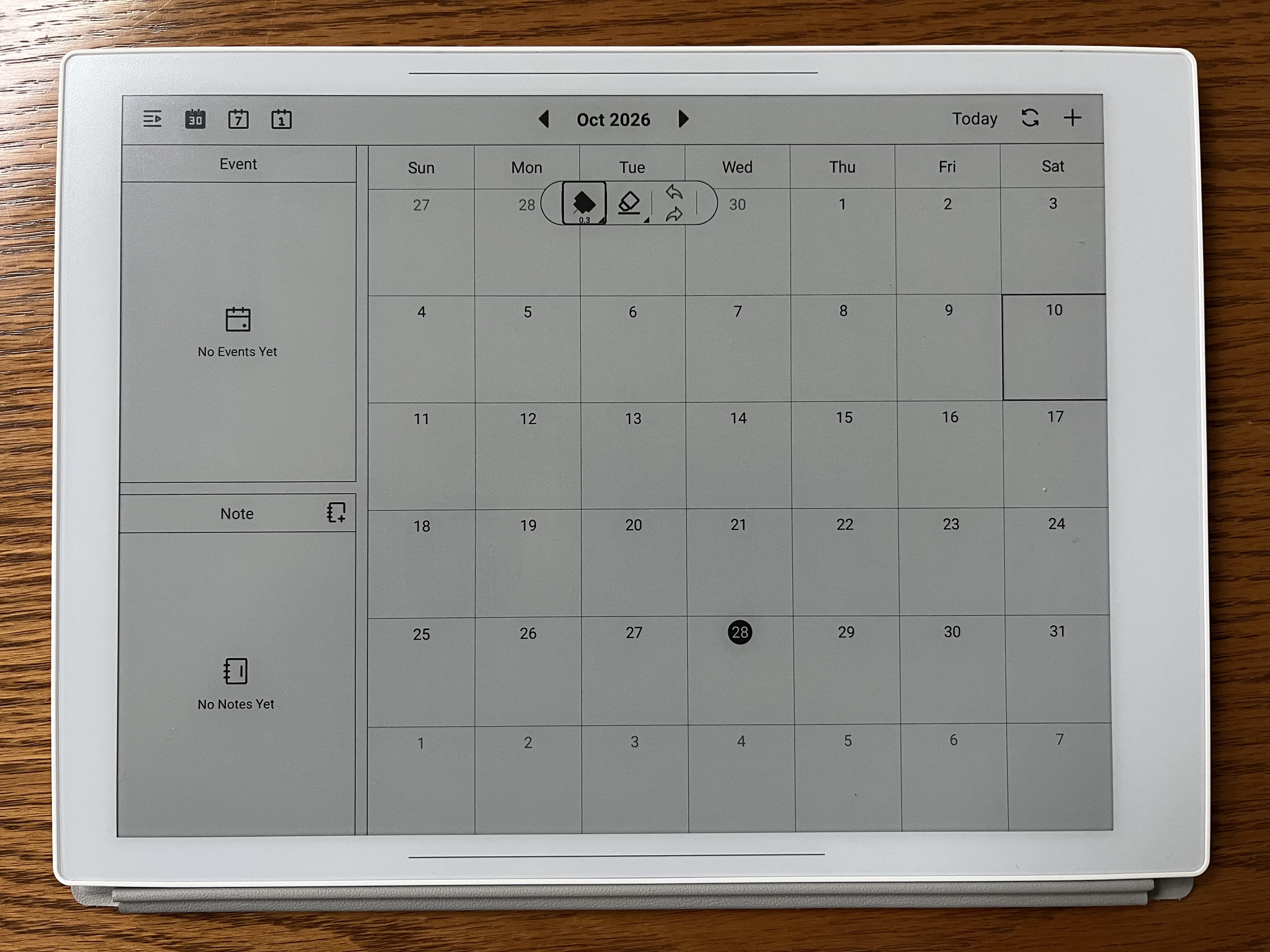
The main reason I thought landscape mode would be valuable for the Calendar app was that the individual event “boxes” would have become noticeably larger, especially in Month view. This would make a huge difference for at-a-glance readability.
One idea: Could we shrink the navigation bar (Month – Week – Day – Agenda) slightly in landscape orientation by making the header font smaller (the same size as in the portrait mode)? I’m not sure it would do anything, but I thought the extra space could make the event boxes larger and let them show a more detailed list of daily events. Right now, the boxes shrink and compress the calendar entries. I’m thinking along the lines of how the Supernote Manta handles landscape mode (see the screenshot).
Thanks for the updates - the landscape mode works like a charm!
Might you be willing to update the sdk version so once can install it on Manta (we had a similar issue with another app):
adb: failed to install koyomi-v0.1.46.apk: Failure [INSTALL_FAILED_OLDER_SDK: Failed parse during installPackageLI: /data/app/vmdl564149100.tmp/base.apk (at Binary XML file line #7): Requires newer sdk version #31 (current version is #30)]
Review for version 0.1.16
Author’s rating: ★★★★★ · Author of this review
Thank you. The install error on the Manta should be fixed in Datebook 0.1.47, which now installs on Android 11. I have not been able to test it on a real Manta, so if it still fails, please tell me what the error says.
I’m so happy to have this calendar app on my Kompakt! For all its bells and whistles, I hate using Google calendar even on a desktop. I have tried many FOSS alternatives and never been satisfied with the experience. By for my favorite calendar app has been KompaktCalendar and I’ve relied on it heavily for several months. Now this new wander calendar app is mostly the same but with all icing on the cake I didn’t even know I needed. It works flawlessly with DavX and the interface and menu tabs are perfect. Thank you so very much for developing this! It is also on my Boox devices and works perfectly.