Browser — Community App Review
Version: 1.0
A calm web browser for the Mudita Kompakt, made for E Ink. Pages turn screen by screen, and there are no Google services.
Browser — Community App Review
Version: 1.0
A calm web browser for the Mudita Kompakt, made for E Ink. Pages turn screen by screen, and there are no Google services.
Review for version 1.0
Author’s rating: ★★★★★ · Author of this review
Page turning: read the web screen by screen, with on-screen arrows or the volume keys
Reader mode: full screen, only the text and pictures of an article, with text size and bookmark on a pull-out bar
Top row: Tabs on the left, the page’s name in the middle with refresh, and Settings on the right. Tap the name to type an address or a search
Tabs: up to three, regular or private, with QR code, bookmark and reader mode for the page you’re on
Your own search engine: none is built in, you type the one you want in Settings
Bookmarks: saved pages can be read offline in reader mode
History: off by default, kept for 30 days on the phone only
Share by QR: show the current page as a QR code, or scan one to open it
Save pictures: hold a picture to save it to your gallery
Downloads: saved pictures and downloaded files in one list
Nothing in the background: the browser closes completely when it leaves the screen
Protection: tracking protection, https first and pop-up blocking, each with its own switch
Per site: switches for pictures, JavaScript and cookies
Ad blocker: add AdGuard from Settings, and update or remove it there
Languages: Croatian, English, German, French, Spanish, Italian, Portuguese, Dutch, Polish, Czech
Internet: to open web pages
Network state: to show when you’re offline
Camera: only to scan a QR code, while the scanner is open
Wake lock and audio settings: for video and audio on web pages
Browser uses Mozilla GeckoView 159.0, unmodified, under the Mozilla Public License 2.0. Its source code is at archive.mozilla.org. The app also uses AndroidX and Jetpack Compose, Kotlin, OkHttp, ZXing and Readability4J (Apache 2.0), jsoup and Tabler Icons (MIT) and the Lato font (SIL OFL 1.1); the full licence texts are in the app under About.
AdGuard AdBlocker isn’t part of this app: you add it yourself from Mozilla Add-ons. It is a separate add-on made by AdGuard, and their terms and privacy policy apply to it. Browser is an independent app, not connected with Mozilla or AdGuard.
Review for version 1.0
User rating: ★★★★★
At the moment, I don’t see any bugs in the app. For me, it’s much more convenient and more pleasing to the eye than EinkBro. Good job.
Review for version 1.0
User rating: ★★★★★
This is awesome! In my opinion, it looks better than Einkbro  . But, I just got a crash when I tried to log in to this specific forum. It’s the only crash I’ve experienced so far.
would it also be possible to add an “Add to Home Screen” option? … the Katapult Launcher makes this possible.
Review for version 1.0
User rating: ★★★★★
This app is fantastic, thank you for dedicating so much time and skill to making apps for the Kompakt
In terms of feedback, I did find that I unfortunately couldn’t use my self-hosted SearXNG instance as a search engine - when I try to search with it, it tells me “this page isn’t safe and wasn’t opened” (turning off “HTTPS first” in Settings > Protection doesn’t fix this). Is there a way round this please or could this be allowed in a future update? Thank you.
Review for version 1.0
Author’s rating: ★★★★★ · Author of this review
@Denis Thank you for the great review! I’m glad you find the browser convenient and enjoy its design. I really appreciate your feedback and support!
@sennedriesen Thank you! Regarding the crash, could you please send me the link to the specific page where it happened? I’d like to test it and investigate what might be causing the issue. Regarding the “Add to Home Screen” feature, unfortunately, this isn’t something I can currently support, as it would require developing a dedicated integration with the launcher. Thanks for the suggestion and for testing the browser!
@GP1 Thank you for reporting this! I’d like to investigate the SearXNG issue further.
The browser is designed to let users choose their own search engine, so I’d like to make sure it supports as many options as possible, including self-hosted SearXNG instances.
Could you also share the URL of your SearXNG instance? This would help me reproduce the issue and check whether it’s related to HTTPS handling, redirects, or the browser’s security settings.
I’ll review this for a future update. Thanks for helping improve the browser!
Here is a list of search engines and their URL templates that can be used in the browser. All URLs use %s as a placeholder for the search query.
General Search Engines
Google
https://www.google.com/search?q=%s
DuckDuckGo
https://duckduckgo.com/?q=%s
Bing
https://www.bing.com/search?q=%s
Brave Search
https://search.brave.com/search?q=%s
Startpage
https://www.startpage.com/sp/search?query=%s
Ecosia
https://www.ecosia.org/search?q=%s
Qwant
https://www.qwant.com/?q=%s
Yahoo
https://search.yahoo.com/search?p=%s
Mojeek
https://www.mojeek.com/search?q=%s
Kagi
https://kagi.com/search?q=%s
Swisscows
https://swisscows.com/en/web?query=%s
MetaGer
https://metager.org/meta/meta.ger3?eingabe=%s
Yandex
https://yandex.com/search/?text=%s
Privacy-Focused and Alternative Search Engines
SearXNG (self-hosted instance)
https://YOUR-INSTANCE/search?q=%s
SearXNG (JSON endpoint)
https://YOUR-INSTANCE/search?format=json&q=%s
SearX (public instance)
https://searx.tiekoetter.com/search?q=%s
LibreX (self-hosted instance)
https://YOUR-INSTANCE/search.php?q=%s
Whoogle (self-hosted instance)
https://YOUR-INSTANCE/search?q=%s
4get (self-hosted instance)
https://YOUR-INSTANCE/web?s=%s
Marginalia
https://search.marginalia.nu/search?query=%s
For SearXNG, Whoogle, LibreX and 4get, replace YOUR-INSTANCE with the address of your own or a publicly available instance.
Regional and National Search Engines
Baidu (China)
https://www.baidu.com/s?wd=%s
Naver (South Korea)
https://search.naver.com/search.naver?query=%s
Daum (South Korea)
https://search.daum.net/search?q=%s
Seznam (Czech Republic)
https://search.seznam.cz/?q=%s
Rambler (Russia)
https://nova.rambler.ru/search?query=%s
Mail.ru (Russia)
https://go.mail.ru/search?q=%s
SAPO (Portugal)
https://www.sapo.pt/pesquisa?q=%s
Virgilio (Italy)
https://www.virgilio.it/ricerca/?qs=%s
Specialized Search Engines
Wikipedia (Encyclopedia)
https://en.wikipedia.org/w/index.php?search=%s
Internet Archive (Internet archives)
https://archive.org/search?query=%s
GitHub (Source code)
https://github.com/search?q=%s
GitLab (Source code)
https://gitlab.com/search?search=%s
Hugging Face (AI models)
https://huggingface.co/search/full-text?q=%s
Google Scholar (Academic research)
https://scholar.google.com/scholar?q=%s
PubMed (Medical and scientific research)
https://pubmed.ncbi.nlm.nih.gov/?term=%s
OpenStreetMap (Maps and locations)
https://www.openstreetmap.org/search?query=%s
YouTube (Videos)
https://www.youtube.com/results?search_query=%s
Openverse (Images and media)
https://openverse.org/search/?q=%s
Review for version 1.0
User rating: ★★★★★
Hi! Tanks for you reply.
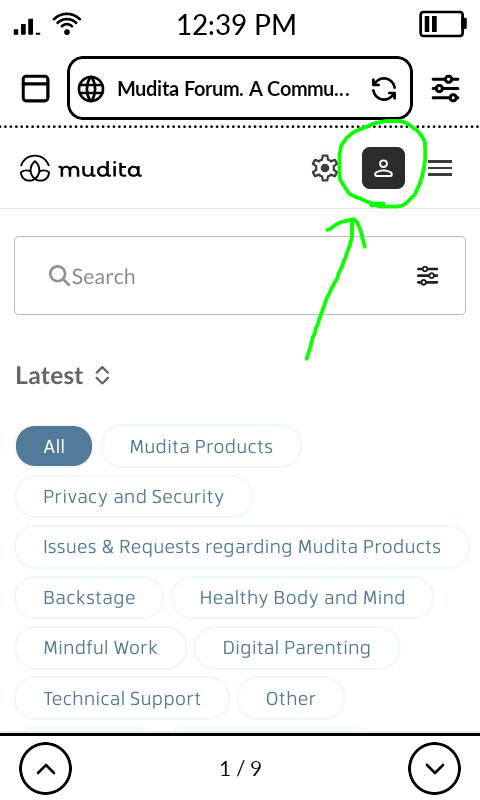
It happens just on the main page of this forum: when I click the account icon to log in, the app crashes.
fyi, you can add https://degoog.org/ as a general search engine as well. Highly recommended!
Review for version 1.0
User rating: ★★★★★
Of course and thank you!
The url is https://searxng.tipi.internal/search?q=%s. I’ve added a certificate to trust this local domain to the CA certificate authorities on my phone. I haven’t tried removing the certificate to see if this fixes things, because I’m not sure this is a solution (I’d have to click through untrusted site warnings every time I make a search, which would be inconvenient!).
Hopefully I’ve just missed something easy, but I can’t figure out any other solution.
Review for version 1.0
User rating: ★★★★★
Ok, so I think I narrowed this down further. Once I opened my SearXNG instance’s port and used the port number in the url, search worked fine. I’d previously used SearXNG without an open port on a different browser successfully, so I’m guessing that this Browser wasn’t reading the Kompakt’s CA certificate store in the same way (to be honest, this is beyond my expertise now and no longer matters, so I’ll stop here ).
Review for version 1.0
Author’s rating: ★★★★★ · Author of this review
@GP1 thanks a lot for narrowing it down! About search engines: I deliberately didn’t build any search engine into Browser, with no default and no ready-made list to pick from. Search engines’ names and brands belong to their owners, and I’d rather not pre-select or promote anyone, so the choice is entirely yours. Type any address with %s in Settings → General and it works. The list in my earlier post is only a cheat sheet to copy from.
About your SearXNG instance: your finding fits. Browser runs on Mozilla’s GeckoView engine, which trusts only its built-in certificate authorities, not certificates you add to the phone yourself. That’s why your local domain shows “This page isn’t safe”, and Browser deliberately has no “continue anyway” button. I’ll look at letting Browser accept user-installed certificates in a future update. Until then, your workaround with the port is fine.
@sennedriesen thanks for the details! I can see the crash when logging in here too, and it’s on my list for the next update
Review updated by @zoran.sacic
- Version:
1.0→1.0.1
Review for version 1.0.1
User rating: ★★★★☆
This is great! Can you add an option to open tab in background in the pop up menu?
Review for version 1.0.1
Author’s rating: ★★★★★ · Author of this review
I’ve considered adding this option, but since I’ve limited the number of tabs to a maximum of three and nothing runs in the background to keep battery consumption as low as possible, I’m not sure it would be a good fit for the app.