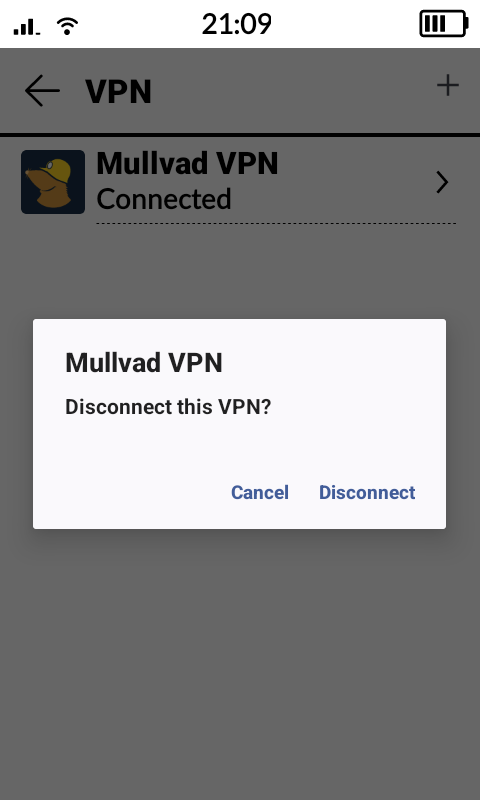
I use Mullvad VPN on my smartphone and my computer. Since you can connect up to five devices if you pay for Mullvad VPN, I thought it wouldn’t hurt to also install it on my Kompakt. No problems at all! Quick and easy through Obtainium and logging into my Mullvad account.
However, I’m encountering issues selecting my VPN as “always-on.” Through the app’s settings, there is a view where I see Mullvad VPN, but I don’t see the gear icon that leads to the settings where you can choose (with toggle buttons) whether to have Always-On and/or Kill-Switch on or off. If I click on Mullvad VPN, I can only choose to disconnect. See screenshot.
It seems to be limited in MuditaOS due to its UI.
Is there any way to set up Always-On VPN other than asking the Mudita Team to open that setting? (If that’s indeed the case).
I’ve tried using ADB but haven’t been able to get past the view shown in the screenshot. Is there any app that could solve this?
Okey, I just found this post that says Mudita have disable the Andriod built in VPN always on-setting. Could you please enable this setting again for the sake of privacy? (Ping @urszula)
It looks like Urszula referenced a link to a thread that was last updated almost a year ago, with people similarly addressing your/our concern (VPN/privacy). Nothing on Mudita’s end has been done to enable always on VPN or more robust security measures since those posts.
Why does Mudita even advertise that this a privacy-focused device when that’s truly not the case? No always on VPN, no on-device encryption enabled, no Android version that supports current security updates except for homemade ones from Mudita that we have to trust are doing something to keep the phone secure.
I see no need for Mudita to support VPN on the Kompakt if its used for for calls/SMS, VPN is intended to protect your browsing habits, and the phone doesn’t have a browser. VPN is unnecessary on this phone when out of the box, as it is designed.
Don’t use public WiFi, secure your own private router if you use WiFi.
Don’t install a browser or sideload internet connected apps on the Kompakt.
Don’t do sensitive transactions such as banking transactions on the device.
Most basic phones lack VPN support.
VPNs consume mobile data and drain the battery faster.
Some browsers (Firefox) now come with their own built in VPN
It’s funny to me that people want privacy then install whatsapp for communications
lol. So, basically, don’t do anything with the phone except make phone calls and send unencrypted MMS messages? Also, become a security analyst if you do want to sideload apps?
I don’t use WhatsApp nor have I ever. But how dare people who do, especially all of Europe. Even Urszula has WhatsApp installed on her Kompakt because it’s a must in Europe.
Also, I have no banking apps on the Kompakt nor am I logged into anything. I have a browser on my phone and Reddit. But I don’t need to explain myself and why having a secure device in general is imperative in 2026.
This is correct. I use the Kompakt to filter/block and receive phone calls forwarded from various other phone numbers, and Google Voice, and use it for some brief SMS texts.
I like its pocket size, speaker phone quality, monochrome screen and the provided apps are satisfactory for my needs. It is a device that has some capacity for other needs that my flip phone lacks.
SMS is really only used in the US. In Europe and other places almost everyone uses a messaging app like Signal, so that’s most of the world where your method doesn’t work. SMS/MMS is incredibly insecure anyway which is why most phones in the US have switched to RCS, which Mudita doesn’t support.
Like it or not some people need to access the internet sometimes on the go (say, for finding transit information) and don’t want to carry two phones with them all the time - kinda defeats the purpose of a minimalist device if I’m also always carrying an iPhone around with me that can easily access Tik Tok. Sideloading a browser on the Mudita would be a great compromise if it were secure - have a browser when you need it but the eink screen makes it annoying enough to use that you aren’t scrolling on it all the time.
If this is a device that is only meant for people who have the privilege to just use the base device with no sideloading then it will remain a niche device. Mudita doesn’t seem to want it to be a niche device, which is why they have encouraged sideloading by making it easier through the Mudita Center. People’s security concerns should not be written off just because they have a different use-case than you.
A smart phone is designed as a do-it-all device if you desire to carry one device in this modern age. You get what you pay for is the lesson I learned, this will never meet all my needs and I won’t get frustrated trying to use a spoon when I need a shovel but as a phone its a good product. If I have specific needs its best to know those needs before getting a device that doesn’t meet those needs. The Kompakt is a phone with limited capabilities, its got a niche.
I found that the best time to return it was before I took it out of the box.