Hello, I still cannot get GPS service even if I make sure all settings are on and am standing outside. I am in a big city in NA. Any suggestions? I also made sure to turn off developer settings.
1 Like
Did you try the time & date trick? Some other person reported on this forum that he managed to get his GPS running after setting autamatic time & date over the Wi-Fi connection. Look around for the prices intructions 
1 Like
TL;DR
We may need to “seed” the GPS software/algorithms with an accurate (to your) date/time/timezone and/or a Latitude & Longitude on our big blue marble.
Thoughts:
When I fired up my Kompakt for the first time, the weather location was set to Warsaw, Poland. The date, time & timezone did not match my locality and the GPS results gave me errors. Warsaw is about 133º longitude, 11º latitude away and 5500 miles or 8850 klicks from my location. Not a good initial “seed” for the GPS software near my location.
andrewhalil “How to Seed Data within your .NET Core Applications” (this description for my illustration is right on)
"What is Seeding?
Seeding is an initialization task within the application that involves pre-populating your application with data that allows your application to minimally function when initially started.
The data that is used for seeding can be obtained from flat files or even a table within a data store…"
2 Likes
I’m traveling to a place far away from home (different hemisphere).
The GPS is not working anymore.
the maps app says GPS unavailable now
Sharing location is enabled for both weather and maps.
I tried to set the date/time to update with GPS, but it doesn’t fix the issue.
Do we have to “re-seed” the GPS everytime we travel??
This is embarassing 
1 Like
I’m sorry that you’re experiencing issues. However, I just want to make sure we cover all the basis before we declare defeat
Are you accessing the GPS feature indoors by any chance?
No, the phone is sitting outdoor, facing a clear sky for the last hour and it’s still not working
1 Like
@T9Pilot OK. Thanks for the clarification. Let me ask my team about this.
1 Like
I was able to fix the issue by clearing the AGPS data.
I used GPSTest app from f-droid.
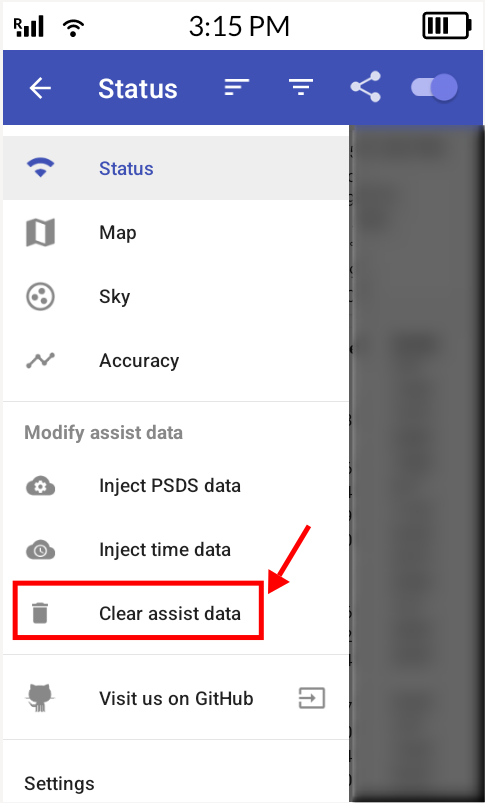
I don’t know if there are simpler workarounds.
1 Like
That’s GREAT! I’m passing this info on to the team.
1 Like
Thanks Urszula. I think this kind of stuff should be automatic (no user intervention) IMO.
2 Likes
@T9Pilot I’ll definitely let the team know. I do really appreciate you sharing this workaround.